
check-my-headers
Fast and simple way to check any HTTP Headers

Thanks Liran Tal and the amazing Snyk team for your support
About
Fast and simple way to check any HTTP Headers
Usage
Command line
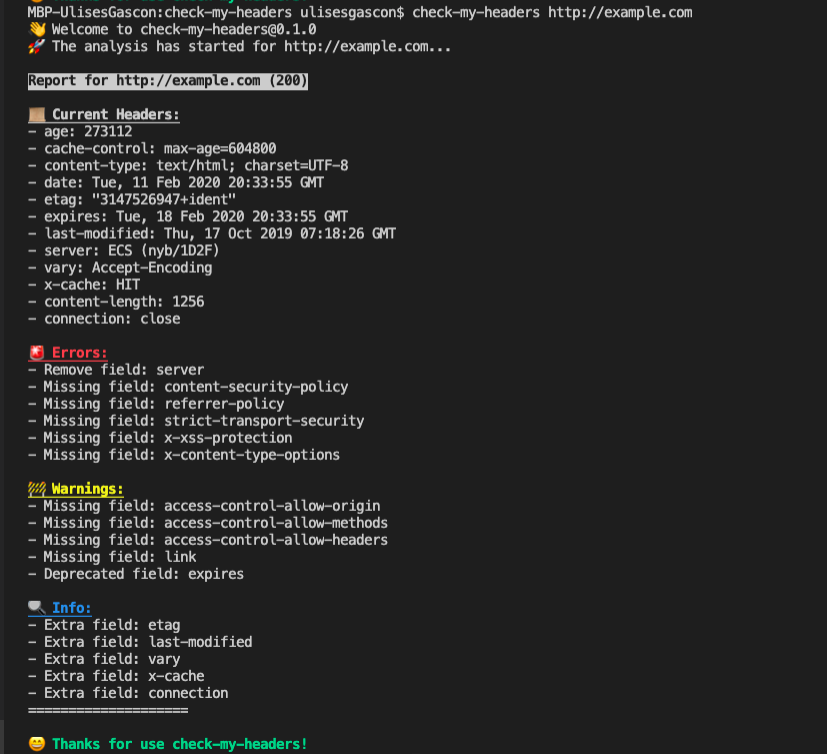
Using Node.js's npx to run a one-off scan of a website:
npx check-my-headers https://example.com The CLI will gracefully handle cases where the URL to scan is missing or wrong:
$ npx check-my-headers
👋  Welcome to check-my-headers@0.1.0
😬  Missing argument URL!
👉  Example: check-my-headers https://github.com/ulisesgascon/check-my-headers
Module
Using check-my-headers in your project.
const checkMyHeaders = require('check-my-headers')

checkMyHeaders("http://example.com")
.then(({ messages, headers, status }) => {
    console.log(`Status code: ${status}`)
    console.log(`Messages:`)
    console.log(messages)
    console.log("Current headers:")
    console.log(headers)
})
Output:
Status code: 200
Messages:
[
  { msg: 'Remove field: server', type: 'error' },
  { msg: 'Missing field: content-security-policy', type: 'error' },
  { msg: 'Missing field: referrer-policy', type: 'error' },
  { msg: 'Missing field: strict-transport-security', type: 'error' },
  { msg: 'Missing field: x-xss-protection', type: 'error' },
  { msg: 'Missing field: x-content-type-options', type: 'error' },
  { msg: 'Missing field: access-control-allow-origin', type: 'warn' },
  { msg: 'Missing field: access-control-allow-methods', type: 'warn' },
  { msg: 'Missing field: access-control-allow-headers', type: 'warn' },
  { msg: 'Missing field: link', type: 'warn' },
  { msg: 'Deprecated field: expires', type: 'warn' },
  { msg: 'Extra field: etag', type: 'info' },
  { msg: 'Extra field: last-modified', type: 'info' },
  { msg: 'Extra field: vary', type: 'info' },
  { msg: 'Extra field: x-cache', type: 'info' },
  { msg: 'Extra field: connection', type: 'info' }
]
Current headers:
{
  age: '534610',
  'cache-control': 'max-age=604800',
  'content-type': 'text/html; charset=UTF-8',
  date: 'Wed, 12 Feb 2020 19:37:45 GMT',
  etag: '"3147526947+ident"',
  expires: 'Wed, 19 Feb 2020 19:37:45 GMT',
  'last-modified': 'Thu, 17 Oct 2019 07:18:26 GMT',
  server: 'ECS (nyb/1D2A)',
  vary: 'Accept-Encoding',
  'x-cache': 'HIT',
  'content-length': '1256',
  connection: 'close'
}
Docker
Use Docker Hub:
# Pull the image from Docker Hub:
docker pull ulisesgascon/check-my-headers:latest

# Run container:
docker run --rm -e SCAN_URL="https://www.github.com/" ulisesgascon/check-my-headers:latest
SCAN_URL is an environment variable and its value must be replaced with the desired URL during Docker run. Docker container will exit once the scan has been completed.
To build and run the container locally:
# Clone Repo:
git clone https://github.com/ulisesgascon/check-my-headers.git

# Change to repo's cloned directory:
cd check-my-headers

# Build Image locally:
docker build --no-cache -t ulisesgascon/check-my-headers:latest .

# Run container:
docker run --rm -e SCAN_URL="https://www.github.com/" ulisesgascon/check-my-headers:latest
Install
You can install globally via:
npm install -g check-my-headersTest
You can run them:
npm run test:coverageContributing
Please consult CONTRIBUTING for guidelines on contributing to this project.
Author
check-my-headers Ulises Gascón, Released under the MIT License.