coc-flutter-tools v1.6.8
 coc-flutter-tools
Flutter support for (Neo)vim
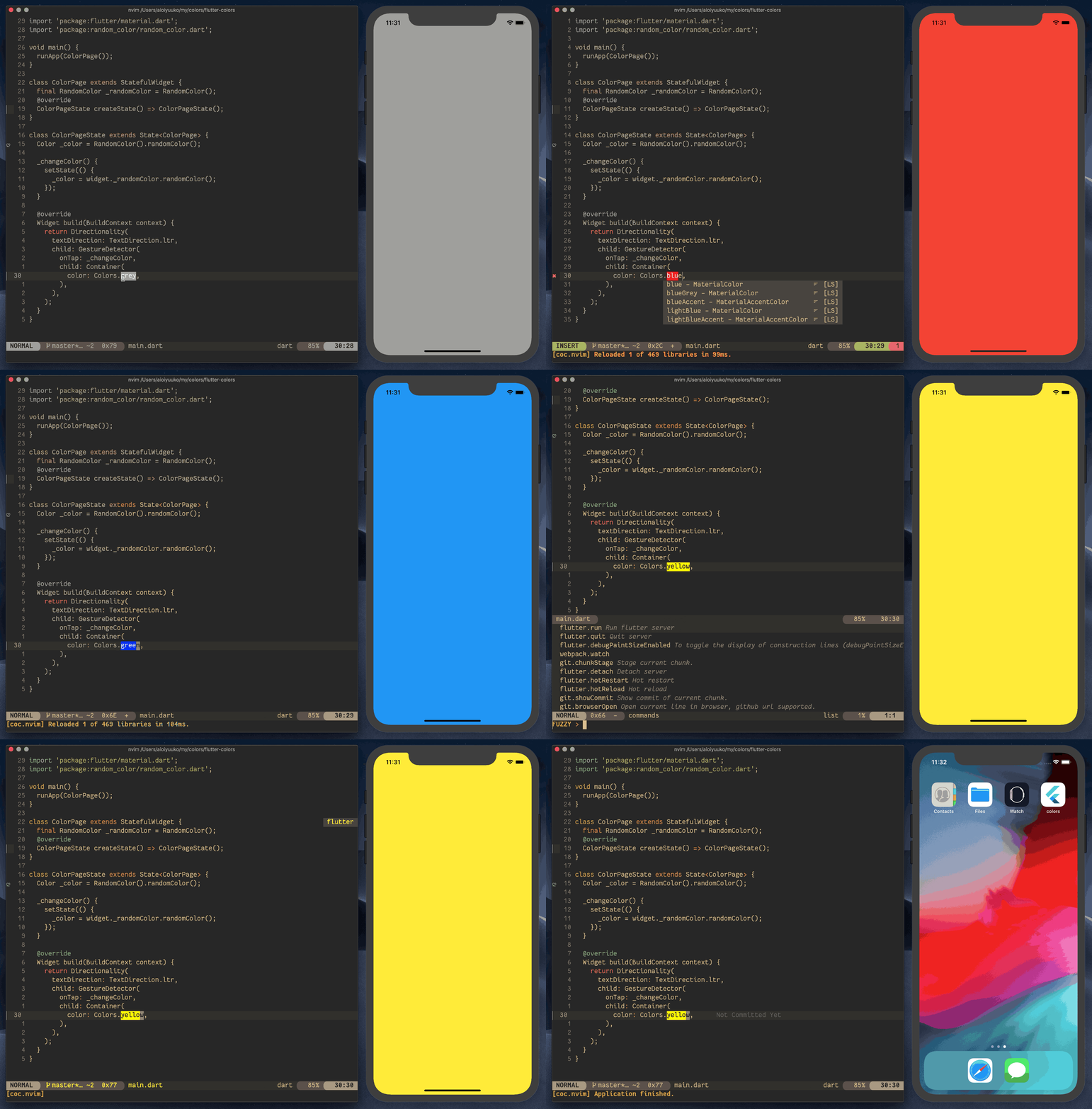
What is this?
coc-flutter-tools is an active fork of coc-flutter, that fixes bugs and adds new features.
Big thanks to the author of coc-flutter @iamcco
Features of this fork:
- DevTools support
- Better DevLog Notifications (Notification Filtering)
- UI Path Display
- Flutter Outline Panel

Features
Make sure that you have the Flutter SDK path in the
PATHenvironment variable
- LSP features (power by analysis_server)
- Auto-completion
- Diagnostics
- Auto-formatting
- Renaming elements
- Hovering support
- Signature help
- Jumping to definitions/implementations/references
- Highlighting
- Widget trees (flutter outline)
- Document symbols
- Code actions
- More detail
- Automatic hot reloading on save
- Automatically run
flutter pub getonpubspec.yamlchanges- Flutter Dev Server support
- Snippets (enable with
flutter.provider.enableSnippet)- Device/Emulator List
- SDK switching
Installation
:CocInstall coc-flutter-tools
NOTE: The dart-vim-plugin plugin is recommended (for filetype detection and syntax highlighting)
Most likely the extension will find your SDK automatically as long as the flutter command maps to an SDK location on your system.
If you are using a version manager like asdf that maps the flutter command to another binary instead of an SDK location or this extension cannot find your SDK for another reason you'll have to provide the extension with how to find your SDK.
To do this there are a few options:
1. If your version manager supports a which command like then you can set the flutter.sdk.flutter-lookup config option. Eg. "flutter.sdk.flutter-lookup": "asdf which flutter".
2. You can add the path where to find the SDK to the flutter.sdk.searchPaths config option.
Either specify the exact folder the SDK is installed in or a folder that contains other folders which directly have an SDK in them. Note that not all of these folders need to have an SDK, if they don't contain one they will simply be ignored
3. Set the flutter.sdk.path config option to the exact path you want to use for your SDK.
If you have also set the flutter.sdk.searchPaths then you can use the FlutterSdks list (see below) to see what versions you have installed and set the config option for you. Note that this means that the flutter.sdk.path option will be overriden by this list
coc-list sources
FlutterSdks
:CocList FlutterSdksShows all the sdks that can be found by using thesearchPathsconfig and theflutter-lookupconfig options and allows you to switch between them, either only for your current workspace or globally. Besides those two ways to find sdks it also checks if you are using fvm and if so uses those directories to find your sdk. You can disable this using theflutter.fvm.enabledconfig option.You can also use this list to see what your current sdk is since it will have
(current)behind it clearly.Flutter Devices:
:CocList FlutterDevices- Flutter Emulators:
:CocList FlutterEmulators
Settings
flutter.enabledEnablescoc-flutter-tools, default:trueflutter.lsp.initialization.onlyAnalyzeProjectsWithOpenFiles: default:trueWhen set to true, analysis will only be performed for projects that have open files rather than the root workspace folder.
flutter.lsp.initialization.suggestFromUnimportedLibraries: default:trueWhen set to false, completion will not include synbols that are not already imported into the current file
flutter.lsp.initialization.closingLabels: default:trueWhen set to true, will display closing labels at end of closing, only neovim support.
flutter.UIPath: default:trueWhen set to true, will display the path of the selected UI component on the status bar
flutter.outlineWidthcontrols the default width of the flutter outline panel. default:30flutter.outlineIconPaddingcontrols The number of spaces between the icon and the item text in the outline panel. default:0flutter.sdk.searchPathsthe paths to search for flutter sdks, either directories where flutter is installed or directories which contain directories where flutter versions have been installed eg./path/to/flutter(command at/path/to/flutter/bin/flutter) or~/flutter_versions(command at~/flutter_versions/version/bin/flutter).flutter.sdk.dart-commanddart command, leave empty should just work, default:''flutter.sdk.dart-lookuponly use this if you don't have a flutter installation but only dart command to find dart executable location, used to infer dart-sdk location, default:''flutter.sdk.flutter-lookupcommand to find flutter executable location, used to infer location of dart-sdk in flutter cache:''flutter.provider.hot-reloadEnable hot reload after save, default:trueonly when there are no errors for the save file
flutter.provider.enableSnippetEnable completion item snippet, default: trueimport '';=>import '${1}';${0}someName(…)=>someName(${1})${0}setState(() {});=>setState(() {\n\t${1}\n});${0}
flutter.openDevLogSplitCommandVim command to open dev log window, like:botright 10split, default: ''flutter.workspaceFolder.ignorePath start within the list will not treat as workspaceFolder, default: []- also flutter sdk will not treat as workspaceFolder, more detail issues 50
flutter.runDevToolsAtStartupAutomatically open devtools debugger web page when a project is run, default: falseflutter.autoOpenDevLogAutomatically open the dev log after calling flutter run, default: falseflutter.autoHideDevLogAutomatically hide the dev log when the app stops running, default: false
Enable format on save:
If you have dart-vim-plugin install, put this in your vimrc:
let g:dart_format_on_save = 1Alternatively, you may use coc-settings.
"coc.preferences.formatOnSaveFiletypes": [
  "dart"
],
Code Actions
coc.nvim provides code actions. To enable them, add the following configuration in your vimrc
this can also be found in
coc.nvimREADME
xmap <leader>a  <Plug>(coc-codeaction-selected)
nmap <leader>a  <Plug>(coc-codeaction-selected)
To show code actions on selected areas:
<leader>aapfor current paragraph,<leader>awfor the current word
Then you will see a list of code actions:
- Wrap with Widget
- Wrap with Center
- etc
Commands
Get a list of flutter related commands: CocList --input=flutter commands
Global Commands:
flutter.runRun flutter dev serverflutter.attachAttach running applicationflutter.createCreate flutter project using:flutter createflutter.doctorRun:flutter doctorflutter.upgradeRun:flutter upgradeflutter.pub.getRun:flutter pub getflutter.devicesopen devices listflutter.emulatorsopen emulators listflutter.outlineopens up an instance of the flutter outline side-panelflutter.toggleOutlinetoggles the flutter outline side-panel
LSP Commands
flutter.gotoSuperjump to the location of the super definition of the class or method
Dev Server Commands:
These commands will only be available when the Flutter Dev Server is running (i.e after you run
flutter run)
flutter.dev.quitQuit serverflutter.dev.detachDetach serverflutter.dev.hotReloadHot reloadflutter.dev.hotRestartHot restartflutter.dev.screenshotTo save a screenshot to flutter.pngflutter.dev.openDevLogOpen flutter dev server logflutter.dev.clearDevLogClear the flutter dev server logflutter.dev.debugDumpAPPYou can dump the widget hierarchy of the app (debugDumpApp)flutter.dev.elevationCheckerTo toggle the elevation checkerflutter.dev.debugDumpLayerTreeFor layers (debugDumpLayerTree)flutter.dev.debugDumpRenderTreeTo dump the rendering tree of the app (debugDumpRenderTree)flutter.dev.openDevToolsProfilerOpen the DevTools in the browserflutter.dev.debugPaintSizeEnabledTo toggle the display of construction lines (debugPaintSizeEnabled)flutter.dev.defaultTargetPlatformTo simulate different operating systems, (defaultTargetPlatform)flutter.dev.showPerformanceOverlayTo display the performance overlay (WidgetsApp.showPerformanceOverlay)flutter.dev.debugProfileWidgetBuildsTo enable timeline events for all widget build methods, (debugProfileWidgetBuilds)flutter.dev.showWidgetInspectorOverrideTo toggle the widget inspector (WidgetsApp.showWidgetInspectorOverride)flutter.dev.debugDumpSemanticsHitTestOrderAccessibility (debugDumpSemantics) for inverse hit test orderflutter.dev.debugDumpSemanticsTraversalOrderAccessibility (debugDumpSemantics) for traversal order
Closing Labels
when flutter.lsp.initialization.closingLabels is set to true,
the closing labels will be display at end of closing.
this feature only support neovim since vim do not support virtual text
| disabled | enabled |
|---|---|
UI Path
when flutter.UIPath is set to true, the path for the UI component under cursor will be shown on the status bar.

Flutter Outline
In the Flutter Outline panel, press enter to goto the corresponding location in the source file.
3 years ago
4 years ago
4 years ago
4 years ago
5 years ago
5 years ago
5 years ago
5 years ago
5 years ago
5 years ago
5 years ago
5 years ago
5 years ago
5 years ago
6 years ago
6 years ago
6 years ago
6 years ago
6 years ago
6 years ago
6 years ago
6 years ago
6 years ago
6 years ago
6 years ago
6 years ago
6 years ago
6 years ago
6 years ago
6 years ago
6 years ago
6 years ago
6 years ago
6 years ago