0.0.1-rc1 • Published 2 years ago
coc-jq v0.0.1-rc1
vscode-jq
Ported from vscode-jq.
Install
" command line
CocInstall coc-jq
" or add the following code to your vimrc
let g:coc_global_extensions = ['coc-jq', 'other coc-plugins']
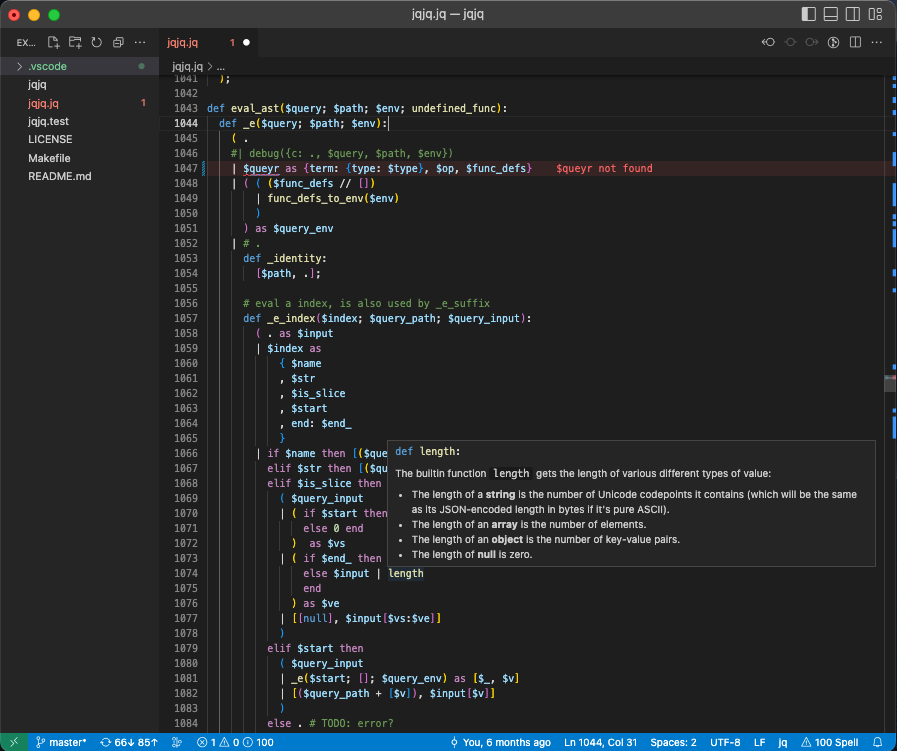
jq extension for VSCode
It provides:
- Syntax highlighting
- Syntax checking
- Auto completion
- Goto defintion
- Hover documentation
- Snippets
Install
Install jq-lsp
Install jq-lsp and make sure it's in $PATH:
go install github.com/wader/jq-lsp@latest
cp $(go env GOPATH)/bin/jq-lsp /usr/local/bin
Package and install vscode extension
npm install
vsce package && code --install-extension vscode-jq-*.vsix
# or if vsce is not installed
npm exec @vscode/vsce package && code --install-extension vscode-jq-*.vsix
If your using dash or zeal I would recommend installing the jq docset. Search for "jq" under "User Contributed Docsets" in dash or goto https://zealusercontributions.now.sh/.
Development
- Run
npm install. - Open VSCode
- Press Ctrl+Shift+B to compile the client and server.
- Switch to the Debug viewlet.
- Select
Launch Clientfrom the drop down. - Run the launch config.