dappy-node v3.20.1
Dappy node
This repository includes the necessary softwares and tools to run a validator node of dappy. Dappy is a no-DNS name system and web platform that uses blockchain and a co-resolution system instead of the centralized services of the DNS.
The main component of this repository is the nodeJS application src and the kubernetes manifests.
To run dappy-node locally, please refer to the developer documentation.
Production with kubernetes (gamma, beta or d network)
General architecture
The common/base kubernetes settings are in kubernetes/base/, those are the general settings that do not change, whatever the dappy network or RChain network is. The base settings can be overwritten by those in kubernetes/envs that are namespace-specific and context-specific.
The specific configurations files are organized on a per-namespace basis, in the kubernetes/envs/<CLOUD_PROVIDER>/ folder. We warmly invite you to duplicate this folder and create for example kubernetes/envs/aws/ folder.
kubernetes/envs/<CLOUD_PROVIDER>/ contains one folder per namespace. (see commands)
You may handle one, two or more dappy-node namespaces with this repository. An example:
- namespace 1 : gamma, connected to RChain testnet. Configuration files in
kubernetes/envs/<CLOUD_PROVIDER>/gamma - namespace 2 : beta, connected to RChain mainnet. Configuration files in
kubernetes/envs/<CLOUD_PROVIDER>/beta - namespace 3 : d, connected to RChain mainnet. Configuration files in
kubernetes/envs/<CLOUD_PROVIDER>/d(main dappy name system not deployed yet)
Non production dappy-node infrastructure
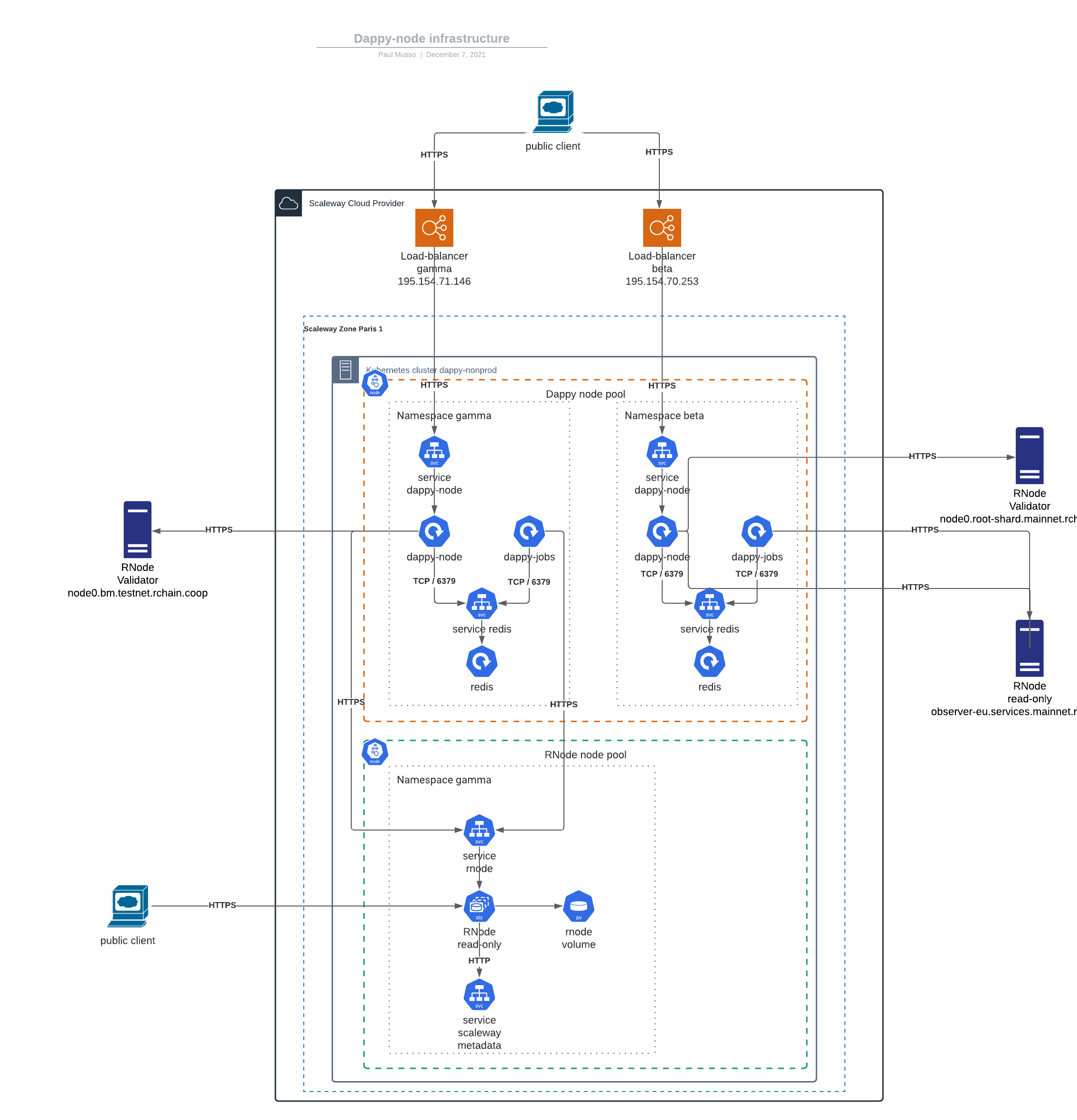
Cloud specific setting
The dappy-node endpoint does not need exposition to the DNS, but rnode endpoint must be publicly avaiable and have a domain name. To be executed, rnode needs to know its public domain (argument --host). In scaleway we can recover the public domain name of the kubernetes nodes/virtual machines with a wget command, and store the value in /var/lib/config/public-domain text file.
You will have to change this so that it works with your cloud provider.
See kubernetes/envs/<CLOUD_PROVIDER>/<NAMESPACE>/rnode/rnode-statefulset.yaml.
Namespace
kubectl get namespace
# switch to gamma namespace
kubectl config set-context --current --namespace=gamma
# switch to beta namespace
kubectl config set-context --current --namespace=beta
Certificate generation (dappy-node <-> rnode)
RNode needs to be exposed to the public internet, each rnode will have its own subdomain. When it starts, each rnode instance will generate a TLS certificate and key, so we don't have to generate the public TLS certificate and key for the blockchain network.
Nevertheless we need to generate a key pair for the dappy-node <-> rnode communication to be secure. RNODE_PUBLIC_DOMAIN_NAME is the public URL of your cluster or server.
openssl req \
  -x509 \
  -newkey rsa:2048 \
  -sha256 \
  -days 3000 \
  -nodes \
  -keyout rnode.key \
  -out rnode.crt \
  -outform PEM \
  -subj '/CN=rnode' \
  -extensions san \
  -config <( \
    echo '[req]'; \
    echo 'distinguished_name=req'; \
    echo '[san]'; \
    echo 'subjectAltName=DNS.1:localhost,DNS.2:rnode,DNS.3:<RNODE_PUBLIC_DOMAIN_NAME>')
kubectl create secret tls rnode-tls --key="rnode.key" --cert="rnode.crt" -n=<NAMESPACE>
kubectl apply -k kubernetes/envs/<CLOUD_PROVIDER>/<NAMESPACE>/rnode
Certificate generation (dappy-browser/internet <-> dappy-node)
Dappy is a no-DNS, encrypted only name system. We need to generate a certificate and key for secure browser to node communication. DAPPY_NETWORK may be gamma, beta, d or local for development.
openssl req \
  -x509 \
  -newkey rsa:2048 \
  -sha256 \
  -days 3000 \
  -nodes \
  -keyout dappy-node.key \
  -out dappy-node.crt \
  -outform PEM \
  -subj '/CN=<DAPPY_NETWORK>'\
  -extensions san \
  -config <( \
    echo '[req]'; \
    echo 'distinguished_name=req'; \
    echo '[san]'; \
    echo 'subjectAltName=DNS.1:localhost,DNS.2:dappynode,DNS.3:<DAPPY_NODE_PUBLIC_DOMAIN_NAME>')

# save as a secret
kubectl create secret tls dappy-node-tls --key="dappy-node.key" --cert="dappy-node.crt" -n=<NAMESPACE>
kubectl apply -k kubernetes/envs/scaleway/<NAMESPACE>/dappy
Static IP
A dappy node needs one static IP, get it from your cloud provider and reference it in kubernetes/envs/scaleway/<NAMESPACE>/dappy/dappy-node-service.yaml .loadBalancerIP. A fixed IP address matters for the (dappy-browser/internet <-> dappy-node) communication because it is a no-DNS communication.
RChain network / rnode configuration
Example file kubernetes/envs/scaleway/gamma/rnode/rnode-statefulset.yaml.
Three settings are critical to run a rnode instance, and have it joining a RChain network.
BOOTSTRAPis the bootstrap node that you will first connect to. Please ask RChain dev team for a bootstrap node for a given network.RCHAIN_NETWORKis the id of the RChain network that you must know prior to connecting, ex: "testbm202107". -SHARD_NAMEis the shard name ex: "testbm". -
Dappy node configuration
Example file kubernetes/envs/scaleway/gamma/dappy/dappy-node-deployment.yaml.
RCHAIN_NAMES_MASTER_REGISTRY_URI: A dappy node must be connected to a name system, therefore it must know a registry URI (blockchain address) of a rchain token master deployment. You can run dappy-node without this env. (dappy network with no name system).DAPPY_NETWORKmay begamma,beta,dorlocalfor development.READ_ONLY(url) should point to the local url of rnode service in the k8s cluster, leave it ashttps://rnode.VALIDATOR(url) should be a public url for a validator node of the same RChain network.RCHAIN_NETWORKsame as above.SHARD_NAMEsame as above.
Dappy jobs configuration
Example file kubernetes/envs/scaleway/gamma/dappy/dappy-jobs-deployment.yaml.
Dappy jobs are cron jobs, the main one stores log of some rchain token contracts.
RCHAIN_NAMES_MASTER_REGISTRY_URIsame as above.RCHAIN_NAMES_LOGS_CONTRACTScomma-separated list of contracts you want to keep the logs of. exampledappynamesystem,dappytoken.
Redeploy rnode on scaleway
The idea is to drop existing rnode statefulset and their persistent volume and recreate them.
cd kubernetes/envs/<CLOUD_PROVIDER>/<NAMESPACE>

# Delete existing rnode stafulset and associated pvc and pv
kubectl delete statefulsets.apps rnode --wait
# Wait until statefulset pods rnodes are deleted, use `kubectl get pods` to know if rnode pods are fully deleted

# Delete rnode pvc by executing `kubectl get pvc` and `kubectl delete pvc <RNODE_PVC_NAME>`
#For example, on Scaleway only, to drop pvc used by rnode-0, execute folloowing command
kubectl delete pvc csi-vol-scw-rnode-0

# Redeploy rnode
kubectl apply -k ./kubernetes/envs/<CLOUD_PROVIDER>/gamma/rnode4 years ago