1.0.2 • Published 5 years ago
dat-gui-vue v1.0.2
dat-gui-vue
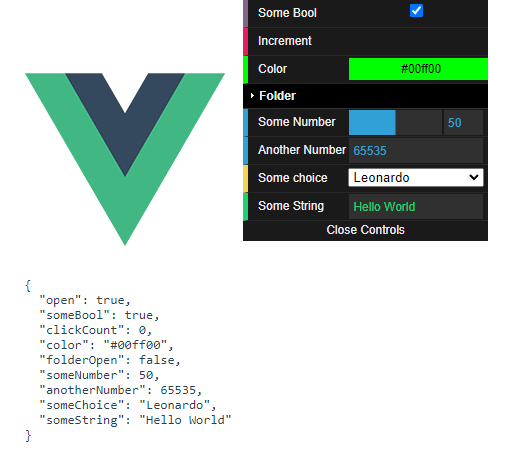
A Vue 3 port of @cyrilf/vue-dat-gui, which is a Vue.js port of the popular dat.GUI library.
Install
npm install --save dat-gui-vueUsage
import { DatGui, DatString } from 'dat-gui-vue'

export default {
  components: { DatGui, DatString }
}
<DatGui>
<DatString v-model="someString" />
</DatGui>Components
DatGui
The main UI.
<DatGui
  v-model:open="isOpen"
  open-text="Open Controls"
  close-text="Close Controls"
  close-position="bottom"
>
  ... other components ...
</DatGui>v-model:open(Optional) Bind to the open state of the GUI.open-text(Optional) Text to display when GUI is closed.close-text(Optional) Text to display when GUI is open.close-position(Optional) Snap to top or bottom of screen.
DatBoolean
A checkbox to indicate true or false
<DatBoolean
  v-model="someBoolean"
label="My Boolean" />v-model(Required) Bind to a boolean value in your model.label(Optional) Text to display as the label.
DatButton
A button
<DatButton
  @click="onClick"
label="Click me" />@click(Optional) Click handlerlabel(Optional) Button text
DatColor
A color selector
<DatColor
  v-model="someColor"
label="My Color" />v-model(Required) Bind to a color stringlabel(Optional) Text to display as the label.
DatFolder
A collapsible folder containing other controls
<DatFolder
  v-model:open
  label="My Folder"
>
  ... other components ...
</DatFolder>v-model:open(Optional) Bind to the open state of the folder.label(Optional) Folder label
DatNumber
A number slider / input. If min and max are specified, then
a slider will be visible.
<DatNumber
  v-model="someNumber"
  :min="0"
  :max="100"
  :step="5"
  label="My Number"
  :show-slider="false"
/>v-model(Required) Bind to a numbermin(Optional) Minimum valuemax(Optional) Maximum valuestep(Optional) Incremental valuelabel(Optional) Text to display as the labelshow-slider(optional) Option to hide the slider
DatSelect
A dropdown list. Options can be [{name, value}, ...] or [value, ...].
<DatSelect
  v-model="someValue"
  :items="someArray"
  label="My Dropdown"
/>v-model(Required) Bind to a valueitems(Required) Array of{name, value}or array of values.label(Optional) Text to display as the label
DatString
A text input.
<DatString
  v-model="someString"
  :label="My String"
/>v-model(Required) Bind to a stringlabel(Optional) Text to display as the label