0.3.7 • Published 8 years ago
droopy-firebase v0.3.7
Droopy Firebase
Wrapper around the Firebase SDK to make working with collections simpler.
Install
npm install --save droopy-firebaseUsage
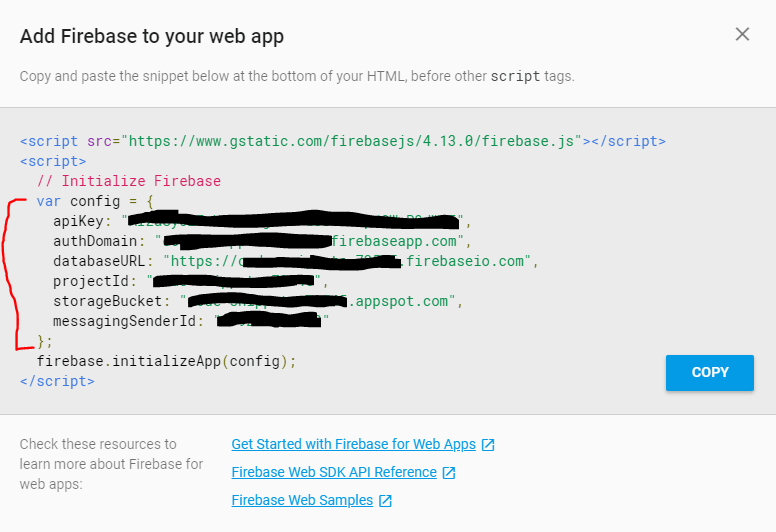
Get your Firebase App's config from the Firebase Console. Then connect to the db with droopy-firebase.
var config = { "..." : "...config from firebase portal..." }
var db = require("droopy-firebase").connect(config);

// Add an item to the collection. You MUST specify a 'key'
await db.movies.add({ key: 123, title: "Gladiator" })

// Update an item
await db.movies.update(123, { rating: 8.2 });

// Get the item by key
let movie = await db.movies.get(123)
console.log(movie);

// Get all items in a collection
let allMovies = await db.movies.getItems()
console.log(movies);

let actors = await db.actors.getItems();
console.log(actors):
Firebase Setup
- Go to your Firebase Console
- Create a new App
- Click Database and setup a Realtime DB instance
droopy-firebasedoesn't do anything with Auth. You can:- Handle auth yourself using
firebase.auth() - Configure you Realtime DB to run in "Test Mode" (anonymously accessible)
- Handle auth yourself using
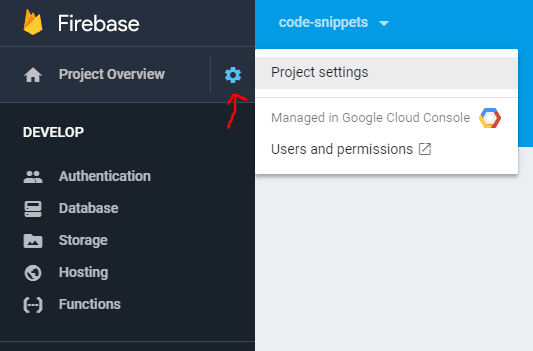
- Go to your Project Settings, click Add Firebase to your Web App, and copy out your App's config
Dynamic Collections
Even if a collection doesn't exist, you can still reference it on your db object (thanks to a javascript proxy)
// Create a movies collection if it doesn't exist, then add an item to it
await db.movies.add({ key: 123, title: "Gladiator" })
Get all items in a collection
Let's say we had a collecton of blog posts in the db
let posts = await db.posts.getItems();Get Item by key
let movie = await db.movies.get(123)Update Item
Use update if the item exists already an you just want to change a couple property or add a new property
await db.movies.add({ key: 567, title: "A Lot Like Love" })
await db.movies.update(567, { rating: 7.3 })
Remove Item
db.movies.remove(123);Realtime Events
Event types are add, update, remove.
Subscribe to movies collection changes
db.movies.on("add", (newMovie) => {
    console.log(newMovie);
})

db.movies.on("update", (updatedMovie) => {
    console.log(updatedMovie);
})

db.movies.on("remove", (deletedMovie) => {
    console.log(deletedMovie);
})
Empty/remove a collection
Get rid of all items in the posts collection
db.posts.clear();