1.0.9 • Published 1 year ago
dropdown-rl v1.0.9
dropdown-rl
Dropdown SelectBox component, only for Makyo Co technical test purpose. Available in npm registry https://www.npmjs.com/package/dropdown-rl


✨ Features
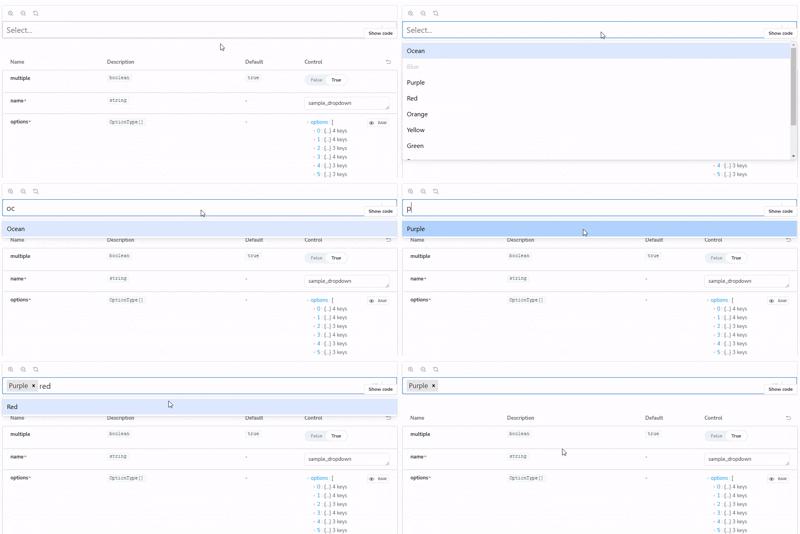
- A flexible and beautiful Select Input control for ReactJS
- with multiselect, autocomplete, async and creatable support
- also support for Portal configuration and customize render option.
🖥 Environment Support
- Modern browsers and Internet Explorer 10+
- Server-side Rendering
- Electron
| IE / Edge | Firefox | Chrome | Safari | Opera | Electron |
|---|---|---|---|---|---|
| IE10, IE11, Edge | last 5 versions | last 5 versions | last 5 versions | last 5 versions | last 5 versions |
📦 Install
Install as a component in your own project :
npm install dropdown-rlor
yarn add dropdown-rl📦 Run
for dropdown-rl develiper, You can run the storybook locally using this command :
npm run storybook📦 Build for dropdown-rl developer
This component will expose only the JavaScript file after you run this command. Then, you can push the component to your registry Check the result in root folder / dist
npm run buildCheck the result in root folder / dist. the package ready to be published into npm registry.
Also you can build the storybook by running this command:
npm run build-storybookcheck the result file in root folder / storybook-static
🔨 Usage
import React from 'react'
import { SelectBox } from 'dropdown-rl';

const data = [
    { value: 'ocean', label: 'Ocean', color: '#00B8D9', isFixed: true },
    { value: 'blue', label: 'Blue', color: '#0052CC', isDisabled: true },
    { value: 'purple', label: 'Purple', color: '#5243AA' },
    { value: 'red', label: 'Red', color: '#FF5630', isFixed: true },
    { value: 'orange', label: 'Orange', color: '#FF8B00' },
];

const MyyPage = () => {
    return (
        <SelectBox options={data} isSearchable={true} name="searchable_feature" />
    );
}
License
RL © GitHub