0.1.0 • Published 7 years ago
gatsby-plugin-pixelate v0.1.0
gatsby-plugin-pixelate 

A Gatsby plugin for pixelating images
Install
npm install gatsby-plugin-pixelateHow to use
// in gatsby-config.js
module.exports = {
  plugins: [
    {
      resolve: "gatsby-plugin-pixelate",
      options: {
        nodeType: "GoodreadsBook",
        nodeInput: "image_url",
        nodeOutput: "image_pixelated",
        ratio: 5
      }
    }
  ]
};
It will extend the nodeType with the base64 version of the image contained in nodeInput
  // GoodreadsBook node in GraphQL
  fields {
    image_pixelated
  }
Available options
nodeTypethe node type where the original image is present.nodeInputthe property defining the original image url.nodeOutput(default:image_pixelated) the property where the base64 pixelated version of the image is going to be returned (infieldsproperty).rationthe ratio of pixelation, a value from 0 to 100.
Example
Original:
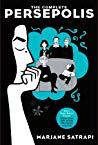
Pixelated:

Note
The image manipulation is powered by Jimp.
If you need multiple images just add a multiple config.
  {
    resolve: "gatsby-plugin-pixelate",
      options: {
        nodeType: "GoodreadsBook",
        nodeInput: "image_url",
        nodeOutput: "image_pixelated",
        ratio: 5
      }
    }
  },
  {
    resolve: "gatsby-plugin-pixelate",
      options: {
        nodeType: "GoodreadsAuthor",
        nodeInput: "image_url",
        ratio: 5
      }
    }
  }