general-basic-table v1.2.11
GeneralBasicTable
一个兼容Vue2和Vue3的表格组件,支持typescript,vue2请使用@1版本,Vue3请使用@2版本 示例:
import { VGeneralBasicTable } from "general-basic-table";<VGeneralBasicTable
size="mini"
:getList="getList"
:tableColumn="tableColumn"
:tableList="tableList"
:total="total"
border
:style="{ width: '98%', marginBottom: 10 + 'px' }"
ref="VGeneralBasicTable"
@selection-change="handleSelectionChange" // 传入选择框以后的回调函数,传出一个val参数
@row-dblclick="addModel" // 行双击后的回调函数,传出row, column, event参数
:paginationAttrs="{
size: device === 'mobile' ? 'small' : null,
autoScroll:false,
layout:
device === 'mobile' ? 'prev, pager, next' : 'total, sizes, prev, pager, next, jumper'
}"
>
frontSlot插槽放在前面,默认在后面
<template v-slot:frontSlot>
<el-table-column type="selection" width="55"> </el-table-column>
</template>
...一些传入插槽的内容
</VGeneralBasicTable>支持所有element-plus element-ui Table 表格的原生属性
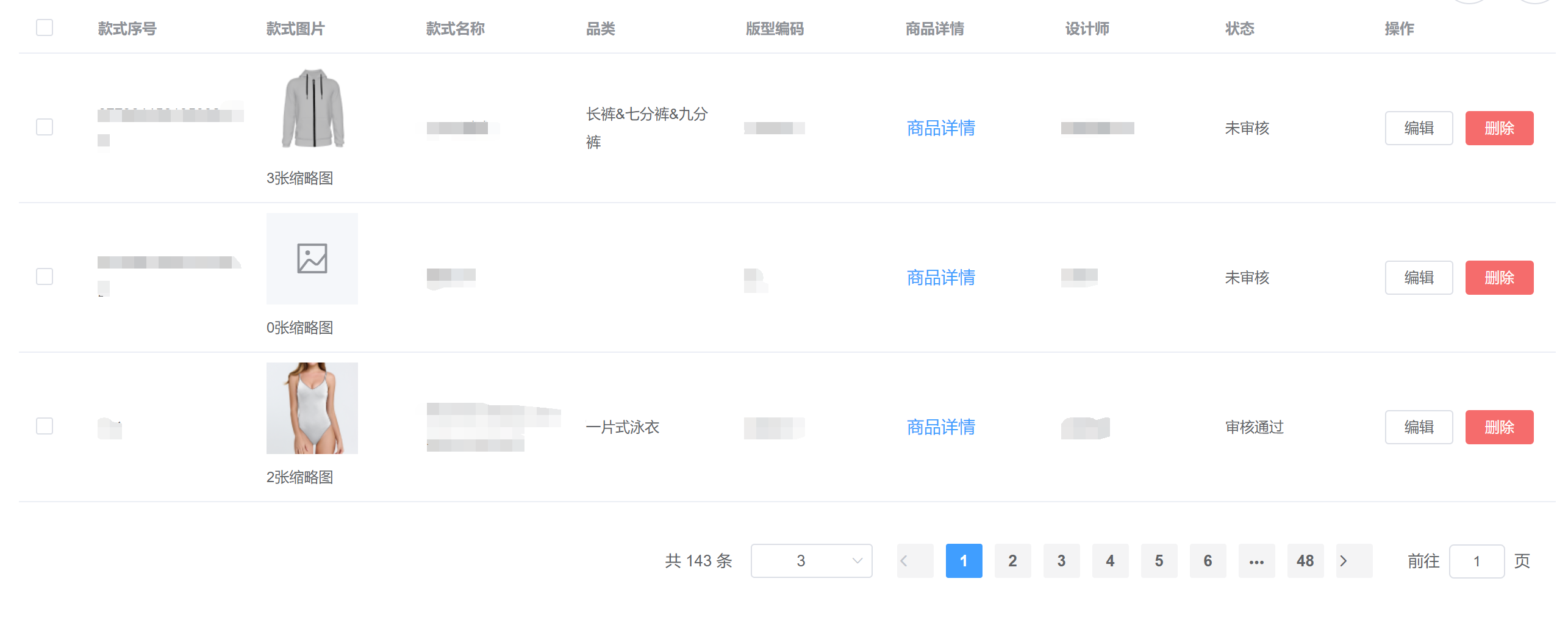
数据示例:
tableList: [
    {
      base: "inch",
    },
    {
      date: "2016-05-03",
      name: "王小虎",
      address: "上海市普陀区金沙江路 1518 弄",
    },
    {
      date: "2016-05-02",
      name: "王小虎",
      address: "上海市普陀区金沙江路 1518 弄",
    },
    {
      date: "2016-05-04",
      name: "王小虎",
      address: "上海市普陀区金沙江路 1518 弄",
    },
  ], //表格内容


  tableColumn: [
    {
      key: "date",
      prop: "date",
      label: "日期",
      align: "center",
    },
    {
      key: "name",
      prop: "name",
      label: "名字",
    },
    {
      key: "address",
      prop: "address",
      label: "地址",
      render: (scope) => {
        const { $index, row = {} } = scope;
        const { address } = row;
        // jsx语法依赖@vue/babel-plugin-jsx或@vitejs/plugin-vue-jsx,可能需要用到tsx文件(Vue3)(Vue2直接在data写TS即可)
        // 详见https://github.com/vuejs/babel-plugin-jsx,https://cn.vitejs.dev/plugins/
        let ele = <div>{address}</div>;
        return ele;
      },
    },
  ],
multipleSelection: [], //表格选中项
total:0,//total为0时不展示分页组件
paginationAttrs //el-pagination的屬性
parametersType:"url" // 见parametersType类型介绍
DBPrimaryKey://[String, Number] indexDB的primaryKey,一般配合parametersType==="indexDB"使用
methods示例:
async getList(
  params = {
    page: Number(this.$route.query.page) || 1,
    limit: Number(this.$route.query.limit) || 10,
  }
) {}

handleSelectionChange(val) {
  this.multipleSelection = val;
},
table提供ref调用:
this.$refs["VGeneralBasicTable"].$refs["queryTableRef"] GeneralBasicPagination
GeneralBasicTable中使用的分页组件,可以单独引入使用
示例:
import { VGeneralBasicPagination } from "general-basic-table";
<VGeneralBasicPagination layout="total, prev, pager, next, jumper" :getList="search"
  :total="total" :defPageSize="4">
</VGeneralBasicPagination>
支持所有element-plus element-ui Pagination 分页的原生属性
parametersType类型介绍
| parametersType形式 | 支持页面刷新 | 参数改变引起路由跳转 | 组件间共享数据 | 存储上限 | 支持区分不同用户和路由 | 浏览器兼容性 |
|---|---|---|---|---|---|---|
| url | 是 | 是 | 是 | 中 | 否 | 高 |
| data | 否 | 否 | 否 | 高 | 否 | 高 |
| indexDB | 是 | 否 | 是 | 高 | 是 | 中 |
数据示例:
total:0, //总条数
currentPageKey:"page", //当前页数key
pageSizeKey:"limit", //每页显示个数选择器的选项设置
small:false, //是否使用小型分页样式
getList:()=>{}, //切换分页调用的函数
parametersType:"url" // 见parametersType类型介绍
DBPrimaryKey://[String, Number] indexDB的primaryKey,一般配合parametersType==="indexDB"使用
defCurrentPage:1, //默认的页数
defPageSize:10, //默认的每页显示个数
layout:"total, sizes, prev, pager, next, jumper", //组件布局,子组件名用逗号分隔
background:true, //是否为分页按钮添加背景色
paginationAttrs //el-pagination的屬性,同$attrs,优先级比$attrs高
安装:npm i general-basic-table install: npm i general-basic-table
1 year ago
1 year ago
1 year ago
1 year ago
1 year ago
1 year ago
1 year ago
1 year ago
1 year ago
1 year ago
1 year ago
1 year ago
2 years ago
2 years ago
2 years ago
2 years ago
2 years ago
2 years ago
2 years ago
3 years ago
3 years ago
3 years ago
4 years ago
4 years ago
4 years ago
5 years ago
5 years ago
5 years ago
5 years ago
5 years ago
5 years ago
5 years ago
5 years ago
5 years ago
5 years ago
5 years ago
5 years ago
5 years ago
5 years ago
5 years ago
5 years ago
5 years ago
5 years ago
5 years ago
5 years ago
5 years ago
5 years ago
5 years ago
5 years ago
5 years ago
5 years ago