github-pr-release v1.3.6
github-pr-release

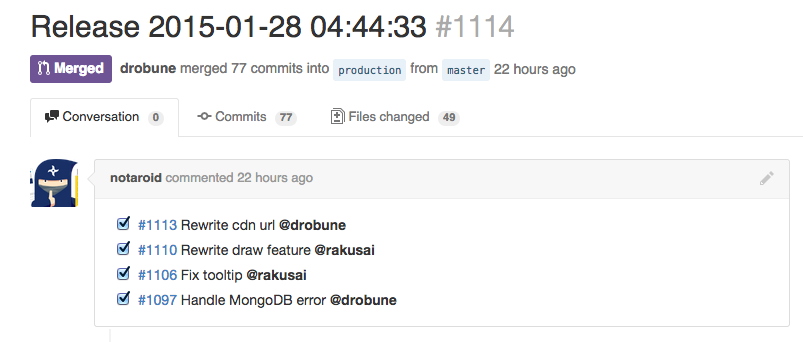
Create a release pull request using GitHub API. Inspired by git-pr-release.
- No dependency on git. You can easily deploy it to Heroku / AWS Lambda / Google Cloud Functions etc.
- Fast because it uses only Github API.
- Written in JavaScript.
Usage
<<<<<<< HEAD
release(config)
=======
API: release(config)
origin/master
Create a release pull request and return Promise.
You must pass a config as an argument.
const release = require("github-pr-release");

const config = {
  token: "your github token",
  owner: "uiur",
  repo: "awesome-web-app",
  head: "master", // optional
  base: "production", // optional
  template: "/path/to/template.mustache", // optional
};

release(config).then(function (pullRequest) {
  // success
  // `pullRequest` is an object that github api returns.
  // See: https://developer.github.com/v3/pulls/#get-a-single-pull-request
});
Also, the following environment variables can be used for the config:
GITHUB_PR_RELEASE_OWNERGITHUB_PR_RELEASE_REPOGITHUB_PR_RELEASE_TOKENGITHUB_PR_RELEASE_HEADGITHUB_PR_RELEASE_BASEGITHUB_PR_RELEASE_ENDPOINT
CLI
You can create a release pull request by the following command:
❯ npx github-pr-release owner/repo --head master --base production
# `GITHUB_PR_RELEASE_TOKEN` is required--help:
❯ npx github-pr-release --help
Usage: github-pr-release [repo]

Options:
  --help     Show help                                                 [boolean]
  --version  Show version number                                       [boolean]
  --head                                                     [default: "master"]
  --base                                                 [default: "production"]

Examples:
  github-pr-release uiur/github-pr-release --head master --base production
Install
npm install github-pr-releaseTips
Pull request titles
If one of pull requests of which consist a release pull request has a title like "Bump to v1.0", the title of the release pull request becomes "Release v1.0". Otherwise, it uses timestamps like "Release 2000-01-01 00:00:00" in local timezone.
Specify a message format
You can specify a template to change the message format. Pass a template path to config.template.
release({
  token: 'token'
  owner: 'uiur',
  repo:  'awesome-web-app',
  template: './template.mustache'
})
The default template is below. The first line is treated as the title.
Release {{version}}
{{#prs}}
- [ ] #{{number}} {{title}} {{#assignee}}@{{login}}{{/assignee}}{{^assignee}}{{#user}}@{{login}}{{/user}}{{/assignee}}
{{/prs}}
GitHub Enterprise
If you use this plugin in GitHub Enterprise, you can specify endpoint domain for GitHub Enterprise.
release({
  token: 'token'
  owner: 'uiur',
  repo:  'awesome-web-app',
  endpoint: 'https://github.yourdomain.com/api/v3'
})
Example
GitHub Actions
Creating release pull requests can be automated using GitHub Actions.
Create .github/workflows/create-pr-release.yml with the following content:
name: Create release pull requests

on:
  push:
    branches: [master]

jobs:
  build:
    runs-on: ubuntu-latest

    steps:
      - uses: actions/checkout@v2
      - uses: actions/setup-node@v2
        with:
          node-version: 16.x
          cache: "yarn"

      - run: yarn install
      - name: Create release pull requests
        run: |
          npx github-pr-release $GITHUB_REPOSITORY --head master --base production
        env:
          GITHUB_PR_RELEASE_TOKEN: ${{ secrets.GITHUB_TOKEN }}
hubot

release = require('github-pr-release')
module.exports = (robot) ->
  robot.respond /release/i, (msg) ->
    release(config).then((pullRequest) ->
      msg.send pullRequest.html_url
    )
    .catch((err) ->
      msg.send("Create release PR failed: " + err.message)
    )
Development
The release flow of github-pr-release is managed with github-pr-release itself.
It creates a release pull request when merging a topic branch or pushing to the main branch. The update can be published by merging a release pull request.
License
MIT