gupshup-otp v1.0.6

gupshup otp module
Messaging APIs for your app & website
Omni-channel module for SMS Messaging
Seamlessly integrate rich messaging into every app or website.
Getting Started
If you have an existing gupshup.io sms account, then you will be able to use this module to integrate with your bots. If you do not have an sms account with gupshup, kindly visit http://enterprise.smsgupshup.com to register for an sms account.
Step 1 : Link your sms account to the bots account
- Create a bot with your sms account to gupshup.io by visiting this link http://enterprise.smsgupshup.com/bots
- Visit the apis section and map your bots account with your enterprise account by visiting https://www.gupshup.io/developer/ent-apis
. (for international accounts) Scroll down to the
Add International Enterprise Accountsection. . (for indian accounts) Scroll down to the
 Add Enterprise Accountsection. . Enter your username and password in
 accountidandtokenfields respectively.
. ClickTry it Out!button. You should see a204 successmessage if you provide correct credentials.
Step 2 : Create your sms auth key
In the same page mentioned in step 1, scroll to the Create two factor Auth Key section.
 Enter the message as suggested in the example provided in that section and then your account type
For international :
Enter the message as suggested in the example provided in that section and then your account type
For international : intl
For indian : india
and then click on Try it Out! button.
You will get a json as shown below
{
  "xxxxxxxxxxxxxxxxxxxxxxxxxxxxxxxx": {
    "attempt": "5",
    "message": "simpleBot : Hello, your otp is %code%",
    "codeLength": "6",
    "codeExpiry": "200",
    "codeChars": "0123456789",
    "service": "SMS",
    "codeType": "Numeric",
    "retryPeriod": "60"
  }
}
here the first key xxxxxxxxxxxxxxxxxxxxxxxxxxxxxxxx is your otpAuth key also refered to as 2fa key. Kindly make a note of this key as you will require it in future.
Kindly also make a note of your apikey which you get on clicking the profile icon on the top right of the webpage as shown below.
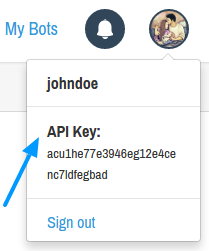
By the end of this step you should have
1. otpkey for eg. xxxxxxxxxxxxxxxxxxxxxxxxxxxxxxxx
2. apikey for eg. acu1he77e3946eg12e4cenc7ldfegbad
Step 3 : Using the otp module.
inside your node project directory run.
npm install gupshup-otpInside your js file access the otp functions as shown below.
"use strict";
const config = {
    "otpkey": "xxxxxxxxxxxxxxxxxxxxxxxxxxxxxxxx",
    "apikey": "acu1he77e3946eg12e4cenc7ldfegbad"
};
var otp = require('gupshup-otp');
otp = new otp(config, initOtp);
function initOtp(creds){
    //Do something on the init call
    otp.sendOtp('9xxxxxxxxx', function (x) {
        if(x.status === 'error'){
            //Handle your error here
        }else{
            // Handle your success here
        }
    });
    otp.verifyOtp({'phone':'9xxxxxxxx9','code':code}, function (x) {
        if(x.status === 'error'){
            //Handle your error here
        }else{
            // Handle your success here
        }
    });
}9 years ago