

ioBroker.weather-warnings




Tests: 

weather-warnings adapter for ioBroker
Deutsche Readme (meist aktueller)
This adapter accesses weather warnings of different weather services and outputs them as text or voice messages. Additionally it creates States grouped by type, which can be used to react to current warnings.
Provider:
- DWD
- ZAMG (Austria)
- UWZ
Push service
- Telegram
- Pushover
- Alexa
- Sayit
Installation
Min. Nodejs: v22 After installation the configuration site will automatically open and will be needed to be reloaded. This will show the templates in the language that was set.
Configuration
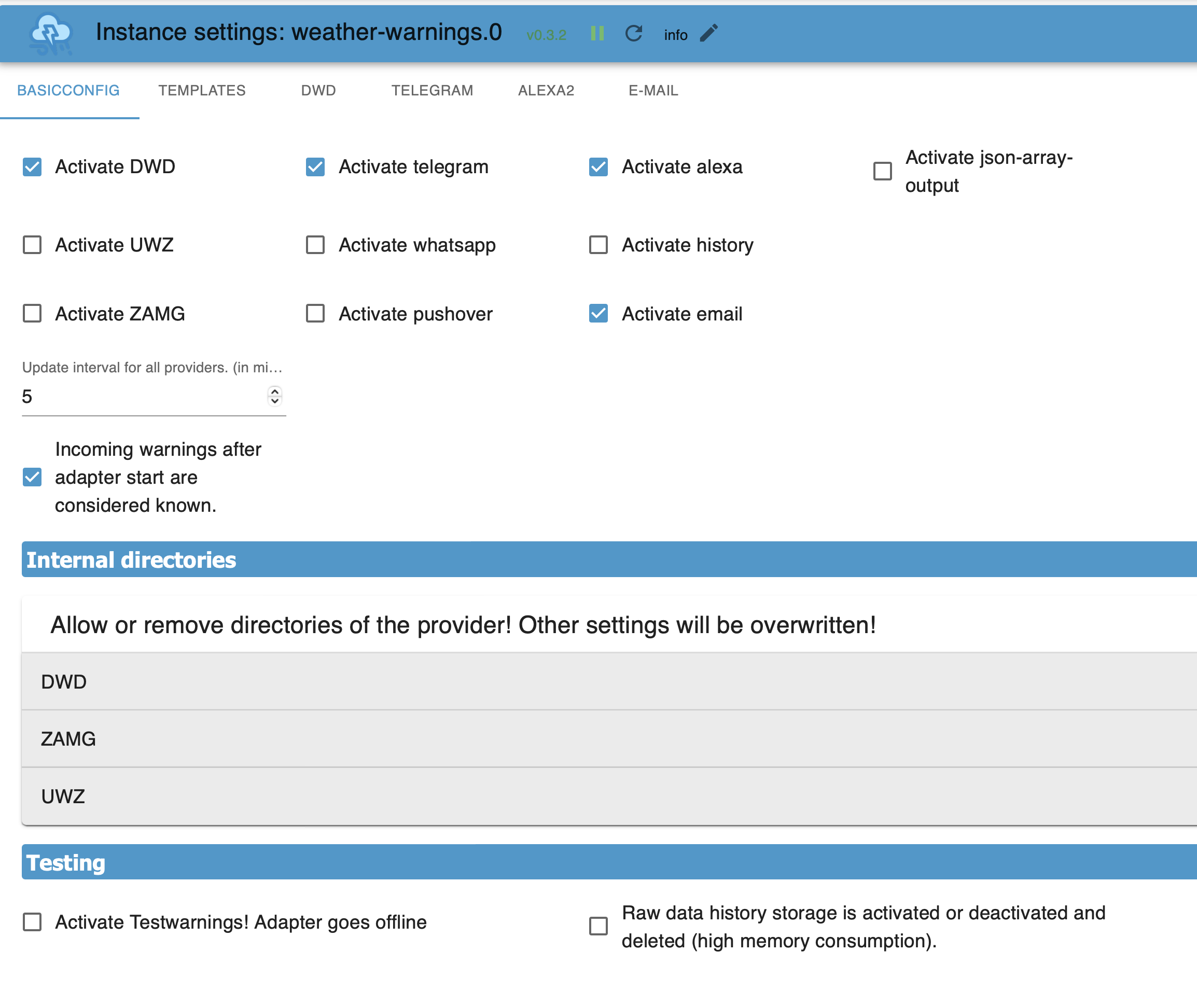
Activate DWD/UWZ/ZAMG: activate the data retrieval of these service providers.
Activate telegram/pushover,...: activate the output of messages to these installed adapters.
Activate email: Writes all current warnings in an E-Mail.
Activate history: writes the history, which can hold up to 500 entries, into the State: .history. All data or selected data.
Activate json-array: very special, puts the current warnings into an Array or - after activation - a user-specifc Json into an Array, which can be used by scripts.
Update interval: the interval of data retrieval in minutes (minimum: 5)
Incoming warnings...: After starting the adapter the warnings of the first data retrieval will be treated as known and will not trigger a notification.
Expert: Activates additional optional settings
Testing- Activate...: Use testdata. Adapter is offline.
Testing- Raw data history: For Debugging, only on request.
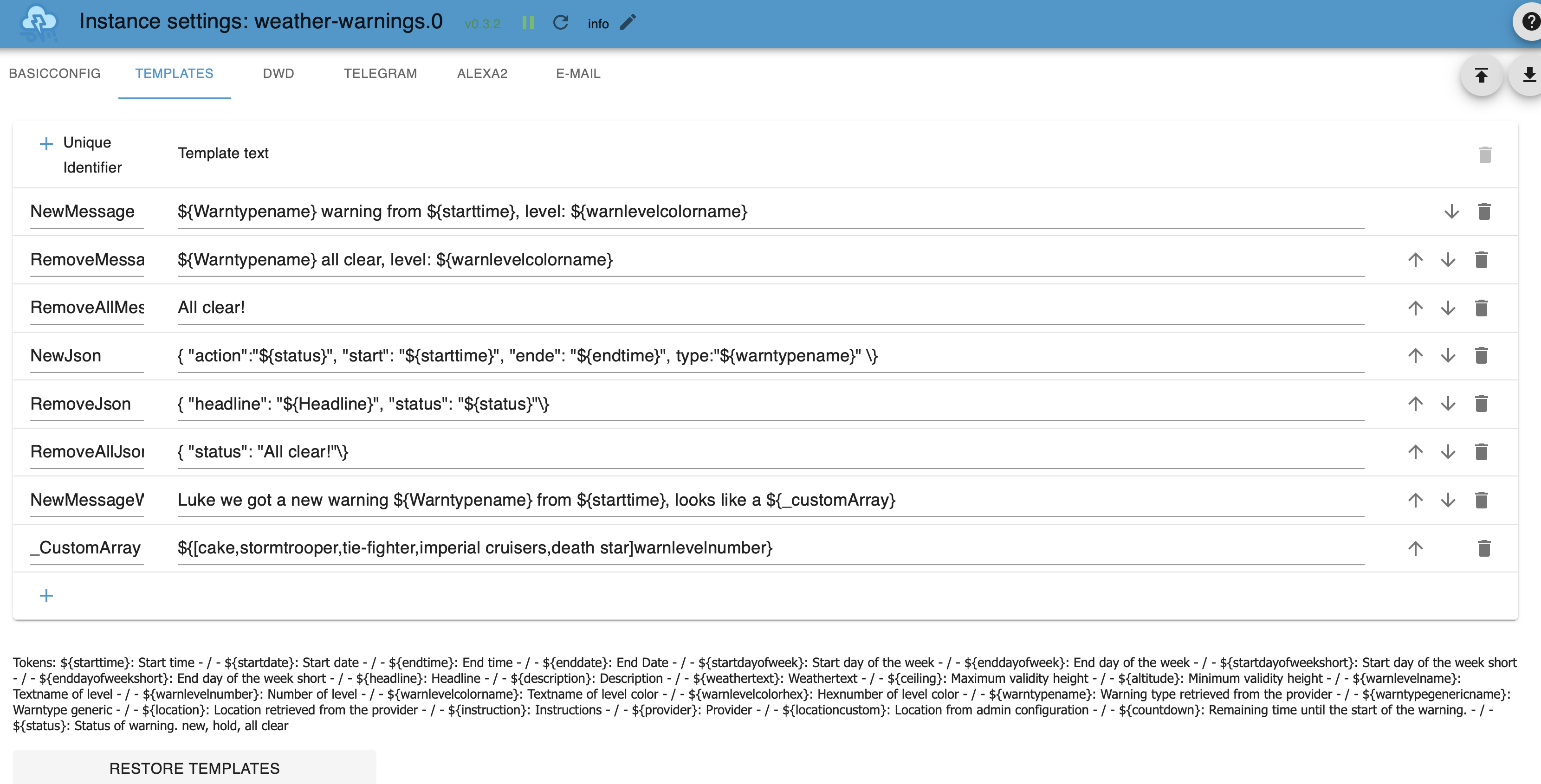
Here you can create own messages or edit existing ones. All available „Tokens“ and their meanings are displayed below the table. The Unique identifier is used by push notification services in order to determine which template to use for which type of notification.
Save and close after adding or deleting templates.
Signs with special meaning:
${}contains tokens that are substituted by generated information. The template identifier is usable here as well.- Template identifier that start with
_are not offered by services. ${[0,1,2,3,4]token}A string with values, token has to be a number token. The index is the same as shown in the example. 0 is the first value in the list.${(value=token)result1#result2}or${(value=token)result1}is the same as a javascript command:if (value == token) result1 else result2possible comparisons:= < > !=- for a Jsons template the closing bracket
}has to be written in this way\} - see examples in the adapter
- alternatively also possible:
${[0,🟢,🟡,🟠,🔴]warnlevelnumber}
Restore Templates: Resets the templates back to the current system language. Existing templates will be lost. Afterwards save & close. Should be used after changing system language.
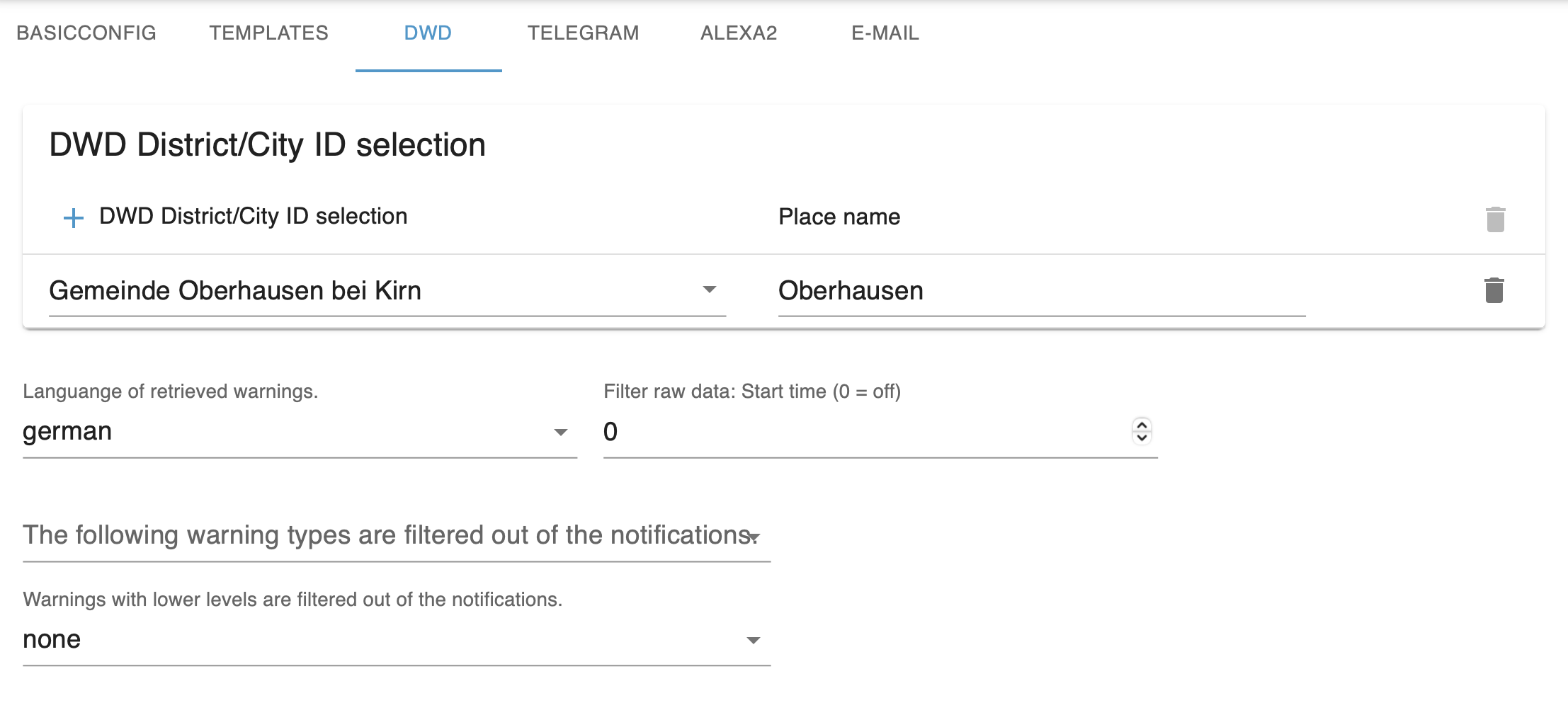
DWD: Selection from a list of 10000 places, after entry click on another tab and then return, list is too big and has to be updated.
UWZ: Entry using the country identifier DE AT (others possible, has to be tested) and the postal code, for example DE12345
ZAMG: Only for Austria. Entry of coordinates within Austria.
Place name: user-specific place name, can be used in warnings (useful with multiple warning cells)
Filter:
- Filter Raw data: Filters out everything within X hours into the future before every following handling.
- Type: discards everything with this type.
- Level: everything lower than this level will be discarded.
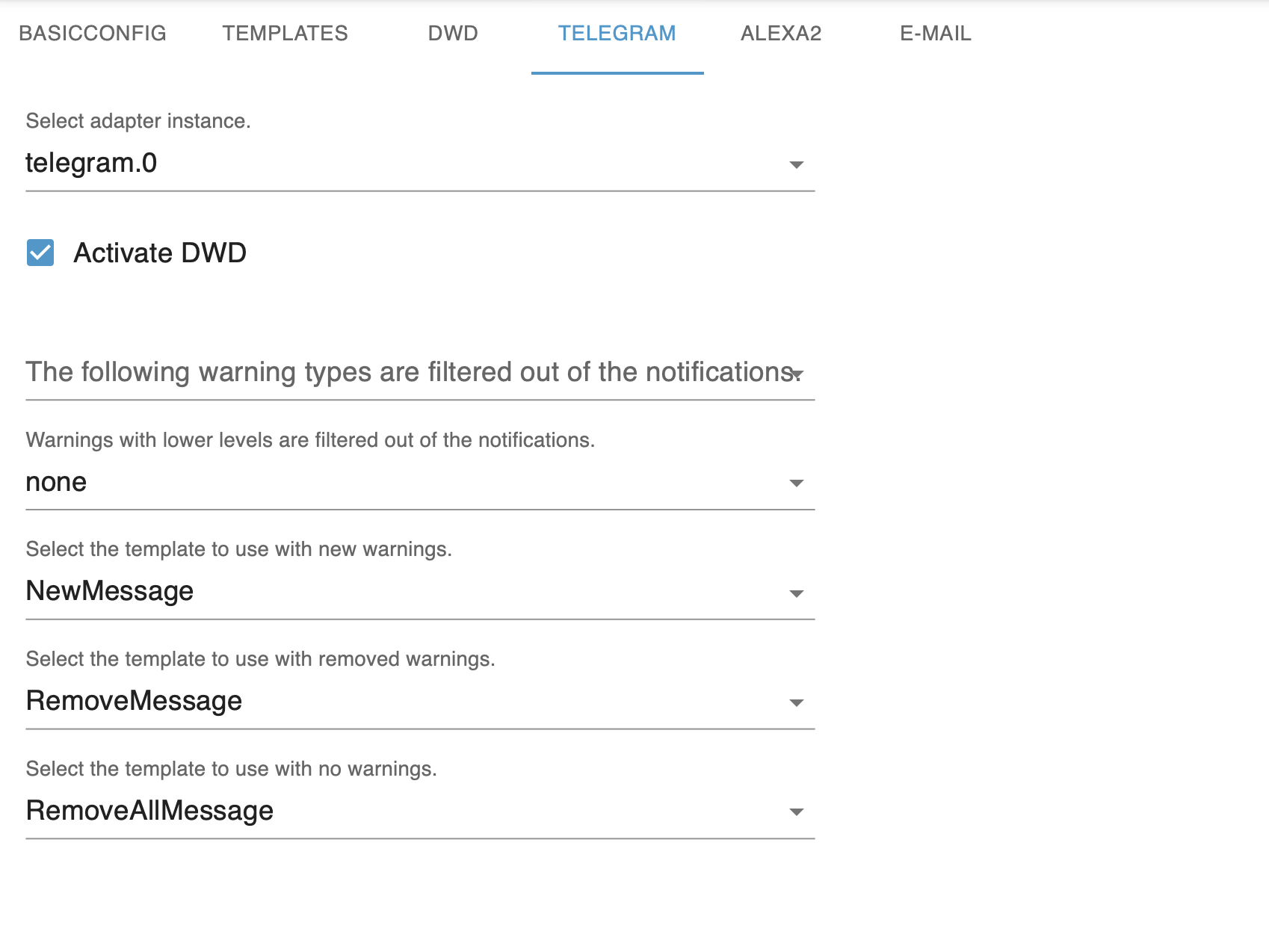 Adapter: If this option was activated and there is an adapter field, a valid option has to be chosen. An error message in the log indicates missing settings.
Activate ...: Send warnings by this provider with this service.
Filter:
- Ignore warnings with this Type
- Ignore warnings with equal or lower level
Messages: use the following templates for: Column 1:
- New warnings or existing warnings
- A warning was removed and there are other active warnings.
- Warnings were removed and there are no other active warnings.
Column 2:
- Manually triggered notifications
- Use for no warning 1.3
Templates for 3) cannot contain ${} Tokens.
Special features
email: Header is put before the Mail, followed by 1,2 or 3 + line break and then Footer. The email is sent in html format, so you can add any htmp tag you like. (additional features are being worked on, not ready yet)
alexa: Additionally one or multiple devices has/have to be selected. The volume only changes for voice messages and should afterwards be reset to default. Message size per warning is limited to 250 characters. Sounds are possible, activate Expert to display the options.
title, header, footer only ${status} works here. Other tokens contain random values or no value.
General Behaviour
- No duplicate messages should be sent for one and the same thing. DWD is very particular about this.
- If
noneis selected as the template, no notifications are sent for it. - States in .alerts contain arrays for start, end, warning type, now active and headline, grouped by warning type. One warning per group is displayed filtered by the following criteria:
- Warning is now active (the one with the highest level).
Icons
DWD Icon: Copyright by Deutscher Wetterdienst ZAMG Icon: Copyright by
others:
Creator: Adri Ansyah
Changes: In the original they are blue, other colours are changes to the original.
Licence: CC BY 4.0 LEGAL CODE
Iconpage: https://icon-icons.com/de/symbol/Wetter-wind-cloud-Blitz-Regen/189105
Changelog
0.11.2 (2026-06-18)
- (ticaki) FIXED: DWD spoken/written color names (
warnlevelcolorname) now come from an exact lookup of the official DWD CAP color palette instead of a hue heuristic; light heat violet is now distinguished from dark heat violet, and the extreme-storm, UV and preliminary-information colors are named correctly (adds the color names light violet, dark red, magenta and pink) (#220)
0.11.1 (2026-06-18)
- (ticaki) FIXED: spoken/written color name for DWD heat warnings (
warnlevelcolorname) is now correct: the light violet DWD heat color (#cc99ff) was misclassified as "green" and is now named "violet", matching email/vis (#220)
0.11.0 (2026-06-02)
- (copilot) BREAKING: Adapter requires node.js >= 22 now
- (ticaki) NEW: added DWD warning type 86 "extreme black ice" (extremes Glatteis) (#251)
- (ticaki) NEW: added global aggregate states
provider.hasActiveWarning(boolean),provider.maxLevel(number) andprovider.maxLevelText(text) - (ticaki) FIXED: alexa2 notification no longer crashes when a warning type has no assigned sound
- (ticaki) FIXED: per-provider deactivation of datapoint categories (warning/alerts/formatedKeys) is applied again on restart
- (ticaki) FIXED: addressed ioBroker repository checker findings (node >= 22,
source-map-supportmoved to runtime dependencies, admin jsonConfig schema issues, missing translations) (#300, #112) - (ticaki) FIXED: DWD color name (
warnlevelcolorname, e.g. spoken by Alexa) now matches the actual DWD warning color shown in email/vis instead of being derived from severity (#220)
0.10.1 (2026-04-20)
- (ticaki) FIXED: Network errors (e.g. internet down, DNS failure, HTTP errors) now show a clear, readable message instead of
[object Object]or a useless stack trace
0.10.0 (2025-11-13)
- (ticaki) update deps
- (ticaki) fix a problem with "remove" key
- (ticaki) support added for nspanel-lovelace-ui (>= v0.8.0)