karma-cukes v1.0.16
Karma-Cukes
Karma plugin for running Gherkin feature files against CucumberJS in end-to-end tests.
Idea
- Karma is a developer-friendly tool for running tests in real browsers, with direct access to client-side markup and code (without needing a Selenium tunnel).
- CucumberJS enables end-to-end tests and stakeholder-friendly, living documentation.
Bringing these two together could simplify the development workflow from story to spec through a unified set of tools.
Main features of this Karma plugin
- Comes bundled with "Progress", "Pretty", and "JSON" reporters that are more in line with the official Cucumber reporters (no HTML reporter yet, this package is more targeted at command-line users).
- The API and syntax for registering step definitions and other support code is compatible with CucumberJS
(i.e. step definition files can use
module.exports). - Native access to the browser, jQuery, etc.
- A single toolkit for both Story BDD and Spec BDD.
- Tested with Chrome, Firefox, PhantomJS
Existing alternatives
Selenium/Webdriver with built-in CucumberJS framework
While Webdriver (Selenium) offers near out-of-the-box support for Cucumber, the generated reports lack the level of detail that "native" Cucumber provides. They don't allow to auto-generate living documentation from report files (e.g. feature descriptions are missing and both feature and scenario names get normalized to underscored identifiers).
Other Karma-CucumberJS adapters
They basically have the same issues as Webdriver-Cucumber. There are good jUnit-reporters but I could not find proper "Progress", "Pretty", or "JSON" formatters that behave like the ones a Cucumber (or Behat in my case) developer is used to. The ones I tested also did not work with PhantomJS and Firefox.
Solution
The two main options were:
- writing a custom adapter + custom Cucumber-compatible reporters for Webdriver, or
- writing a custom adapter + custom Cucumber-compatible reporters for Karma.
This package goes for the second option, which –from looking at available adapters—, seemed to be the lower-hanging fruit. I'm not so sure about this anymore after writing the plugin, but here we are ;-)
Limitations compared to Webdriver
Only PhantomJS offers an API for taking screenshots through Karma (AFAIK), while Webdriver provides this feature for all browsers.
The Browser reports are not fully identical, e.g. PhantomJS and Firefox report step locations instead of step definition locations (due a patched
Error.captureStackTrace).There is only a minimal Browser API for visiting URLs in end-to-end tests. The rest is native browser access and up to you (which I personally think is actually an advantage).
No access to response headers (except for AJAX-based requests), but could be doable via Service Workers
For each non-CORS-enabled target server to be used in end-to-end tests, a proxy needs to be defined in the Karma configuration file.
Installation
npm install karma-cukes --save-devPeer dependencies: jquery (any version), cucumber (1.*), and of course karma (any version)
Configuration (karma.conf.js)
config.set({

    // activate framework
    frameworks: ['karma-cukes'],

    // specify feature files and support code
    files: [
        { pattern: 'dev/**/*.feature', included: false, watched: true, served: true },
        { pattern: 'dev/**/hooks.js', included: true, watched: true, served: true },
        { pattern: 'dev/**/step-definitions.js', included: true, watched: true, served: true }
    ],

    // forward command line arguments to CucumberJS
    client: {
        args: process.argv.slice(4),
        captureConsole: true
    },

    // activate reporters (kc-progress, kc-pretty, and/or kc-json)
    reporters: ['kc-pretty', 'kc-json'],

    // configure the JSON formatter
    kcJsonReporter: {
        outputDir: 'dev/reports/behaviour',
        outputFile: 'karma-cukes-{shortBrowserName}.json' // supported placeholders: `shortBrowserName`, `browserName`
    },

    // enable colors in the output
    colors: true,

    // proxy test server requests for end-to-end testing
    proxies: {
        "/": "http://localhost:8889/"
    },

    // use a root URL for the karma runner that does not interfere with proxied sites
    urlRoot: "/__karma__/",

    ...

})
Running features
// all scenarios
$ ./node_modules/.bin/karma start path/to/karma.conf.js

// tagged scenarios
$ ./node_modules/.bin/karma start path/to/karma.conf.js -- --tags @ui
Assertion utils
Karma-Cukes comes with 3 (basic) assertion methods that are accessible from step definitions.
this.assert.ok(condition, callback, message)this.assert.equal(actual, expected, callback, message)this.assert.contain(haystack, needle, callback, message)
Using the Browser object
The World context provides a Promise-based browser interface for loading local (proxied) paths or CORS-enabled URIs:
var world = this;
this.browser
    .url('/my/path')
    .then(function () {
        var window = world.browser.window;      // native browser window (an iframe)
        var document = world.browser.document;  // native browser document object
        var $title = $(document).find('title'); // just use jQuery from here on
        var pageContent = $(document).text();
        ...
    })
    // wait for an element to appear
    .then (function() {
        var $form = $(world.browser.document).find('#my-form');
        $form
            .find('input#search').val('cucumber').end()
            .find('button[type="submit"]').click();
        ;
        return world.browser.waitFor('#search-results');
    });
AJAX requests can be issued as well:
var world = this;
this.browser
    .http('my/api', 'GET', { search: 'cucumber' })
    .then(function(response) {
        var $xhr = world.browser.$ajax;
        if ($ajax.status === 200 && $ajax.getResponseHeader('Content-Type').match(/application\/json/)) {
            return JSON.parse(response);
        }
    })
Built-in Step Definitions
Karma-Cukes provides basic step definitions to get you started:
I go to "$path"- Calls
browser.url - Example:
When I go to "/test"
- Calls
I should see "$html" in the "$element" element- Calls
assert.contain $elementcan be a tag name or a CSS selector- Example:
Then I should see "Hello" in the "body" element
- Calls
the "$element" element should be "$expected"- Calls
assert.equal $elementcan be a tag name or a CSS selector- Example:
And the "title" element should be "Hello World"
- Calls
Formatters
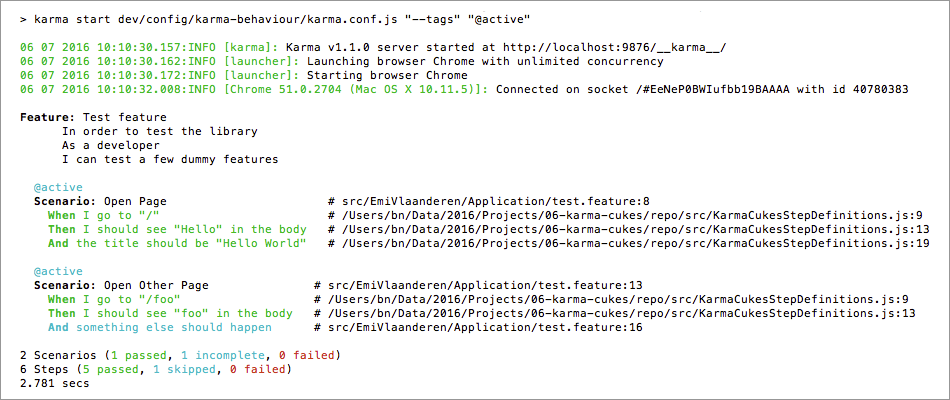
Karma-Cukes has 3 built-in reporters:
"kc-progress"

"kc-pretty"
"kc-json"
  [{
      "id": "test-feature",
      "uri": "path/to/test.feature",
      "name": "Test feature",
      "description": "    In order to test the library\n    As a developer\n    I can test a few dummy features",
      "line": 3,
      "keyword": "Feature",
      "tags": [
          {
              "name": "@active",
              "line": 2
          }
      ],
      "browser": "Chrome 51.0.2704 (Mac OS X 10.11.5)",
      "elements": [
          {
              "id": "test-feature;open-page",
              "name": "Open Page",
              "line": 8,
              "keyword": "Scenario",
              "type": "scenario",
              "tags": [
                  {
                      "name": "@active",
                      "line": 2
                  }
              ],
              "examples": [],
              "steps": [
                  {
                      "keyword": "When ",
                      "name": "I go to \"/\"",
                      "line": 9,
                      "match": {
                          "location": "/path/to/KarmaCukesStepDefinitions.js:9"
                      },
                      "result": {
                          "status": "passed",
                          "error_message": "",
                          "duration": 276000000
                      },
                      "log": []
                  },
                  ...
              ]
          }
          ...
      ]
  }
  ...
  ]
License
The MIT License (MIT) / Copyright 2016 Benjamin Nowack
10 years ago
10 years ago
10 years ago
10 years ago
10 years ago
10 years ago
10 years ago
10 years ago
10 years ago
10 years ago
10 years ago
10 years ago
10 years ago
10 years ago
10 years ago
10 years ago
10 years ago
10 years ago
10 years ago
10 years ago
10 years ago