lan v0.2.0
Lan Server Layer



Internet of Things Server Layer with CoAP, WebSocket, MQTT, HTTP Protocol.
Similar to Ponte & Inspired by Qest
Test on Node Version: 0.12.7
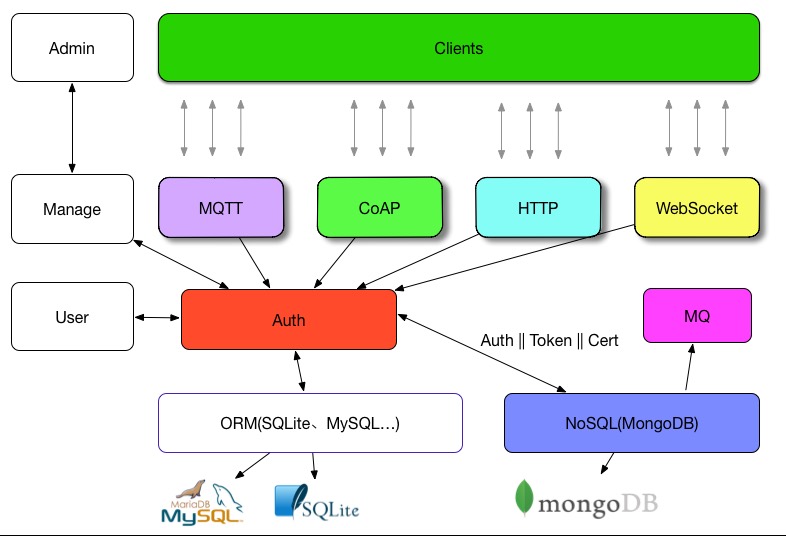
##IoT Architecture:

##Lan Server Layer:
##Configure
Default Config:
{
  "encrypt": "crypto",
  "db_url": "mongodb://localhost:27017/lan",
  "db_collection": "documents",
  "db_collection_user": "user",
  "modules": [
    "coap",
    "http",
    "mqtt",
    "websocket"
  ],
  "port": {
    "http": 8899,
    "websocket": 8898,
    "coap": 5683,
    "mqtt": 1883
  },
  "logging" :true,
  "secret": "keyboard cat"
}###Import make sure change secret
encrypt: "crypto", "bcrypt"
modules: "coap", "http", "mqtt", "websocket"
Use bcrypt, please install it:
npm install --save bcrypt##Docker
Require: Docker
docker build .##安装(Setup)
必装:
- MongoDB -> NoSQL: 数据存储
- Sqlite || MySQL || PostgreSQL || MariaDB || MSSQL -> SQL: 存储用户信息
然后:
1.Clone
git clone https://github.com/phodal/lan2.安装依赖
npm install
bower install
3.修改config下的配置
/config.json 数据库配置
/default.json Lan系统配置
4.数据库初始化
npm install -g sequelize-cli
sequelize db:migrate
5.Start Cron
npm jobs/cron.js6.运行
npm start ##Setup
require: Install
MongoDB- Sqlite || MySQL || PostgreSQL || MariaDB || MSSQL -> SQL: save user info
Then.
1.Install dependencies
npm installOr Just Production only:
npm install --production2.Setup Database
sequelize db:migrate 3.Start Cron
npm jobs/cron.js4.Run
npm start##Test With Tool
###HTTP
Get
curl --user root:root -X GET -H "Content-Type: application/json" http://localhost:8899/topics/rootPUT/POST - cUrl
curl --user root:root -X PUT -d '{ "dream": 1 }' -H "Content-Type: application/json" http://localhost:8899/topics/root###MQTT
Publish - Mosquitto
mosquitto_pub -u root -P root -h localhost -d -t lettuce -m "Hello, MQTT. This is my first message."Subscribe - Mosquitto
mosquitto_sub -t message -h localhost -u root -P root###CoAP
POST/PUT - libcoap
coap-client -e "{message: 'hello,world}" -m put coap://127.0.0.1/topic?root:rootGET - libcoap
coap-client -m get coap://127.0.0.1:5683/topic?root:rootGET/POST/PUT - Copper
GET: Click GET
POST: Type on Outgoing, Click POST
###WebSocket
Message
node test_scripts/ws_test.js##Auth
Standalone (单机)
User -> SQL Database (Auth)
SQL Database -> NoSQL (Save)
Multi
User -> SQL Database (Save)
SQL Database -> NoSQL (Cron Job || MQ)
User -> NoSQL (Auth && Save)
##License
© 2015 Phodal Huang. This code is distributed under the MIT license.