lumio v2.0.0
The color palette it divided into fifteen named components to represent the different color effects.
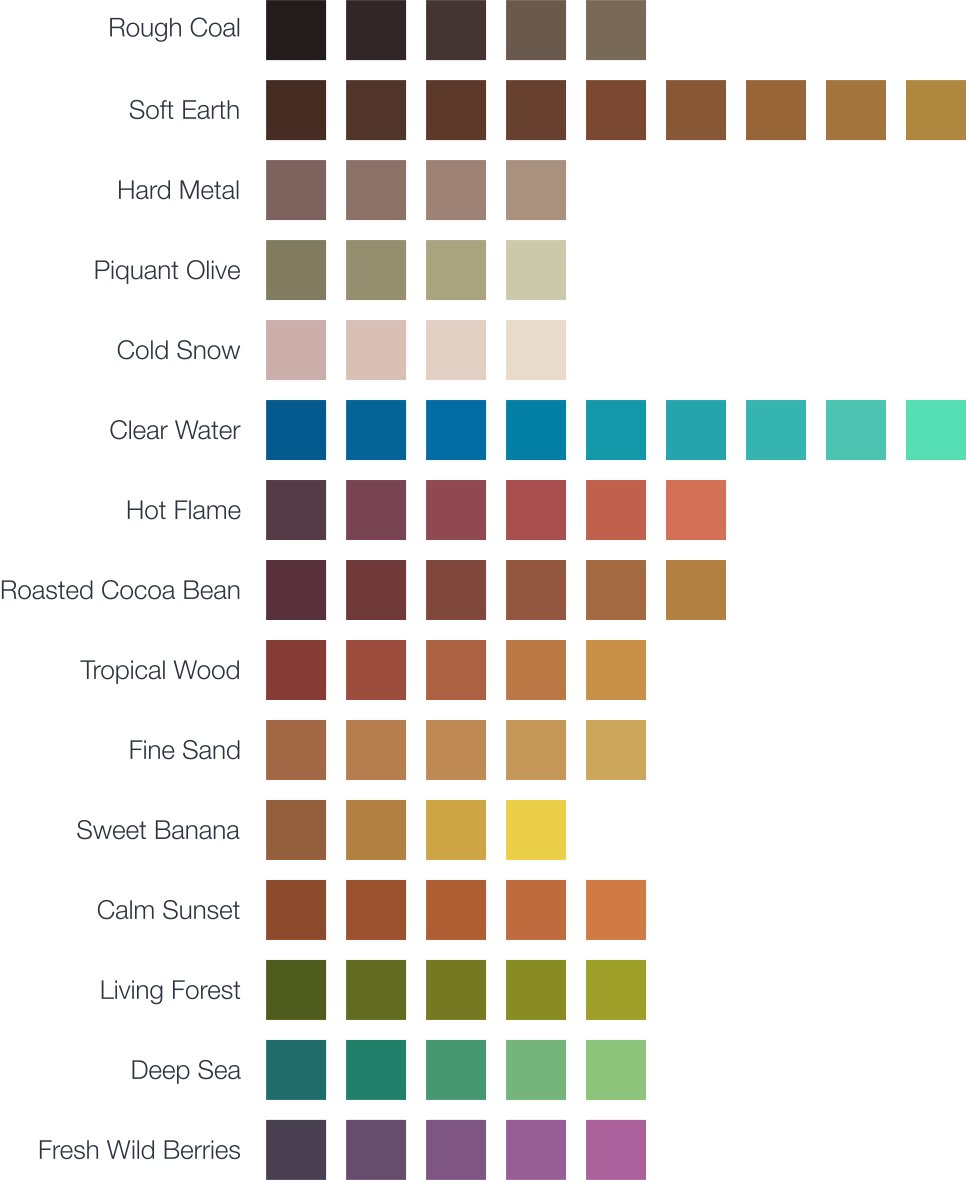
Lumio colors are numbered from lumio0 to lumio15 where each component contains a different amount of colors:
1. Rough Coal lumio0 - lumio4
2. Soft Earth lumio5 - lumio13
3. Hard Metal lumio14 - lumio17
4. Piquant Olive lumio18 - lumio21
5. Cold Snow lumio22 - lumio25
6. Clear Water lumio26 - lumio34
7. Hot Flame lumio35 - lumio40
8. Roasted Cocoa Bean lumio41 - lumio46
9. Tropical Wood lumio47 - lumio51
10. Fine Sand lumio52 - lumio56
11. Sweet Banana lumio57 - lumio60
12. Calm Sunset lumio61 - lumio65
13. Living Forest lumio66 - lumio70
14. Deep Sea lumio71 - lumio75
15. Fresh Wild Berries lumio76 - lumio80
Usage
To show a list of all available Gulp tasks run gulp or gulp help.
CSS
The CSS specification supports the usage of primitive value types to define custom properties which can be used to create e.g. color variables.
Lumio provides the template-css.scss template file to compile a lumio.css stylesheet.
The generated file contains all Lumio color variables prefixed with -- inside the :root pseudo-class.
The :root pseudo-class represents an element that is the root of the document.
This is always the HTML (<html>) element which allows to use the Lumio color variables for the whole document.
The lumio.css stylesheet can be compiled via Gulp:
npm install
gulp compile-css-template
Sass
Copy the lumio.scss file into your project and import it in your Sass files:
@import "lumio";The .scss file extension is optional.
SassDoc
lumio Sass sources are documented using the SassDoc documentation syntax which can be compiled to a HTML documentation via Gulp:
npm install
gulp sassdoc
The Sassdoc theme can be changed by editing the .sassdocrc configuration file.
LESSCSS
Copy the lumio.less file into your project and import it in your LESSCSS files:
@import "lumio";Information about how the @import statement handles imports with different file extensions can be found in the official LESSCSS documentation.
KSS
lumio LESSCSS sources are documented using the KSS documentation syntax.
Information about the generation of a styleguide can be found in the official KSS documentation.
Color Swatches
Lumio is available in various native formats:
.acoAdobe Photoshop Palette.aseAdobe Swatch Exchange.gpaGpick Palette.gplGIMP/Inkscape/CinePaint/Krita Palette.mtlAlias/WaveFront Material
A list of detailed information about each file format can be found here.
Port Projects

Component Cards
Development



Contribution
Please report issues/bugs, feature requests and suggestions for improvements to the issue tracker.
10 years ago