markdown-invoicer v1.0.7
invoice-ninja
Simple invoice generator
Note: This module is not related to the PHP/Laravel invoicing site Invoice Ninja or its GitHub repository.
Getting Started
npm install invoice-ninjaExample Usage
var fs = require('fs');
var Invoice = require('./index.js');

today = new Date();
due = new Date()
due.setDate(today.getDate() + 14);

input = {
  currencyFormat: "£%d",
  invoice_number: 1421,
  date_now: today.toDateString(),
  date_due: due.toDateString(),
  from_name: 'nCrazed',
  client_name: 'Client Inc.',
  items: [
    {
      description: 'Freebie',
      quantity: 1,
      rate: 0,
      amount: 0
    }
  ]
};

var invoice = new Invoice();
invoice.generatePDFStream(input).pipe(fs.createWriteStream('invoice.pdf'));
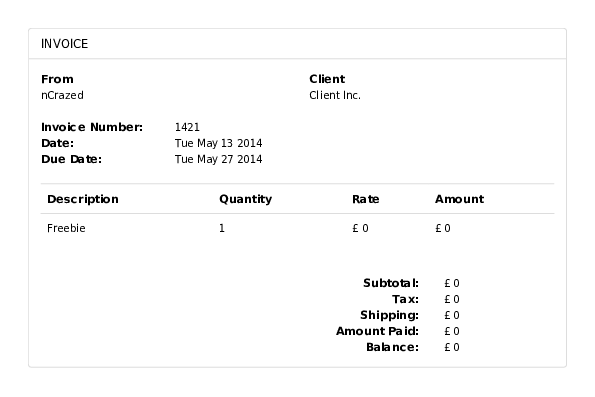
The above code would create a pdf file that looks like this:
Options
Optional absolute paths to your custom template and/or css files.
options.baseTemplate
Type: String
Default: template.md
options.rowTemplate
Type: String
Default: row.md
options.cssPath
Type: String
Default: bootstrap.css
Input
All but currencyFormat are optional.
input.currencyFormat
Type: String
Format string for currency values.
It's passed to util.format as the first argument and should include
the currency symbol and the %d placeholder.
input.invoice_number
Type: String
input.date_now
Type: String
input.date_due
Type: String
input.subtotal
Type: Number
input.tax
Type: Number
input.shipping
Type: Number
input.paid
Type: Number
input.balance
Type: Number
input.from_name
Type: String
input.from_street
Type: String
input.from_city
Type: String
input.from_county
Type: String
input.from_post_code
Type: String
input.from_country
Type: String
input.client_name
Type: String
input.client_street
Type: String
input.client_city
Type: String
input.client_county
Type: String
input.client_post_code
Type: String
input.client_country
Type: String
input.items
Type: Array
Each element of the array represent a single item.
input.items.description
Type: String
input.items.quantity
Type: String
input.items.rate
Type: Number
input.items.amount
Type: Number