markrun v0.26.0
📝 markrun
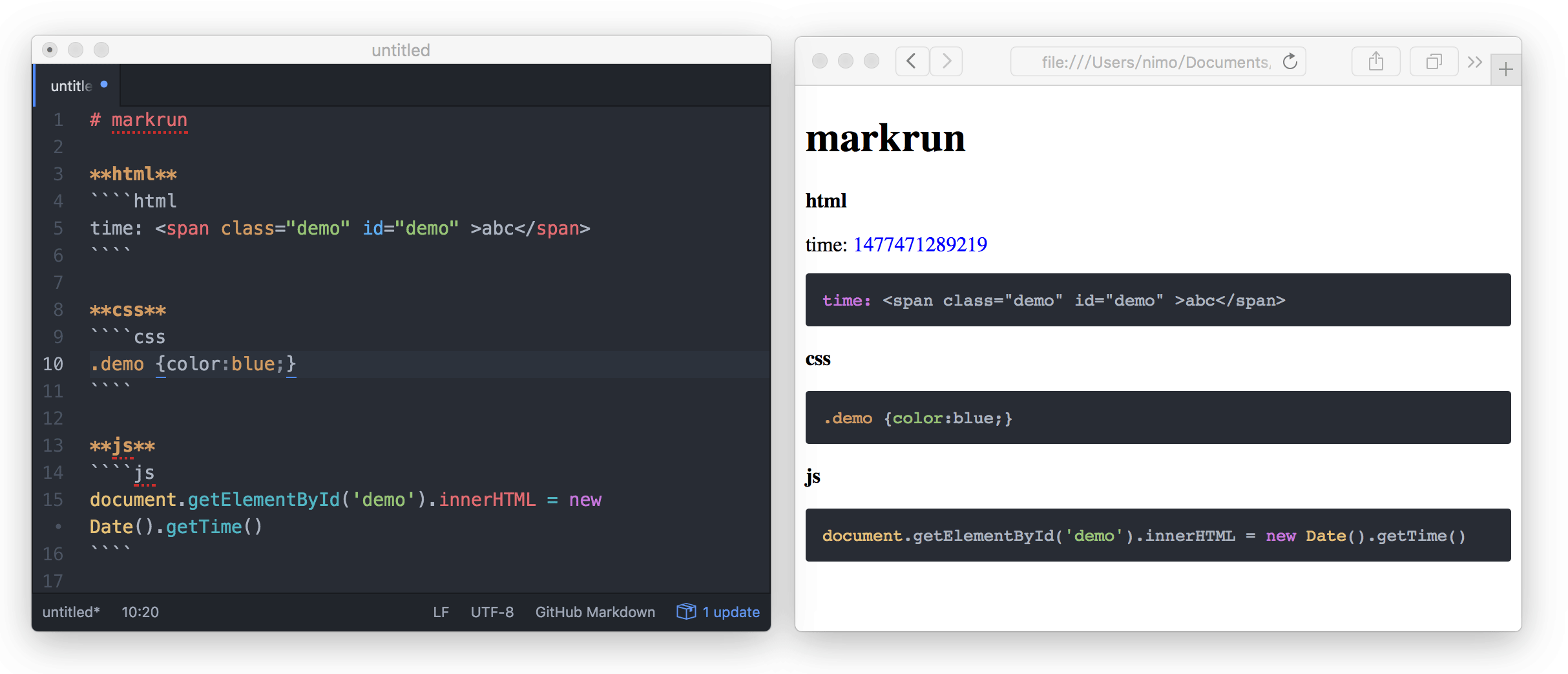
Let your markdown to run, ````js to <pre> & <script>



📦 Install
npm i markrun<script src="https://unpkg.com/markrun/dist/markrun.min.js"></script>
<script>
console.log(
markrun('````js\nconsole.log(1)\n````')
)
</script>📄 Usage
markrun(md [,options][,info])
var markrun = require('markrun')
var html = markrun("````js\n document.title = new Date().getTime() \n````")

var fs = require('fs')
var path = require('path')
fs.writeFileSync(path.join(__dirname, 'demo.html'), html)markrun.string
You can use ES6 template strings replace markrun.string
markrun.string(function() {/*!
````js
console.log("markrun")
````
*/})
markrun.string([
'````js',
'console.log("markrun")',
'````'
])````js
/*_{
html: '<div id="demo" ></div>',
title: '行内表单',
desc: '表单元素水平排列。'
}_*/
table('#demo', {
inline: true
})
````
same
<!--
{
html: '<div id="demo" ></div>',
title: '行内表单',
desc: '表单元素水平排列。'
}
-->
````js
table('#demo', {
inline: true
})
````options
options.template
template: 'string' template: function(templateData) {return 'string'}
var template = markrun.string(function () {/*!

<!DOCTYPE html>
<html lang="en">
<head>
<meta charset="UTF-8">
<meta name="viewport" content="width=device-width, initial-scale=1.0">
<meta http-equiv="X-UA-Compatible" content="ie=edge">
<title><%= title %></title>
<% if (theme === 'bs') {%>
<link rel="stylesheet" href="https://cdnjs.cloudflare.com/ajax/libs/twitter-bootstrap/3.3.7/css/bootstrap.css">
<%= } %>
</head>
<body>
<%- content %>
</body>
</html>

*/})

var content = markrun.string(function () {/*!

# some

<!--
MARKRUN-DATA
{
    theme: 'bs'
}
-->

```js
console.log('markrun')
```

*/})
markrun(content, {
templateDefaultData: {
theme: '',
keywords: '',
description: ''
},
template: template
})abbreviation
<!--
MR-D
{
    theme: 'bs'
}
-->

```js
console.log('markrun')
### options.compile
```bash
npm i babel babel-preset-es2015 babel-preset-react -Dvar content = markrun.string(function () {/*!
<!-- {some: 'abc'} -->
````js
ReactDOM.render(
(<div>markrun</div>),
document.getElementById('demo')
)
````
*/})var babel = require('babel')
markrun(content, {
compile: {
'js': function (source, data, info) {
/*!
source:
ReactDOM.render(
(<div>markrun</div>),
document.getElementById('demo')
)
data: {some: 'abc'}
*/
var code = babel.transform(source, {
presets: [
require('babel-preset-es2015'),
require('babel-preset-react')
]
}).code
return {
lang: 'js',
code: code,
// source not required
source: source
}
}
}
})compile[lang] Should be returned
{
    lang: 'css',
    code: 'body{font-size:12px;}'
}
{
    lang: 'js',
    code: 'console.log(1)'
}
{
    lang: 'html',
    code: '<div>hello</div>'
}
Turns async function into sync
If compile function need asynchronous operations, Please use deasync
DeAsync turns async function into sync, implemented with a blocking mechanism by calling Node.js event loop at JavaScript layer. The core of deasync is writen in C++.
npm i deasync -Dvar deasync = require('deasync');
var cp = require('child_process');
var exec = deasync(cp.exec);
// output result of ls -la
try{
console.log(exec('ls -la'));
}
catch(err){
console.log(err);
}
// done is printed last, as supposed, with cp.exec wrapped in deasync; first without.
console.log('done');options.markdownParser
| attr | default | example | desc |
|---|---|---|---|
| marked | false | `require('marked') | markdown parser |
markrun(content, {
    markdownParser: require('marked')
})
if marked is false, Use ./lib/marked.js.
Code snippets render data
````js
document.getElementById('demoA').innerHTML = 'change demoA text'
````
<div id="demoA">demoA</div>

<!-- {
    markrun_lastrun: false
} -->
````js
document.getElementById('demoB').innerHTML = 'change demoB text'
````
<div id="demoB">demoB</div>| attr | default | example | desc |
|---|---|---|---|
markrun_lastrun Boolean | true | false true | Script append body |
markrun_at the beginning of is makrun rendering method.
MARKRUN-HTML
var content = markrun.string(function() {/*!

abc
<!-- MARKRUN-HTML
This text is display
-->
123

*/})
markrun(content)
/*
abc
This text is display
123
*/abbreviation
<!-- MR-H
This text is display
-->
🔨 Development
npm i
npm run test
# or mocha -w
options.replace
default type: "pre"
options.js
{
    "name": "some options",
    "age": 23
}
write
[options.js](./options.js)
<!-- MARKRUN-REPLACE
{
    file: './options.js',
    type: 'pre'
}
-->
default options
{
    replace: {
        pre: function (data, options, info, highlight) {
            if (typeof data.run === 'undefined') {
                data.run = true
            }
            var path = require('path')
            var fs = require('fs')
            var fullpath = path.join(path.dirname(info.filepath), data.file)
            var code = fs.readFileSync(fullpath, 'utf-8').toString()
            info.deps = info.deps || []
            info.deps.push(fullpath)
            code = '<pre class="markrun-source-pre" data-lang="js" >' + highlight(code, 'js') + '</pre>'
            if (data.run) {
                code = code +'<script data-markrun-lastrun="true" src="'+ data.file + '"></script>'
            }
            return code
        }
    }
}
no need script tag
[options.js](./options.js)
<!-- MARKRUN-REPLACE
{
    file: './options.js',
    type: 'pre',
    run: false
}
-->
abbreviation
[options.js](./options.js)
<!-- MR-R
{
    "file": "./options.js",
    "type": "pre"
}
-->
setOptions
markrun.setOptions({
    template: ''
})
markrun(md)5 years ago
5 years ago
5 years ago
9 years ago
9 years ago
9 years ago
9 years ago
9 years ago
9 years ago
9 years ago
9 years ago
9 years ago
9 years ago
9 years ago
9 years ago
10 years ago
10 years ago
10 years ago
10 years ago
10 years ago
10 years ago
10 years ago
10 years ago
10 years ago
10 years ago
10 years ago
10 years ago
10 years ago
10 years ago
10 years ago
10 years ago