
mg-docs
A simple node package that runs through html files and produces a documentation file.
Installation
In the root folder of your project with your package.json run:
npm install mg-docs --save-devConfiguration
There is a sample config.json file in src folder which has parameters you can set up to customize the end documentation page.
Params that should be in the config.json are as follows:
| Parameter | Required | Description | Example |
|---|---|---|---|
includeTags |
false | an array of tags to include, if empty all snippets will be included | ["dev", "admin"] |
excludeTags |
false | an array of tags to exclude | ["dev", "admin"] |
showTags |
false | boolean for displaying tags | |
jsFiles |
false | an array of file paths pointing to js files to be included | ["./jsfile.js", "./jsfile2.js"] |
cssFiles |
false | an array of file paths pointing to css files to be included | ["./cssfile.css"] |
jqueryFile |
false | file path to the jquery file, if blank it will use jquerys CDN | |
pageConfig.header.title |
false | title for the page | |
pageConfig.header.heading |
false | heading text for the page | |
pageConfig.header.introText |
false | heading paragraph for the page |
To build
In order to build the html file with the documentation you will need to configure the config.json shown above. You will also need to specify the input directory, output file and the config file by running:
node ./node_modules/mg-docs/index.js --config-file your/new/path.json --input-dir ./input/ --output-file ./output.htmlDocumentation
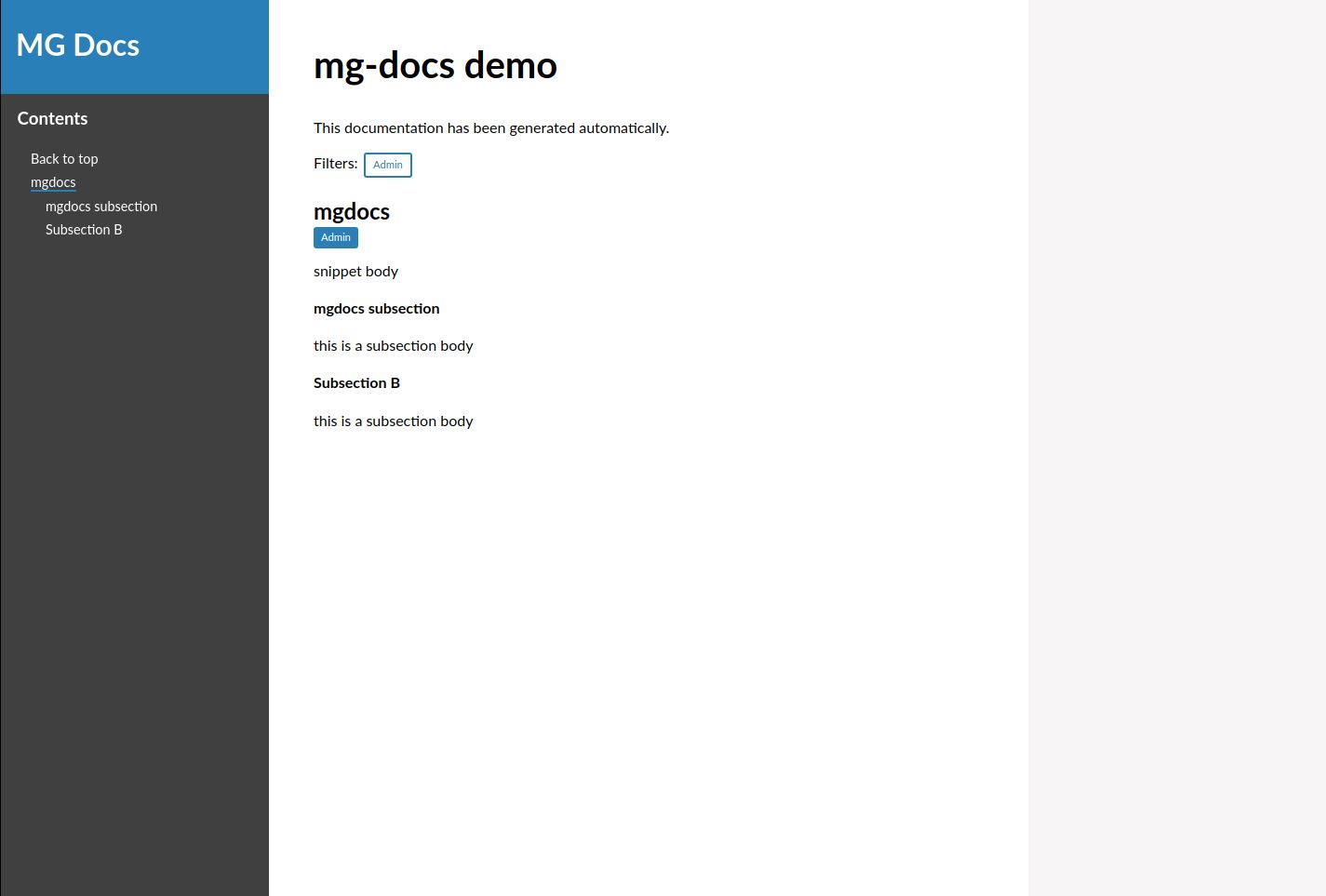
An example of a documentation snippet in an html file:
<mg-docs>
  <mg-tag>Admin</mg-tag>
  <mg-order>12</mg-order>
  <mg-id>124</mg-id>

  <mg-title>mgdocs</mg-title>
  <mg-body>
    snippet body

    <mg-section>
      <mg-sectiontitle>mgdocs subsection</mg-sectiontitle>
      <mg-sectionbody>
        this is a subsection body
      </mg-sectionbody>
    </mg-section>

    <mg-section>
      <mg-sectiontitle>Subsection B</mg-sectiontitle>
      <mg-sectionbody>
        this is a subsection body
      </mg-sectionbody>
    </mg-section>
  </mg-body>
</mg-docs>
will produce:
Tags
| Tag | required | description |
|---|---|---|
<mg-docs> |
true | This is the wrapper tag required to be picked up by the process |
<mg-title> |
false | defines the title for a <mg-docs> |
<mg-body> |
false | defines the body text for a <mg-docs> |
<mg-tag> |
false | defines tags for a <mg-docs> to be filtered upon on the page |
<mg-id> |
false | defines the id for a <mg-docs> for linking purposes |
<mg-order> |
false | defines an index for the <mg-docs>'s to be ordered against |
<mg-section> |
false | defines a section of text for a <mg-docs> |
<mg-sectiontitle> |
false | defines the title for a <mg-section> |
<mg-sectionbody> |
false | defines the body text for a <mg-section> |