mr-developer v1.4.0
mr-developer

mr-developer is an NodeJS utility that makes it easy to work with NPM projects containing lots of packages, of which you only want to develop some.
It allows to replace any given dependency with a checkout from its Git repository.
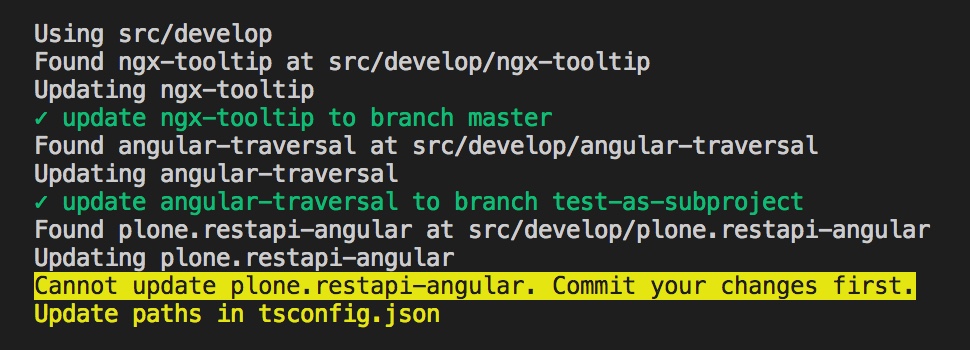
The paths to those local checkouts are added in tsconfig.json (or any file able to override node_modules packages by providing custom paths).
Dependencies are listed in a file named mr.developer.json:
  {
        "ngx-tooltip": {
            "url": "https://github.com/pleerock/ngx-tooltip.git"
        },
        "angular-traversal": {
            "url": "https://github.com/makinacorpus/angular-traversal",
            "branch": "test-as-subproject"
        },
        "plone.restapi-angular": {
            "path": "src/lib",
            "package": "@plone/restapi-angular",
            "url": "git@github.com:plone/plone.restapi-angular.git",
            "tag": "1.3.1"
        }
    }
By running the mrdevelop command, those repositories will be checked out in the ./src/develop folder and they will be added into the tsconfig.json file in the paths property, so the compiler will use them instead of the node_modules ones.
Note: it also sets the baseUrl value to "src".
Usage
$ mrdevelopwill fetch last changes from each repositories, and checkout the specified branch.
If a repository contains non committed changes or if the merge has conflicts, it will not be updated, and the user will have to update it manually.
$ mrdevelop --no-fetchwill just checkout the specified branches or tags without fetching the remote repositories.
$ mrdevelop --hardwill do a hard reset before updating, so local changes are overriden.
$ mrdevelop --last-tagwill get the last tag (according version sorting) for each epository and will update mr.developer.json accordingly.
$ mrdevelop --config=jsconfig.jsonallows to update a different file than tsconfig.json (might be useful in non-Angular context).
$ mrdevelop --no-configwill not write any config
$ mrdevelop --output=myfolderwill checkout the files in src/myfolder
Config file structure
The entry key is used to name the folder where we checkout the repository in ./src/develop.
Properties:
package: Optional. Name of the package that will be mention inpaths. If not provided, defauklt to entry key.path: Optional. Source path in the repository. Will be concatenated to the local repository path intsconfig.json.url: Mandatory. Git repository remote URL.branch: Optional. Branch name, default tomaster. Ignored iftagis defined.tag: Optional. Tag name.
Usage with React
Create a minimal jsconfig.json file in the project root (see https://code.visualstudio.com/docs/languages/jsconfig):
{
    "compilerOptions": {}
}
And run:
$ mrdevelop --config=jsconfig.jsonTo make sure the jsconfig.json paths defined by mr-developer are used in Webpack, change your webpack.config.js like this:
const pathsConfig = require('./jsconfig').compilerOptions.paths;
const alias = {};
Object.keys(pathsConfig).forEach(package => {
  alias[package] = pathsConfig[package][0];
});

...

resolve: {
    ...
    alias: alias
}
Credits
mr-developer is shamelessly inspired by the well-known mr.developer Python buildout extension.
7 years ago
7 years ago
7 years ago
8 years ago
8 years ago
8 years ago
8 years ago
8 years ago
8 years ago
8 years ago
8 years ago
8 years ago
8 years ago
8 years ago
8 years ago
8 years ago
8 years ago
8 years ago
8 years ago
8 years ago
8 years ago
8 years ago
8 years ago