nestor v2.2.2





Nestor
Nestor is a Jenkins CLI and node.js client.
This is handy for Jenkins users who prefer to touch type on the command line over GUI and mouse clicks on the browser. It also serves as an alternative to Jenkins Java CLI where Nestor has shorter commands and executes faster.
Installation
npm install -g nestorUsage
Trigger a build:
nestor build <job>Trigger a parameterised build:
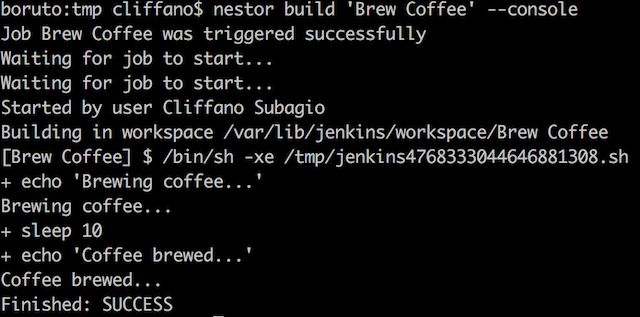
nestor build <job> ["param1=value1¶m2=value2"]Trigger a build followed by console output:
nestor build --console <job>Trigger a build, wait for 5 seconds, then display console output:
nestor build --pending 5000 --console <job>Trigger a parameterised build followed by console output:
nestor build <job> ["param1=value1¶m2=value2"] --consoleDisplay latest build console output:
nestor console <job>Display console output of a particular build number:
nestor console <job> [build_number]Stop currently running build:
nestor stop <job>View status of all jobs:
nestor dashboardView job status reports:
nestor job <job>Enable a job:
nestor enable <job>Disable a job:
nestor disable <job>Create a new job with a specified config.xml:
nestor create <job> <path/to/config.xml>Update an existing job with a specified config.xml:
nestor update <job> <path/to/config.xml>Copy an existing job1 to a new job2:
nestor copy <job1> <job2>Delete an existing job:
nestor delete <job>Fetch the config.xml of an existing job: (experimental)
nestor config <job>Create a new view with a specified config.xml: (experimental)
nestor create-view <view> <path/to/config.xml>Update an existing view with a specified config.xml: (experimental)
nestor update-view <view> <path/to/config.xml>Fetch the config.xml of an existing view: (experimental)
nestor fetch-view-config <view>View queued jobs:
nestor queueView executors' status (running builds):
nestor executorDiscover Jenkins instance running on a specified host:
nestor discover <host>View Jenkins version number:
nestor verView builds feed of all jobs:
nestor feedView builds feed of a job:
nestor --job <job> feedMonitor build status and notify Ninja Blocks RGB LED device:
export NINJABLOCKS_TOKEN=<token_from_https://a.ninja.is/hacking>
nestor ninja
Note: <job> in the examples is a part of your Jenkins job URL after the first job/.
For example, if you use nested folders on Jenkins and your URL is /job/myproject/job/releases/job/master,
then you should pass myproject/job/releases/job/master as <job>.
Programmatically:
var nestor = new (require('nestor'))(
'http://user:pass@host:port/path'
);
// trigger a standard build
nestor.buildJob('job', '', function (err, result) {
});
// trigger a parameterised build
nestor.buildJob('job', 'param1=value1¶m2=value2', function (err, result) {
});Check out lib/jenkins for other available methods.
NOTE: Starting from version 2.0.0, Nestor started using Swaggy Jenkins as an API client. You can still use Nestor programmatically, but it's much better and cleaner if you use Swaggy Jenkins instead.
Configuration
Jenkins URL
Set Jenkins URL in JENKINS_URL environment variable (defaults to http://localhost:8080):
(*nix)
export JENKINS_URL=http://user:pass@host:port/path(Windows)
set JENKINS_URL=http://user:pass@host:port/pathAs an alternative to password, you can use Jenkins API token instead. Jenkins API token can be found on Jenkins user configuration page.
If http_proxy or https_proxy environment variable is set, then Nestor will automatically use it.
If you want authentication details to be prompted interactively:
JENKINS_URL=http://host:port/path nestor --interactive build jobJenkins URL can also be specified as an arg:
nestor --url http://user:pass@host:port/path dashboardSSL client certificate authentication
Set JENKINS_CERT and JENKINS_KEY
(*nix)
export JENKINS_CERT=certificate.pem
export JENKINS_KEY=key.pem
(Windows)
set JENKINS_CERT=certificate.pem
set JENKINS_KEY=key.pem
When you have both key and certificate in one file, currently you have to set both ENV variables to the same file
(*nix)
export JENKINS_CERT=combined.pem
export JENKINS_KEY=combined.pem
(Windows)
set JENKINS_CERT=combined.pem
set JENKINS_KEY=combined.pem
It is possible to specify a custom CA. Just set the JENKINS_CA env variable
(*nix)
export JENKINS_CA=custom.ca.pem(Windows)
set JENKINS_CA=custom.ca.pemTranslation
To add a new language translation:
- Create a locale JSON file in conf/locales/ directory, with the locale's ISO 639-1 code as file name.
- Copy paste the content of the existing non-English locale file (anything other than en.json) and modify the translation values accordingly.
- Test by executing a command with LANG environment variable, e.g.
LANG=<code> nestor dashboard
Contribution
When opening an issue to report a bug, please provide the following information:
- node.js version:
node --version - npm version:
npm --version - Nestor version:
nestor --version - Jenkins version:
nestor ver
Thanks in advance for reporting an issue, opening a feature request, or even better, a pull request!
Colophon
Build reports:
- Code complexity report
- Unit tests report
- Test coverage report
- Integration tests report
- API Documentation
Articles:
- Nestor – A Faster And Simpler CLI For Jenkins
- Monitor Jenkins From The Terminal
- Using Node.js To Discover Jenkins On The Network
Videos:
- Jenkins World 2017: Bringing Jenkins Remote Access API To The Masses
- Evolution of nestor (Gource Vizualisation) by Landon Wilkins
Presentations:
Related Projects:
- nestor-buildlight - CLI for Jenkins build light notifier
- nestor-lifx - CLI for Jenkins LIFX notifier
- nestor-ninjablocks - CLI for Jenkins Ninja Blocks notifier
4 years ago
4 years ago
7 years ago
8 years ago
8 years ago
10 years ago
10 years ago
10 years ago
10 years ago
10 years ago
10 years ago
11 years ago
11 years ago
11 years ago
11 years ago
12 years ago
12 years ago
12 years ago
13 years ago
13 years ago
13 years ago
13 years ago
13 years ago
13 years ago
13 years ago
13 years ago
13 years ago
13 years ago
13 years ago
13 years ago
13 years ago
13 years ago
14 years ago
14 years ago
14 years ago
14 years ago
14 years ago
14 years ago
14 years ago
15 years ago