1.0.0 • Published 5 years ago
ng-direct-pay-ipg v1.0.0
DirectPay Ipg
Version 1.0.0
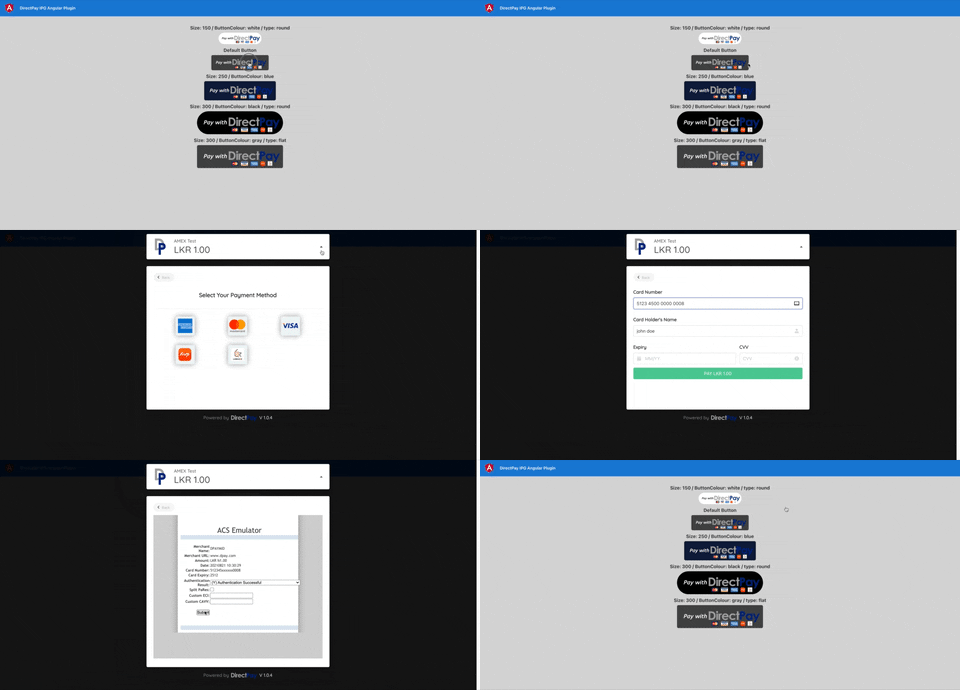
DirectPay Payment Gateway Plugin for Angular can payment using MasterCard, Visa, Amex, Frimi and LankaQr.
Installation
Install the npm package.
npm i ng-direct-pay-ipgImport in NgModule:
import {DirectPayIpgModule} from 'ng-direct-pay-ipg';

@NgModule({
  imports: [
    //set with default global config
    DirectPayIpgModule.forRoot({size: 200,colour: 'gray'})
  ]
})
Usage
app.component.html
  * you can set multiple button with different configurations *
  <!-- override global configuration -->
  <direct-pay-ipg [config]="{  size: 150, type: 'round',colour: 'white'}" [PaymentRequest]="paymentRequest" (onSuccess)="onSuccess($event)" (onError)="onError($event)"></direct-pay-ipg>
  <!-- default button with global configuration -->
  <direct-pay-ipg [PaymentRequest]="paymentRequest" (onSuccess)="onSuccess($event)" (onError)="onError($event)"></direct-pay-ipg>
app.component.ts
paymentRequest = {
    signature: this.signature,
    dataString: this.dataString,
    stage: 'DEV'
};

public onSuccess(param: any): void {
  console.log('client-onSuccess',param);
  alert(JSON.stringify(param))
}

public onError(param: any): void {
  console.log('client-onError',param);
  alert(JSON.stringify(param))
}
Properties
| Name | Type | Default value | Allow values | Description |
|---|---|---|---|---|
| size | number | 200 | any | Button size |
| type | string | flat | flat / round | Button border style |
| colour | string | gray | blue / white / black / gray | Button colour |
| PaymentRequest | Object | {signature: object, dataString: string, stage: string (allow only: 'DEV' or 'PROD')} | Generated payment requested included payment details |
Events
| Event | Description | ReturnType |
|---|---|---|
| onSuccess | The event is called after transaction success or failed | JSON |
| onError | The event is called when receive error transaction initiate or transactions processing | JSON |
Buttons

This library was generated with Angular CLI version 12.0.5.
1.0.0
5 years ago