ng-formio-grid v1.4.2
Form.io Angular UI-Grid component
This library allows Form.io submission data to be rendered within a Angular UI Grid. This introduces a new directive that produces a Grid view of the submission data provided the Form within Form.io
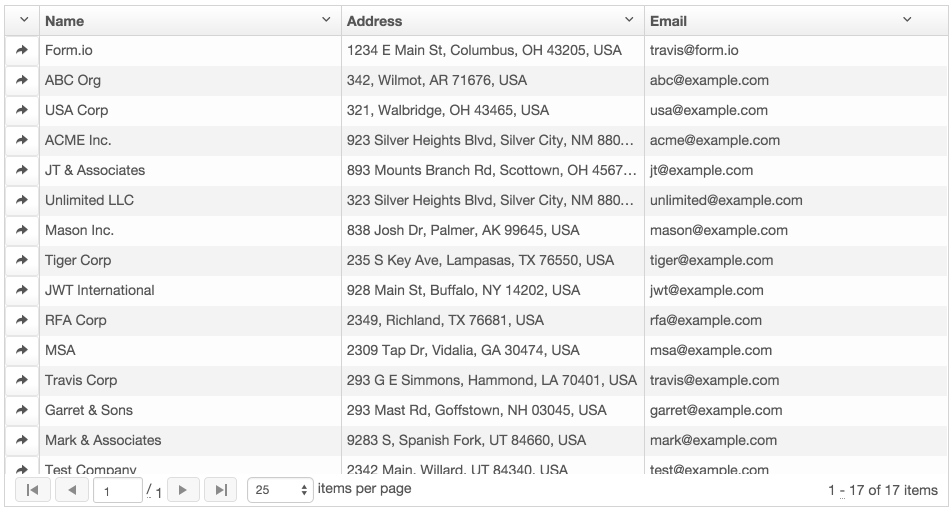
<formio-grid src="'https://myapp.form.io/myform'"></formio-grid>This will render the Form.io Submissions like so.
Installation
You can install this library by typing the following command in your application.
bower install ng-formio-grid --saveOnce you have this installed, you can add this library to your application with the following <script> tag.
<link rel="stylesheet" href="https://cdn.rawgit.com/formio/ngFormioGrid/master/dist/ng-formio-grid-full.min.css" />
<script src="https://cdn.rawgit.com/formio/ngFormioGrid/master/dist/ng-formio-grid-full.min.js"></script>
You will now need to add this module within your Angular.js application declaration like so...
app.js
angular.module('yourApp', [
  'ngFormioGrid'
])
Usage
Now that you have the library installed, you can then do the following to add a form to your application.
- Create an account on https://form.io
- Create a new project.
- Create a Form within your project.
- Add some submissions to this form.
You can then embed the data grid within your application using the following snippit of code.
<formio-grid src="'https://myapp.form.io/myform'"></formio-grid>
Full Documentation
To view detailed documentation, go to https://github.com/formio/ngFormioGrid/wiki
Enjoy!
The Form.io Team!
8 years ago
8 years ago
8 years ago
8 years ago
8 years ago
9 years ago
9 years ago
9 years ago
9 years ago
9 years ago
9 years ago
9 years ago
9 years ago
9 years ago
9 years ago
10 years ago
10 years ago
10 years ago
10 years ago
10 years ago
10 years ago
10 years ago
10 years ago
10 years ago
10 years ago
10 years ago
10 years ago
10 years ago
10 years ago
10 years ago
10 years ago
10 years ago
10 years ago