
Console color
Simple script for colorize nodejs console messages.
Install
npm i node-con-colorUsage
It's simple to use this function. Put in the brackets your text and specify style as index with grid simbol before.
'#index{user text here}'Here index means a number of styles object in config array. You can specify your own config or use default. If you want to use only first style in config, then type grid symbol without a number.
'#{apply first style}'Default styles
| index | color | style | background |
|---|---|---|---|
| 0 | white | bold | - |
| 1 | white | italic | - |
| 2 | red | normal | - |
| 3 | red | bold | - |
| 4 | red | italic | - |
| 5 | green | normal | - |
| 6 | green | bold | - |
| 7 | green | italic | - |
| 8 | blue | normal | - |
| 9 | blue | bold | - |
| 10 | blue | italic | - |
| 11 | yellow | normal | - |
| 12 | yellow | bold | - |
| 13 | yellow | italic* | - |
If you want other background or combine several styles, for example 'bold' with 'italic', then use your custom styles, where define styles as array.
Available styles
colors: black, red, green, yellow, blue, magenta, cyan, white, grey styles: normal, bold, italic, underline, inversed, hidden backgrounds: none, black, red, green, yellow, blue, magenta, cyan, white
Example
const { log } = require('node-con-color');

/* default styles */
log('#{this} #1{is} #4{my} #6{colorful} #12{message}!');

/* user styles */
const styles = [
    {
        color: 'cyan',
        style: ['bold', 'italic', 'underline']
    },
    {
        color: 'red',
        style: 'bold',
        back: 'magenta'
    }
];

log('this is my #0{colorful} #1{message}!', styles);
You cant also colorize error output using ColoredError:
const { ColoredError } = require('node-con-color');

throw new ColoredError('#{This is} #12{colored} #3{error}');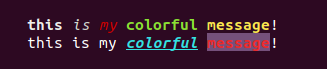
Thanks for using.
Developed by Ustinov Maxim - ewclide