rawan-bee-bot v1.2.8
rawan-bee-bot
A flexible, AI-powered chatbot UI component for React, supporting multiple AI providers (OpenAI, Mistral, self-hosted LLMs).
📌 Features
- ✅ Prebuilt Chat UI – Easily embed a chatbot into any React project.
- ✅ Multi-AI Support – Supports OpenAI, Mistral (self-hosted via Ollama).
- ✅ Theming & Customization – Modify UI colors, fonts, and styles.
- ✅ Message Storage – Supports local storage & API-based message saving.
- ✅ Responsive & Mobile-Friendly – Works across all screen sizes.
🚀 Installation
npm install rawan-bee-botor
yarn add rawan-bee-bot🔧 Usage
Import and integrate the chatbot inside your React project:
import React from "react";
import ChatbotUI from "rawan-bee-bot";

const App = () => {
  const saveMessageToDatabase = async (message) => {
    await fetch("https://your-api.com/save-message", {
      method: "POST",
      headers: { "Content-Type": "application/json" },
      body: JSON.stringify(message),
    });
  };

  return (
    <ChatbotUI
      aiProvider="selfhosted" // Use "openai" for OpenAI API
      apiKey="YOUR_OPENAI_API_KEY" // Required only for OpenAI
      backendUrl="http://localhost:11434/api/generate" // Required only for Mistral (Ollama)
      theme={{
        chatButtonBg: "#B20710",
        chatButtonTextColor: "#ffffff",
        headerBg: "#131834",
        headerTextColor: "#ffffff",
        closeButtonColor: "#ffffff",
        userMessageBg: "#B20710",
        userMessageText: "#ffffff",
        botMessageBg: "#43465e",
        botMessageText: "#ffffff",
        inputContainerBg: "#131834",
        inputFieldBg: "#43465e",
        inputFieldText: "#ffffff",
        sendButtonBg: "#B20710",
        sendButtonTextColor: "#fff",
        typingIndicatorColor: "#fff",
      }}
      onSaveMessage={saveMessageToDatabase}
    />
  );
};

export default App;
🌍 AI Providers
This chatbot supports multiple AI backends. Choose one of the following:
🔹 OpenAI API
- Set
aiProvider="openai"and provide an API key.
<ChatbotUI
  aiProvider="openai"
  apiKey="YOUR_OPENAI_API_KEY"
/>
🔹 Mistral (Self-hosted via Ollama)
- Requires Ollama installed locally.
- Runs a Mistral model on
http://localhost:11434/api/generate.
<ChatbotUI
  aiProvider="selfhosted"
  backendUrl="http://localhost:11434/api/generate"
/>
🎨 Customization
You can fully customize the chatbot UI with the theme prop:
| Property | Description | Default |
|---|---|---|
chatButtonBg | Chat button background color | #0084ff |
chatButtonTextColor | Chat button text color | #fff |
headerBg | Header background color | #0084ff |
headerTextColor | Header text color | #fff |
closeButtonColor | Close button color | #fff |
userMessageBg | User message background | #0084ff |
userMessageText | User message text color | #fff |
botMessageBg | Bot message background | #e4e6eb |
botMessageText | Bot message text color | #000 |
inputContainerBg | Input container background | #f1f1f1 |
inputFieldBg | Input field background | #fff |
inputFieldText | Input field text color | #000 |
sendButtonBg | Send button background | #0084ff |
sendButtonTextColor | Send button text color | #fff |
typingIndicatorColor | Typing indicator color | #666 |
💾 Saving Messages
You can store chat messages locally or send them to a database.
1⃣ Local Storage (Default)
The chatbot automatically saves messages in the browser's localStorage.
2⃣ Save to Database
Pass a function to onSaveMessage to send messages to an API:
const saveMessageToDatabase = async (message) => {
  await fetch("https://your-api.com/save-message", {
    method: "POST",
    headers: { "Content-Type": "application/json" },
    body: JSON.stringify(message),
  });
};

<ChatbotUI onSaveMessage={saveMessageToDatabase} />;
💻 Development
1️⃣ Clone the Repository
git clone https://github.com/RawanBee/rawan-bee-bot.git
cd rawan-bee-bot
npm install
2️⃣ Build the Project
npm run build4️⃣ Publish to NPM
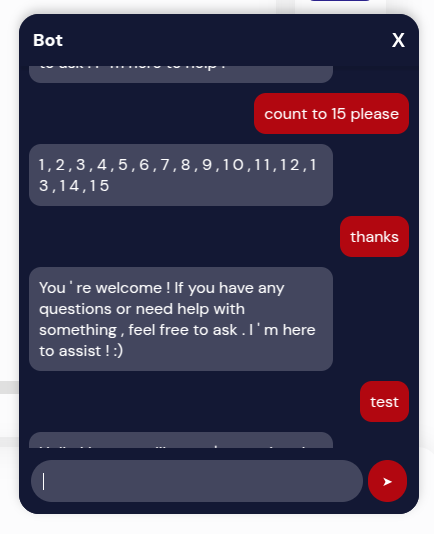
npm publishScreenshot
Here is a preview of the chatbot UI:
📝 License
This project is licensed under the MIT License. Feel free to use and modify it.
📞 Support
For questions and issues, open an issue on GitHub.
🚀 Happy Coding! 🎉
1 year ago
1 year ago
1 year ago
1 year ago
1 year ago
1 year ago
1 year ago
1 year ago
1 year ago
1 year ago
1 year ago
1 year ago
1 year ago
1 year ago
1 year ago
1 year ago
1 year ago
1 year ago
1 year ago
1 year ago
1 year ago
1 year ago
1 year ago
1 year ago
1 year ago
1 year ago
1 year ago