3.3.8 • Published 4 years ago
react-hook-notification v3.3.8
React Hook Notification
Add notifications in your React app. Types: success, error, warning, info or default
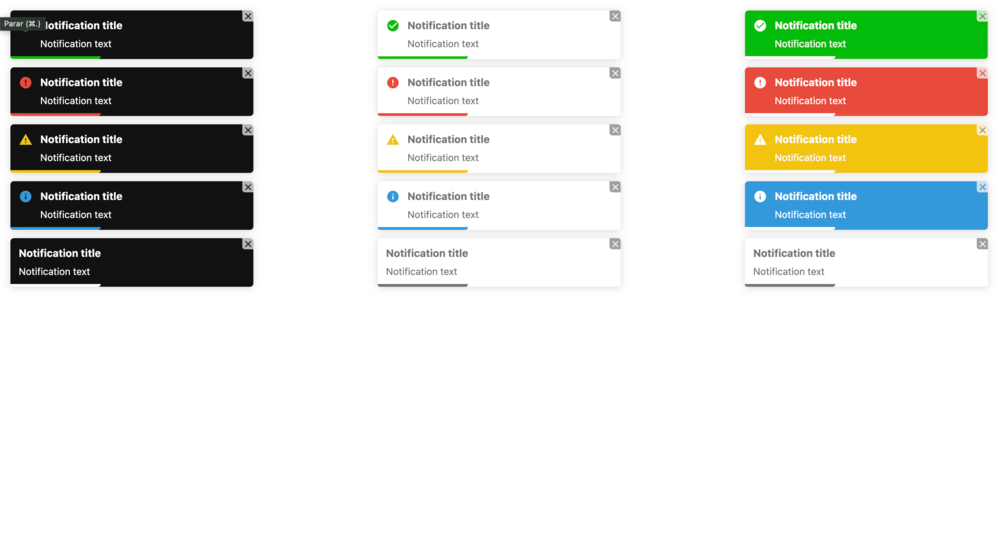
Storybook demo
https://reverent-lalande-5e2160.netlify.app
Install
npm install react-hook-notificationor
yarn add react-hook-notificationUsage
import React from 'react';
import { useNotification } from 'react-hook-notification';

export default function Component() {
  const notification = useNotification();

  return (
    <button
      type="button"
      onClick={() =>
        notification.success({
          text: 'Notification test',
        })
      }
    >
      Dispatch
    </button>
  );
}
Props
| Property | Type | Required | Default | Description |
|---|---|---|---|---|
| text | string | yes | Notification text | |
| title | string | no | Notification title | |
| position | top-right | top-center | top-left | bottom-right | bottom-center | bottom-left | no | top-right | Notification position |
| theme | colored | light | dark | no | colored | Notification theme |
| transition | bounce | flip | fade | slide | zoom | no | bounce | Notification transition |
| delay | number | no | 5000 | Notification delay in milliseconds |
| showProgressBar | boolean | no | true | Show or hide progress bar |
| showButtonClose | boolean | no | true | Show or hide close button |
| closeOnClick | boolean | no | true | Close on click |
| showIcon | boolean | no | true | Show or hide icon |
| autoClose | boolean | no | true | Close notification after delay ends |
| pauseOnHover | boolean | no | true | Auto close pause on hover |
| draggable | boolean | no | true | Enable or disable drag |
| titleMaxLines | number | no | 1 | Maximum number of lines for title |
| textMaxLines | number | no | 2 | Maximum number of lines for text |
LICENSE

Developed by: André Coelho
3.3.8
4 years ago
3.3.7
4 years ago
3.3.6
4 years ago
3.3.5
4 years ago
3.3.4
4 years ago
3.3.3
4 years ago
3.3.2
4 years ago
3.0.9
4 years ago
3.3.1
4 years ago
3.1.3
4 years ago
3.0.12
4 years ago
3.3.0
4 years ago
3.1.2
4 years ago
3.2.0
4 years ago
3.1.1
4 years ago
3.0.10
4 years ago
3.1.0
4 years ago
3.0.11
4 years ago
3.0.8
4 years ago
3.1.6
4 years ago
3.1.5
4 years ago
3.1.4
4 years ago
3.0.7
4 years ago
3.0.5
4 years ago
3.0.4
4 years ago
3.0.3
4 years ago
3.0.0
4 years ago
2.1.0
4 years ago
2.0.9
4 years ago
2.0.6
4 years ago
2.0.5
4 years ago
2.0.4
4 years ago
2.0.3
4 years ago
2.0.2
4 years ago
2.0.1
4 years ago
2.0.0
4 years ago
1.0.7
4 years ago
1.0.6
4 years ago
1.0.5
4 years ago
1.0.4
4 years ago
1.0.3
4 years ago
1.0.2
4 years ago
1.0.1
4 years ago
1.0.0
4 years ago
0.1.2
4 years ago
0.1.1
4 years ago
0.1.0
4 years ago