
Licence
MIT
Version
3.0.1
Deps
2
Size
20 kB
Vulns
0
Weekly
0
react-html-layout
Basic react page layout.

Usage
Installation:
npm install react-html-layoutMake sure you have next styles
Some browsers have default styles for html or body tags. We should be sure that below tags have:
html,
body {
  margin: 0;
  padding: 0;
}
Glossary
Layout
import { Layout } from 'react-html-layout';
...
<Layout
    header="Header"
    footer="Footer"
    leftSidebar="Left Sidebar"
    rightSidebar="Right Sidebar">
    Content
</Layout>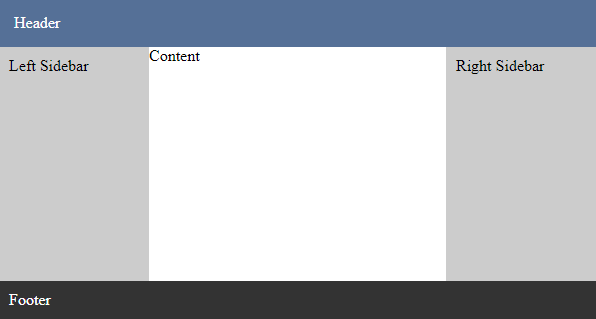
header,footer,leftSidebar,rightSidebarcontains default styles if content hasstringtype.- Layout occupies whole visible page space, that's because it's height is
100vh. - To make
headerfixed, setfixedHeadertotrue. - To make
footerfixed, setfixedFootertotrue. - To make
leftSidebarand/orrightSidebarfixed, setfixedSidebartotrue.
Options
| Name | type | Description |
|---|---|---|
className |
string |
Root class name |
style |
CSSProperties |
Root style |
header |
ReactNode |
Header content. |
fixedHeader |
boolean |
Toggles header to be fixed |
footer |
ReactNode |
Footer content. |
fixedFooter |
boolean |
Toggles footer to be fixed |
leftSidebar |
ReactNode |
Left Sidebar content |
leftSidebarStyle |
CSSProperties |
Left Sidebar style |
rightSidebar |
ReactNode |
Right Sidebar content |
rightSidebarStyle |
CSSProperties |
Right Sidebar style |
fixedSidebar |
boolean |
Toggles leftSidebar or/and rightSidebar to be fixed |
content, children |
ReactNode |
Content of the page |
ContentWrapper
Centralized content with fixed width
import { ContentWrapper } from 'react-html-layout';
...
<ContentWrapper width={300}>
    Content example. Content example. Content example.
</ContentWrapper>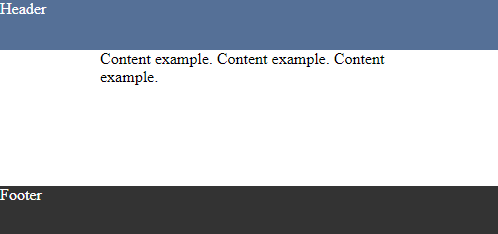
Options
| Name | type | Description |
|---|---|---|
width |
number |
Width of the content |
children |
ReactNode |
Content |