16.3.0 • Published 8 years ago
react-list-scroll-bound v16.3.0
react-list-scroll-bound
prevent body scrolling on list bottom or top end. Brings a better control for user and increase use experience.
example
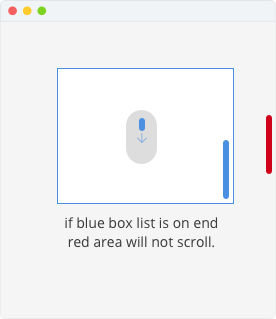
supports react 15.x and 16.x


install
> npm install react-list-scroll-bound --savehow to use
<ListScrollBound className="my-list">
    {this.getListPoints()}
</ListScrollBound>
set html tag
default tagName is <ul>
<ListScrollBound tagName="div" className="my-list">
    {this.getListPoints()}
</ListScrollBound>
get events
let onWheel = function (event) {
    console.log(event)
}

let onClick = function (event) {
    console.log(event)
}

<ListScrollBound onWheel={onWheel} onClick={onClick} className="my-list">
    {this.getListPoints()}
</ListScrollBound>
set more propTypes
all given properties will set on the given ListScrollBound element, with
{...this.props}
so you can set all what you want and need
<ListScrollBound tagName="div" className="my-list" onChange onClick>
    {this.getListPoints()}
</ListScrollBound>
Development
if you want to add or optimize this component, feel free <3
clone this repository and run install
npm installand after changes compile es6 to es5
npm run compileGive me a coffee

16.3.0
8 years ago
16.0.1
9 years ago
16.0.0
9 years ago
15.5.4
9 years ago
15.0.6
10 years ago
15.0.5
10 years ago
15.0.4
10 years ago
15.0.3
10 years ago
15.0.2
10 years ago
0.14.11
10 years ago
0.14.10
10 years ago
0.14.9
10 years ago
0.14.8
10 years ago
0.14.7
10 years ago
0.14.6
10 years ago
0.14.5
10 years ago
0.14.4
10 years ago
0.14.3
10 years ago
0.14.2
10 years ago
0.14.1
10 years ago