1.1.0 • Published 9 years ago
react-native-simple-login v1.1.0
react-native-simple-login
Login component for react-native





Install
npm install --save react-native-simple-loginUsage
import Login from 'react-native-simple-login'

...

const onLogin = (email, password) => {
  console.log(email, password) // user credentials
}

const onResetPassword = (email) => {
  console.log(email)
}

<Login
  onLogin={onLogin}
  onResetPassword={onResetPassword}
/>
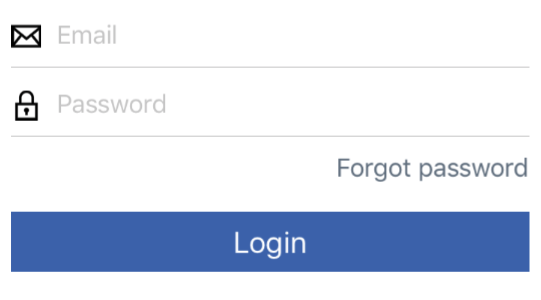
Will output:
| Available Properties | Description |
|---|---|
| onLogin | (required) Function to call when the user tries to login |
| onResetPassword | Function to call when the user tries to reset password |
| labels | An object with the labels to use on the component, if a label is missing, the default will be used. Available labels are: rememberMe, userIdentification, password, forgotPassword, loginFormButton, forgotPasswordFormButton, back. Example: { userIdentification: 'Email' } |
| logoImage | The image to be used as the logo. Will appear at the top of the login and reset password forms |
| passwordInputIcon | The image to be used as the password input icon |
| resetPasswordHeaderRenderer | If present, function that will be used to get the output of the reset password form header. Receive a param with the function to call to go back to login. |
| showLogoOnLogin | If true, will show the logo image on the login form. Defaults to true. |
| showLogoOnResetPassword | If true, will show the logo image on the reset password form. Defaults to true. |
| userIdentificationInputIcon | The image to be used as the user identification input icon |
| inputPlaceholderTextColor | Color to use for the input placeholders |
| backButtonStyle | Reset password back button style |
| backButtonTextStyle | Reset password back button text style |
| baseButtonStyle | Base style for the submit buttons |
| baseButtonTextStyle | Base style for the submit buttons text |
| loginResetPasswordLinkStyle | Reset password link style |
| loginResetPasswordLinkTextStyle | Reset password link text style |
| fieldsetWrapperStyle | Form fieldset style |
| inputIconStyle | Input icon style |
| inputWrapperStyle | Input wrapper style |
| inputStyle | Input style |
| loginFormSubmitButtonStyle | Login form submit button style |
| loginFormSubmitButtonTextStyle | Login form submit button text style |
| loginFormWrapperStyle | Login form wrapper style |
| logoStyle | Logo style |
| resetPasswordFormWrapperStyle | Reset password form wrapper style |
| resetPasswordFormSubmitButtonTextStyle | Reset password form submit button text style |
| resetPasswordFormSubmitButtonStyle | Reset password form submit button style |
Contributing
- Fork this repository
- Create a branch based on master about what you are doing
- Names should be separated by hyphen: example-name
- Commit using the format: [\<type>] \<message>
- The type should be: Feat, Fix, Refactor or Docs
- Example message: [Docs] Added contributing to readme
- Do not forget to add tests!
- Run all tests
npm testand linternpm run lint - Create a pull request describing the changes you made