resize-start-stop v1.1.4
resizestart & resizestop events



Debounced resize events: know when a user started or stopped resizing the window.
Why would I need this?
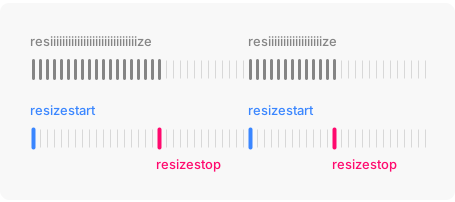
The window's resize event is triggered continously and often. That's bad news
for performance. In most cases, what we really want to know is when the user has started or stopped resizing the window.
What does it do?
This package will trigger debounced resize events on the window. Simply replace
your old resize event listeners with more performant resizestart and
resizestop listeners.
Installation
npm install resize-start-stopUsage
Import and call bindResizeEvents() to install debounced resizestart and
resizestop events on the window.
import { bindResizeEvents } from 'resize-start-stop'

bindResizeEvents()

window.addEventListener('resizestart', () => { console.log('Resizing') })
window.addEventListener('resizestop', () => { console.log('Resized') })
Toggle class name during resize
The package includes a helper for the most common use case: toggling a class
name on the html element during resize. Great for disabling transitions
and animations while crossing breakpoint boundaries.
import { toggleClassDuringResize } from 'resize-start-stop'

toggleClassDuringResize()
html.is-resizing * {
transition: none !important;
}All options and their defaults:
toggleClassDuringResize({
  className: 'is-resizing',
  element: document.documentElement,
  wait: 200
})
Cleaning up
If you don't need the installed events anymore, import and call
unbindResizeEvents().
import { bindResizeEvents, unbindResizeEvents } from 'resize-start-stop'

// Bind events
bindResizeEvents()

// Unbind at later stage
unbindResizeEvents()
In the browser
If you don't have the luxury of using a bundler, you can also simply include the script tag and call it a day.
<script src="https://unpkg.com/resize-start-stop"></script>
<script>
  resizeStartStop.bindResizeEvents()
</script>