1.0.5 • Published 5 years ago
rnlog v1.0.5
motivation
rnlog was motivated to facilitate logging via terminal without going into debug mode for two reasons
- the debug mode is heavier and more costly for the machine, joining with the debug tools, it gets even heavier
- when we're using a physical device, debugging is easier or when we're using a release (that's why I use emotions)
Install
npm install rnlogor
yarn add rnlog1. Usage
import log from 'rnlog'

...

log.info('test log info')

log.success('test log success')

log.warning('test log warning')

log.error('test log error')

log.json({
  name: "ayrton",
  lastname: "lacerda"
})
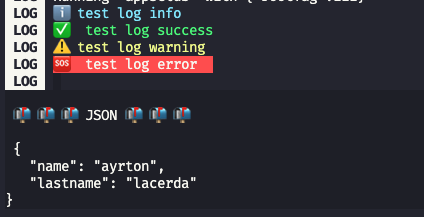
and the result would be this on the console
1.1 Conditional
if you want the log to only appear in a specific scenario, the second parameter is a boolean conditional (not required), thus avoiding a series of IFs
import log from 'rnlog'

...
const anyvar = 'yes'

log.info('test log info compare no', anyvar === 'no')

log.info('test log info compare yes', anyvar === 'yes')
1.2 backgroundcolor json
for json logs it is possible to change the background color to suit different terminals
import log from 'rnlog'

...

log.json({
  name: "ayrton",
  lastname: "lacerda"
}, 'blue')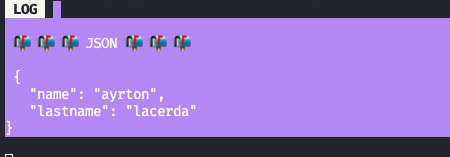
| key color |
|---|
| black |
| red |
| green |
| yellow |
| blue |
| magenta |
| cyan |
| white |
| crimson |
1.3 global mode
to configure the global mod just call log.config() in App.js and then you will have access to any log via the console.
import log from 'rnlog'

...

log.config()
so
// import log from 'rnlog' - you don't need it anymore

...

console.info('test log info')

console.success('test log success')

console.warning('test log warning')

console.error('test log error')

console.json({
  name: "ayrton",
  lastname: "lacerda"
})
⚠️ warning
I believe the best setting to avoid problems in production is
import log from 'rnlog'

...
if (__DEV__) {
  log.config()
}
but if it's to debug in release it won't work, just don't forget to put it again