sense-navigation v1.0.0-beta-03
sense-navigation
Sense Sheet Navigation + Actions visualization extension for Qlik Sense.
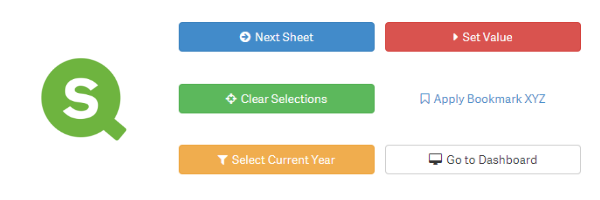
Table of Contents
- Purpose and Description
- Screenshots
- Installation & Download
- Configuration
- Compatibility
- Room for improvement / contribution
- Contributing
- Related projects
- Authors & Contributors
- License
- Change log
(TOC generated by verb using markdown-toc)
Purpose and Description
The Visualization Extension sense-navigation for Qlik Sense allows you to add a button to a Qlik Sense sheet to navigate in your app:
- Go to first sheet
- Go to next sheet
- Go to previous sheet
- Go to last sheet
- Go to a sheet
- Go to a sheet (defined by sheet Id)
- Go to a story
- Open a website / eMail
- Switch to the Edit mode
The button can be easily styled nicely by selecting some of the predefined designs.
Furthermore sense-navigation offers the option to define actions which will be executed before the navigation happens. This could for example be:
- Apply a bookmark
- Clear selections
- Lock selections
- Unlock selections
- Select value(s) in a field
- Select alternatives
- Select possible values in a field
- Set a variable value
See here for a complete list of all available 20 actions.
Note: The main difference between version 0.x and 1.x of sense-navigation is that with v1.x you can define more than two actions.
Screenshots
Button styles
There are several predefined styles available, you can choose from:

Buttons can also be styled based on a custom expression or custom CSS:


Button icons
Every button can also include an icon:

sense-navigation uses Fontawesome icons, therefore you can select from a collection of 675 icons.
Installation & Download
Fresh Installation
- Do not download the entire Github repository, this will not work!
- Download the latest version or any other version you want to install.
- Then install on either Qlik Sense Desktop or Qlik Sense Server:
- Qlik Sense Desktop
* To install, unzip all files and copy the content to the folder folder
"C:\Users\%USERNAME%\Documents\Qlik\Sense\Extensions\sense-navigation" - Qlik Sense Server * See instructions how to import an extension on Qlik Sense Server
You are already using an sense-navigation version 0.x?
- I have unfortunately bad news: Version 0.x of sense-navigation does not seamlessly upgrade to version v1.x of sense-navigation!
- If you upgrade to v1.x, you will have to
- First install new new version of sense-navigation.
- Delete existing old instances of sense-navigation.
- Add it again to your sheets and apply the previous configurations.
Configuration
Drag & drop the object onto a sheet (as you would do it with any other native object or visualization extension). Then define how the sense-navigation should behave:
Compatibility
sense-navigation is designed to work with Qlik Sense September 2017 or higher. If you want to use sense-navigation in older versions, install an older version than v1.0.
sense-navigation & Mashups
sense-navigation it built to be used within the Qlik Sense Client. Any usage in a mashup-based solution might work, but there are many features in sense-navigation which can never work in a mashup-based solution (e.g. "Go to next sheet", "Go to edit mode", etc.). So use sense-navigation in a mashup-based solution only at your own risk!
Room for improvement / contribution
- Allow to add additional styles for the button (very similar to sense-themable-kpi-tile)
- Allow templates for buttons (see here)
- Additional actions, e.g. Reload the app Opening another app and pass the current selections to the app (similar to "document chaining in QlikView")
- Allow icons instead of images (see here)
- Select fields instead of defining fields in the expression editor (see here)
Is there anything else you'd like to see in this visualization extension?
- Don't hesitate to add the feature and create a pull request!
- You don't have the time or skills to implement this specific feature? No problem, drop a note here.
Contributing
Pull requests and stars are always welcome. For bugs and feature requests, please create an issue. The process for contributing is outlined below:
- Create a fork of the project
- Work on whatever bug or feature you wish
- Create a pull request (PR)
I cannot guarantee that I will merge all PRs but I will evaluate them all.
Building the project
See https://github.com/stefanwalther/sense-extension-contrib
Related projects
Some related projects (Qlik Sense Visualization Extensions) I have recently created:
- qliksense-extension-tutorial: Comprehensive tutorial to start developing Qlik Sense Extensions. | homepage
- sense-calendar-heatmap: Qlik Sense Visualization Extension with a diverging color scale. The values are displayed as colored… more | homepage
- sense-extension-recipes: Recipes on working with Qlik Sense Visualization Extensions. | homepage
- sense-funnel-chart: Funnel Chart for Qlik Sense. | homepage
- sense-media-box: Include web pages, videos, images and much more into your Qlik Sense app. | homepage
- sense-on-off-switch: Set a variable in Qlik Sense to true/false using an on-off switch. | homepage
- sense-qr-code: QR Code to be embedded into Qlik Sense. | homepage
- sense-range-slider: Slider object for Qlik Sense to manipulate one or two variables. | homepage
- sense-themable-kpi-tile: KPI Tile for Qlik Sense with the ability to use themes or to customize background… more | homepage
Authors & Contributors
Stefan Walther
- qliksite.io - Qlik Sense / QAP related blog
- qlikblog.at - QlikView related blog
- stefanwalther.io - Private blog
- twitter/waltherstefan
- github.com/stefanwalther
Contributors
License
MIT
Change log
See CHANGELOG.yml
This file was generated by verb-generate-readme, v0.6.0, on January 24, 2018.
8 years ago
8 years ago
8 years ago
8 years ago
8 years ago
8 years ago
10 years ago
10 years ago
10 years ago
10 years ago
10 years ago
10 years ago
10 years ago
10 years ago
11 years ago
11 years ago