shipit-now v1.0.1
forked from https://github.com/sapegin/shipit
shipit :shipit:
Minimalistic SSH deployment.
Installation
$ pathtoshipit=/usr/local/bin/shipit; curl -o $pathtoshipit https://raw.githubusercontent.com/kurdin/shipit/master/bin/shipit; chmod +x $pathtoshipit; unset pathtoshipitYou can use this command to update shipit too.
Use sudo or replace /usr/local/bin/shipit to path somewhere inside your home directory.
Usage
shipit [command|option]Options
| Option | Description |
|---|---|
| -V, --version | Print program version |
| -h, --help | Print help (this screen) |
Commands
| Command | Description |
|---|---|
<target> | Executes target target on remote host (run shipit to execute 'deploy' target) |
| list | Print list of available targets |
| console | Open an SSH session on remote host |
exec <cmd> | Execute cmd on remote host |
copy <file> | Copies files to remote host |
Command aliases
| Command | Aliases |
|---|---|
| list | ls |
| console | shell, ssh |
| exec | run |
| copy | cp |
Examples
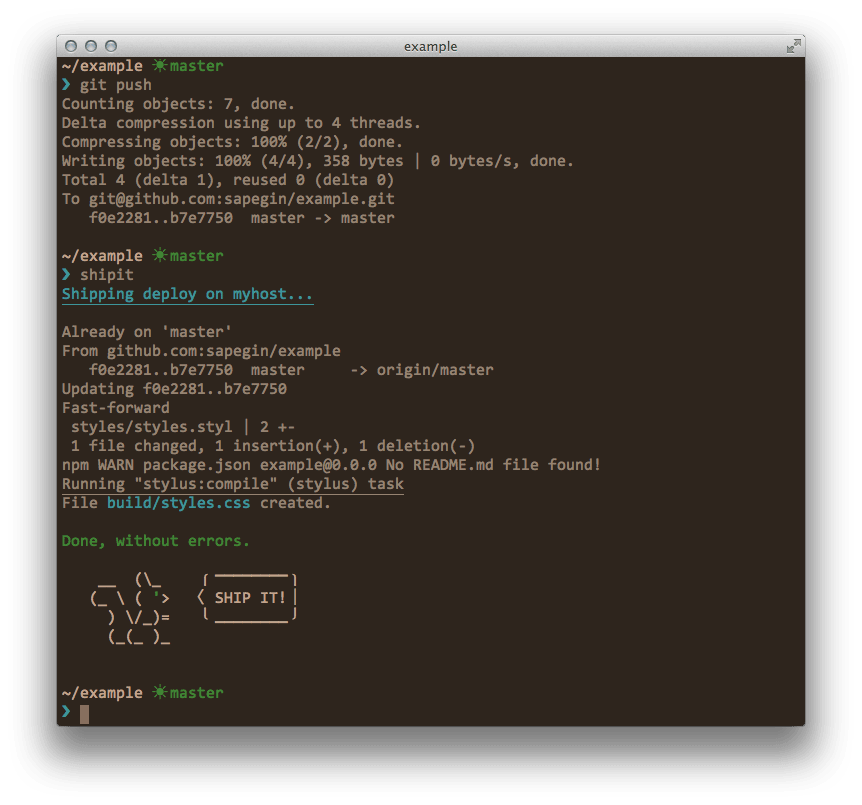
$ shipitWill execute deploy target.
$ shipit statusWill execute status target.
$ shipit listWill show a list of available targets.
$ shipit exec uptimeWill execute uptime command on remote host.
Configuration
You need to create .shipit file in your project’s directory.
Here is a typical config:
host='myhost'
path='sites/example.com'

[deploy:local]
git push origin master

[deploy]
git checkout master
git pull
npm install
grunt build

[status]
uptime
The only required things is host and path parameters and [deploy] or [deploy:local] target.
For non-standard port number, and to specify which SSH key to use, edit your SSH config at ~/.ssh/config:
host example.com
IdentityFile ~/.ssh/keyfile
port 10022
user usernamehere
Parameters
host
It’s the same host you use in ssh command. It could be string of format <username>@<ip>:<port> or just a name of ~/.ssh/config record.
path
Project path on remote host. shipit will cd to this directory before executing any command.
Targets
Target is just a bunch of shell command that will be executed on remote host via SSH. You can define as many targets as you want.
Note that you can’t use blank lines inside targets but you can use comments (#) and other things—it’s just a shell script.
Local targets
If you append :local to a target name (like [name:local]) it will be executed on your local machine before remote target with the same name. You can define only local, only remote or both targets.
In case of any errors in local target remote target won’t be executed.
You can use these variables:
$SSH_HOST— your config’shostvalue,$SSH_PATH— your config’spathvalue.
Examples
Deploy from Git
host='myhost'
path='sites/example.com'

[deploy:local]
git push origin master

[deploy]
git checkout master
git pull
npm install
npm prune
npm run build
Deploy with rsync
host='myhost'
path='sites/example.com'

[deploy:local]
npm test
npm run build
rsync --archive --compress --force --delete public/ $SSH_HOST:$SSH_PATH
Changelog
The changelog can be found on the Releases page.
License
The MIT License, see the included License.md file.