
Sigma Subscriptions
Toolset for managing subscriptions on Ergo built with Fleet SDK
Built during ErgoHack VI
Installation
npm install sigma-subscriptionsUsage
Setup
  import { SigmaSubscriptions } from 'sigma-subscriptions';
  let manager = new SigmaSubscriptions(Network.Mainnet);
Set desired API url
let manager = new SigmaSubscriptions(Network.Mainnet, "https://api.ergoplatform.com/api/v1/");Create Service Configuration
const tx = await manager.createServiceConfig(ergo, name, description, fee, length);Edit Exisiting Service Configuration
  const serviceConfigNFT = "a03c1503ab91a256ee9d256bd8cb3866c2803c2cca1450c33ced5f142d7b4cd7";
  const tx = await manager.editServiceConfig(ergo, serviceConfigNFT, name, description, fee, length);
Create Service
const tx = await manager.createService(ergo, serviceConfigNFT);Set max number of subscriptions
const tx = await manager.createService(ergo, serviceConfigNFT, "100");Subscribe
  const serviceTokenId = "0c5b3144f8db88ce0fd78c0a7fd5f5681f4bc26382c6c4c0a964d99c14fb78c3";
  const tx = await manager.subscribe(ergo, serviceTokenId);
Renew
const tx = await manager.renew(ergo, serviceTokenId);Cancel
const tx = await manager.cancel(ergo, serviceTokenId);Collect
  const subscriberBoxId = "2128567ba692bac62bce7c0d631e09862dbbb78e6cf5ee02154ecdf12e7b521e";
  const tx = await manager.collect(ergo, subscriberBoxId);
Authenticate Subscription
  const serviceTokenId = "0c5b3144f8db88ce0fd78c0a7fd5f5681f4bc26382c6c4c0a964d99c14fb78c3";
  const auth: SigmaSubscriptionsAuthResponse = await manager.auth(ergo, serviceTokenId);
Get Services
const services = await manager.getServices(serviceWalletAddress);Get Subscriptions
const subscriptions = await manager.getSubscriptions(serviceTokenId);ErgoScript Contracts View All
Service Configuration Contract View
This contract is used to manage the settings for a given subscription service.
Subscribe Contract View
This contract is used to manage the distrubtion of subscription tokens, ensure the fee is sent to the correct subscription contract, and ensure the a correct subscription length is set.
Service Contract View
This contract holds the service fee. Its created on a subscribe and is used to enforce the renewal, cancel, and collect rules.
Details
Configuration
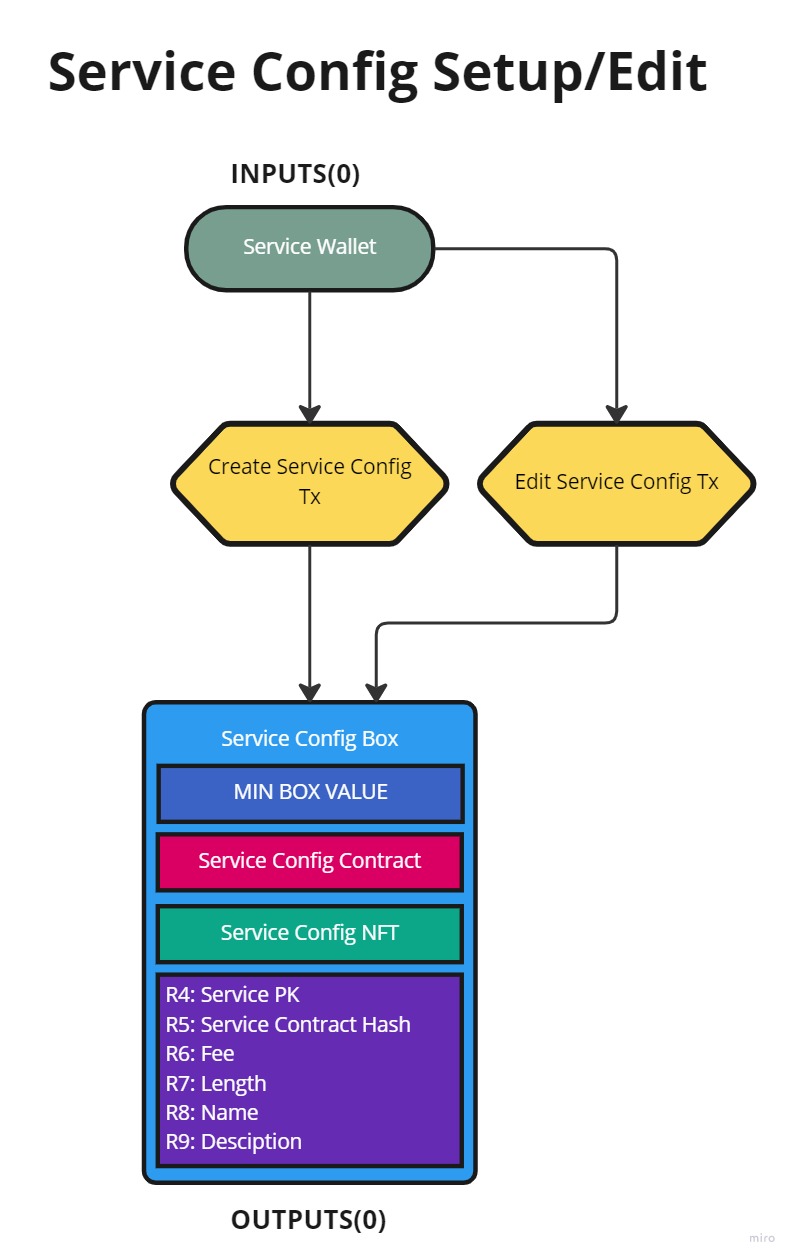
Config boxes are created to manage subscription services and are used as data inputs to ensure proper setup of subscriptions. They should contain the following.
- Service Config NFT
- R4: Service Address
- R5: Hash of Service Contract
- R6: Service Fee
- R7: Service Length (milliseconds)
- R8: Service Name
- R9: Service Description
Create Service
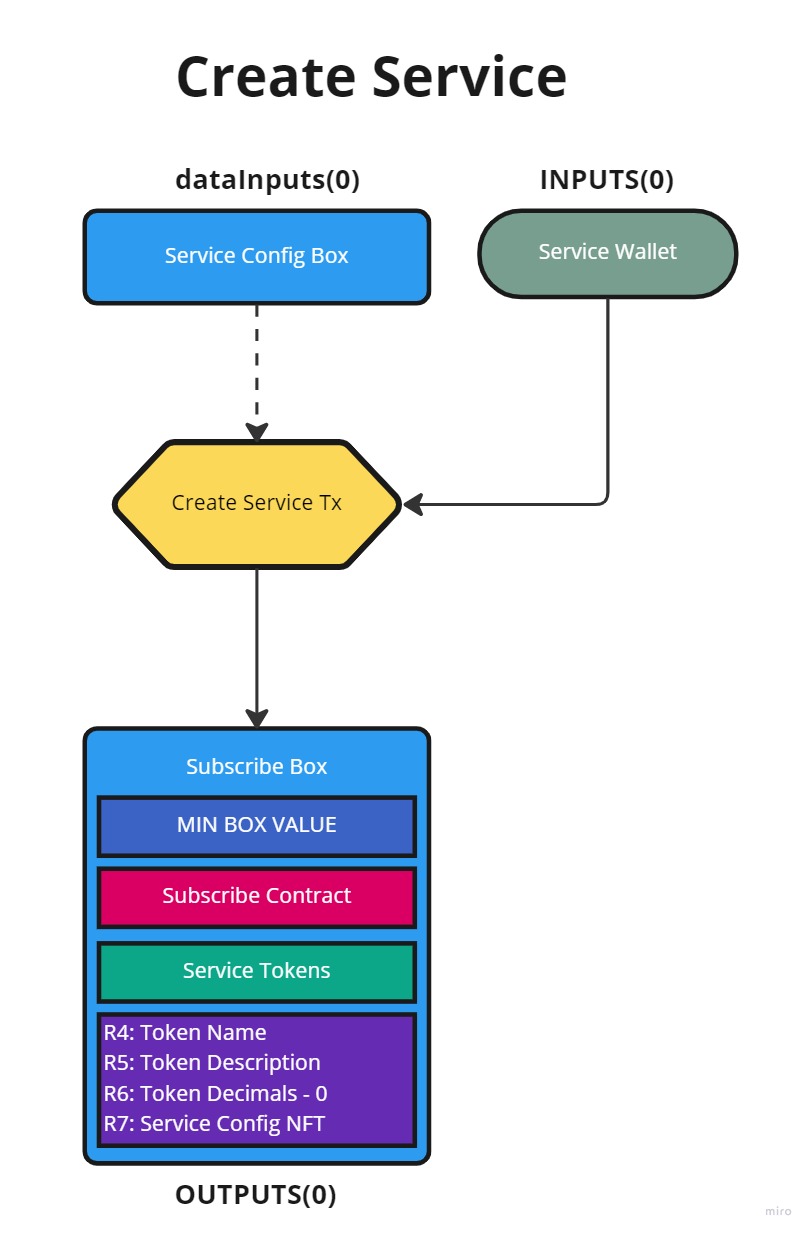
Services are created with a configuation box and they will control the distribution of Service Tokens. They will contain the following.
- Service Tokens
- R4: Service Name
- R5: Service Description
- R6: 0 (Decimals in EIP-004 token standard)
- R7: Service Config NFT
Subscribe
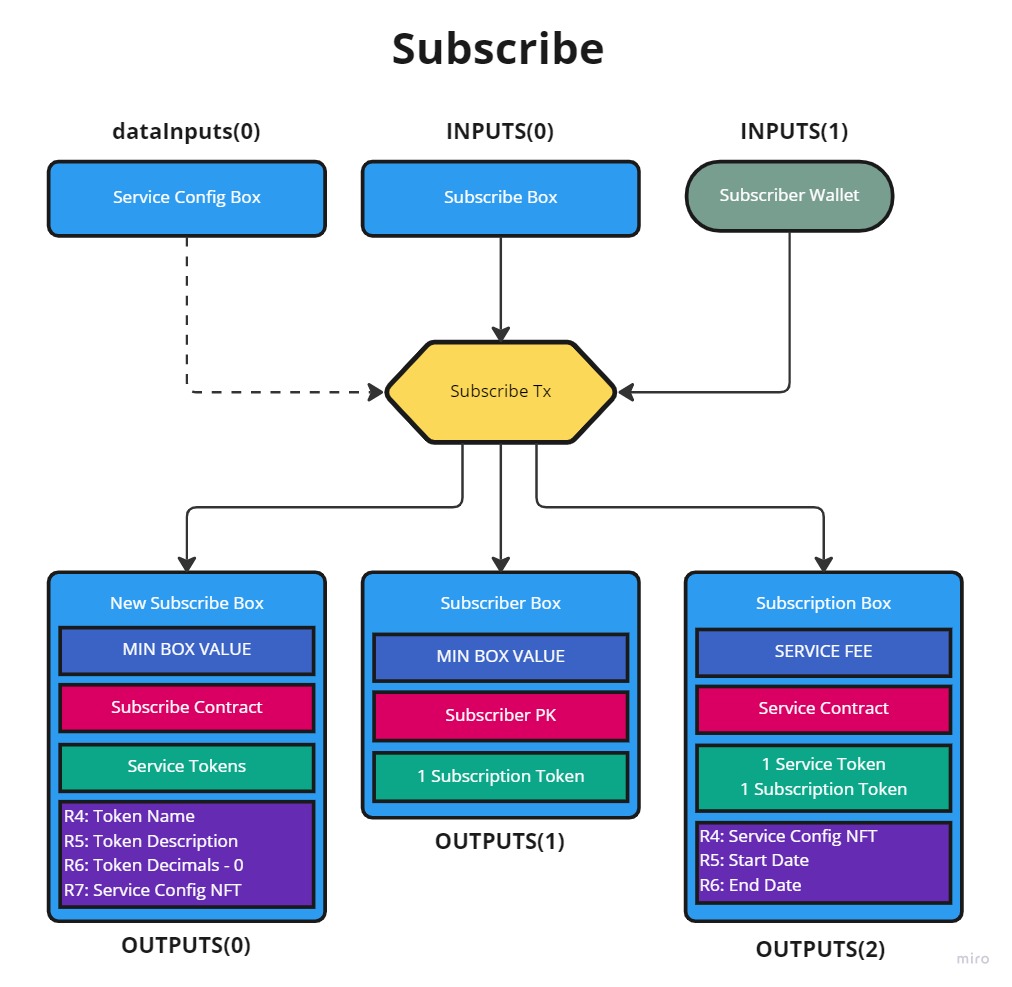
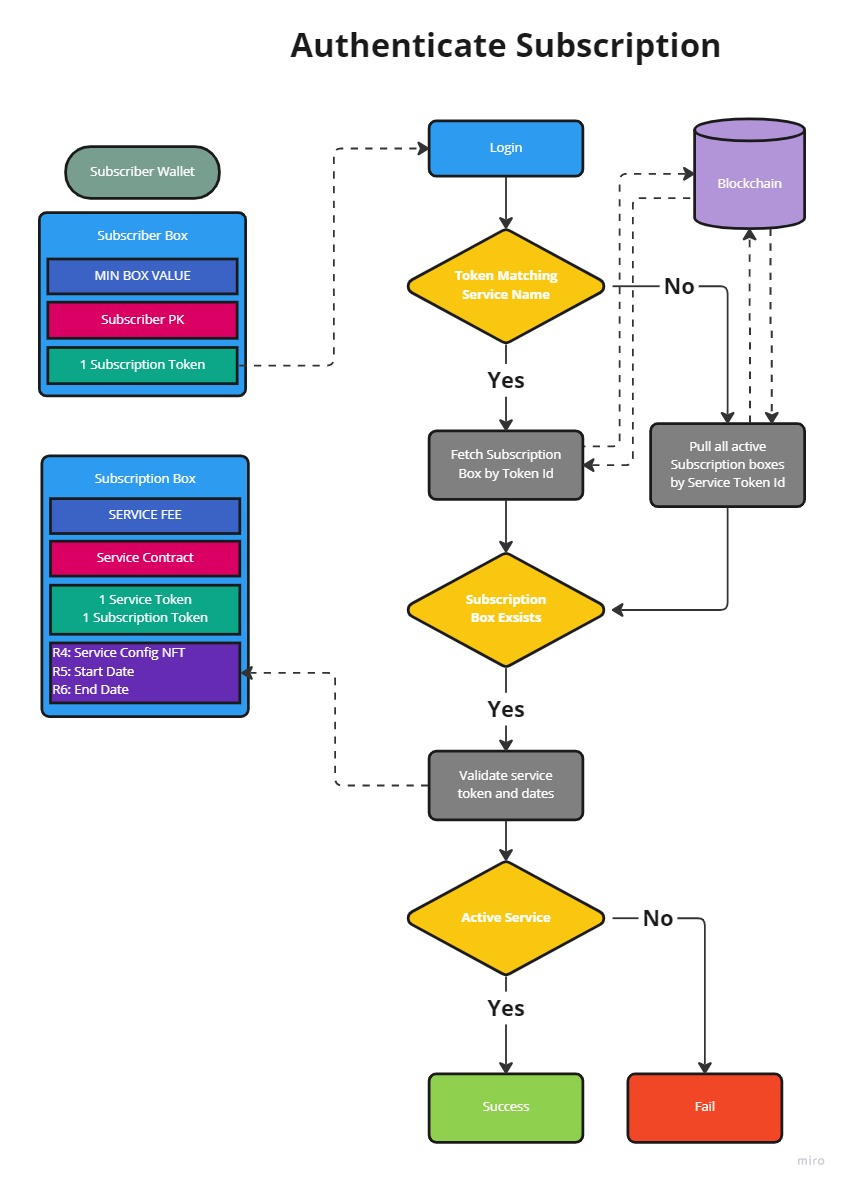
Subscription boxes are created when the Subscribe box is spent. This will result in 2 Subscription tokens being minted with 1 sent to the Subscribe box and other sent to the Subsciber wallet. The Subscription box will contain the following.
- 1 Service Token from the Subscribe box
- 1 Subscription Token that is minted
- R4: Service Config NFT
- R5: Start date of service (unix timetamp in milliseconds)
- R6: End date of service (unix timetamp in milliseconds)
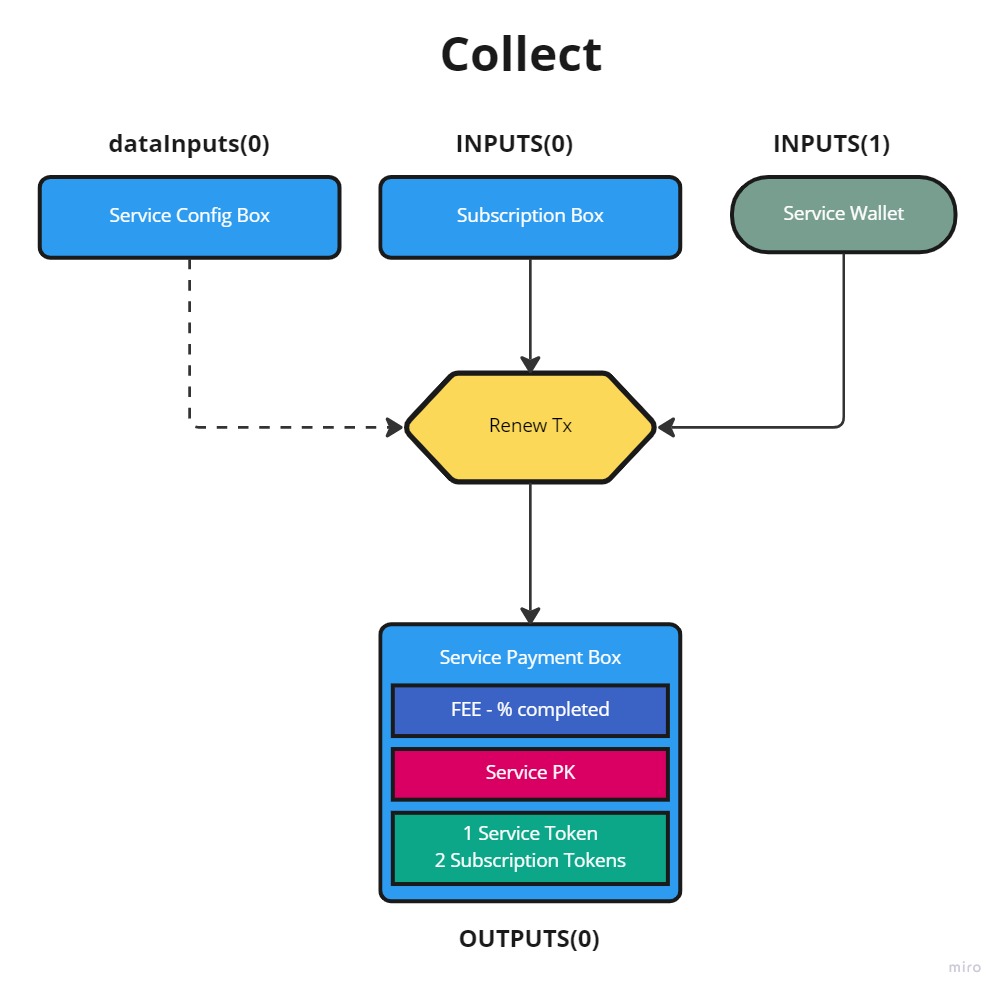
Renew
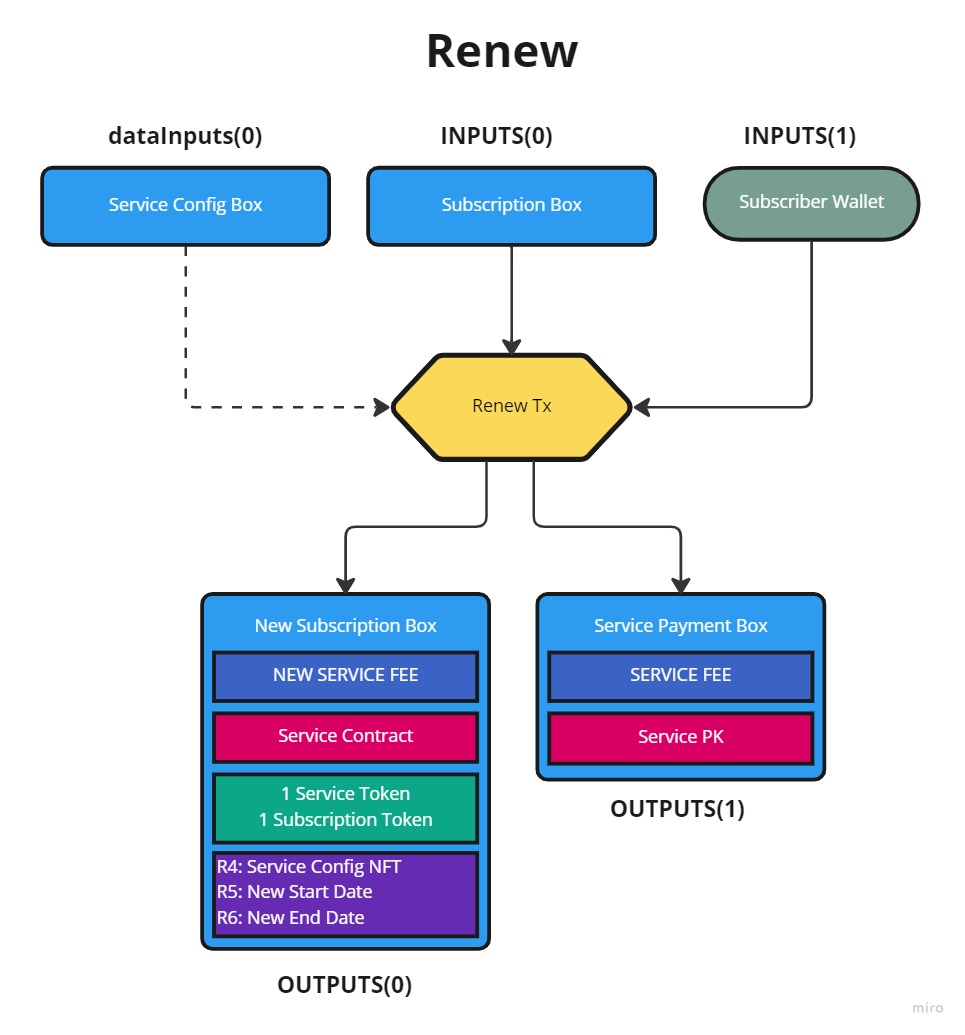
To renew a service contract the subscriber must send the correct fee along with their unique Subscription Token. The service box is then recreated, the previous fee is sent to the Service address, and the Start/End dates are adjusted.
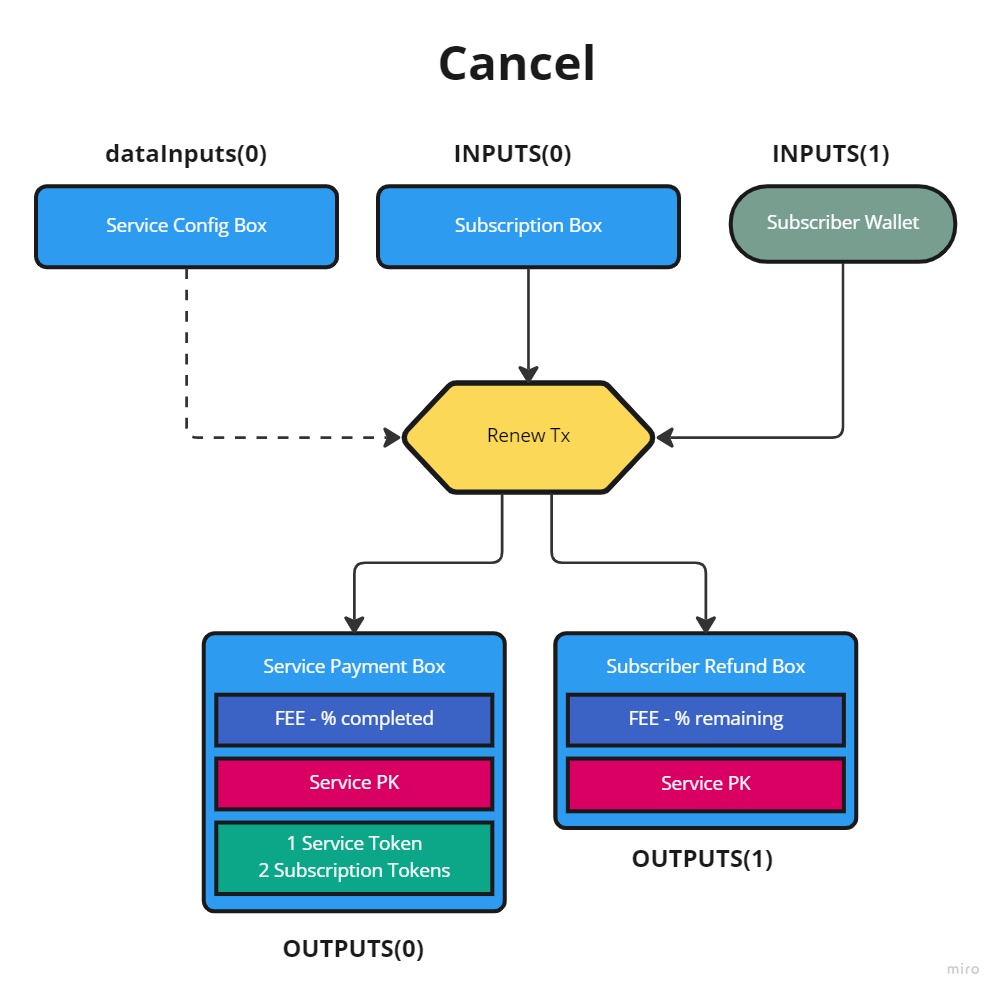
Cancel
To cancel a subscription the subscriber must send thier unique Subscription Token
- If the service start date has not been reached then a full refund is issued
- If the service is active then a partal refund is issued and the remaning fee is sent to the service
- THe Service Token and both Subscription Tokens are sent back to the service
Collect
The service can force collect the fee in this box if the service end date has passed.
Authentication
A subscription is considered valid if there is a unspent Subscription Box containing the service token and a unique subscription token.
License
Distributed under the MIT License. See LICENSE file for more information.
Contact
Discord: @cornbelt #sigma-subscriptions
Open source is the way.