1.1.9 • Published 2 years ago
simple-tags-for-vue v1.1.9
Simple tags component for Vue.js 3
A package that allows you to attach, detach and remove tags with ease, following provided suggestions. The tags are styled by default using Tailwind CSS
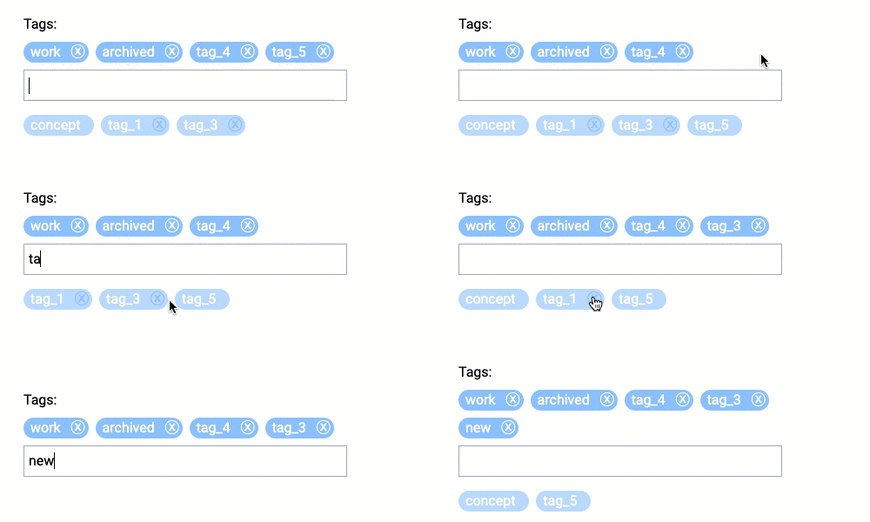
Demo
Installation
NPM
npm i simple-tags-for-vueCDN
<script src="https://www.unpkg.com/simple-tags-for-vue/dist/simple-tags-for-vue.min.js"></script>Usage
import simple_tags_for_vue from 'simple-tags-for-vue';

// add to the components section
components: {
    'simple-tags-for-vue': simple_tags_for_vue
}
<simple-tags-for-vue v-model="selected_tags"
:existing="existing_tags"
></simple-tags-for-vue>Styling
If you have tailwindcss installed, you are good to go. If not, just turn it off :tailwind="false", add class="your-own-class" and style it as you need.
Backend
POST query of the form with simple-tags-for-vue results in an array of 'tags'.
If you use Laravel with spatie/laravel-tags:
<?php

// Get tags
$tags = $model->tags->map(fn($tag) => $tag->name);
$existing_tags = Tag::all()->map(fn($tag) => $tag->name);

// Update tags
$tags = $request->input('tags') ?? [];
$model->syncTags($tags);
Properties
| Name | Type | Default | Description |
|---|---|---|---|
| modelValue | Array | [] | Value for v-model |
| existing | Array | [] | List of existing tags (used in suggestions) |
| unused | Array | [] | List of unused tags (can be permanently deleted) |
| tailwind | Boolean | true | Style with tailwindcss |
Emits
| Name | Description |
|---|---|
| update:modelValue | Update event for v-model |
| destroy | Permanently delete tag |
License
The MIT License (MIT). Please see License File for more information.