2.1.2 • Published 7 years ago
text2png-rotate v2.1.2



text2png: text-to-png generator for Node.js
The original address: https://github.com/tkrkt/text2png
text2png('Create png image\nfrom multi-line text!');
Quick start
text2png depends on node-canvas.
With node-canvas. (See node-canvas wiki on installing node-canvas.)
$ npm install text2png-rotateWith node-canvas-prebuilt
$ npm install text2png@prebuiltvar fs = require('fs');
var text2png = require('text2png');
fs.writeFileSync('out.png', text2png('Hello!', {color: 'blue'}));Option
text2png(text, option)
| param | default |
|---|---|
| text | (required) |
| option.font | '30px sans-serif' |
| option.textAlign | 'left' |
| option.color (or option.textColor) | 'black' |
| option.backgroundColor (or option.bgColor) | 'transparent' |
| option.lineSpacing | 0 |
| option.padding | 0 |
| option.padding(Left|Top|Right|Bottom) | 0 |
| option.borderWidth | 0 |
| option.border(Left|Top|Right|Bottom)Width | 0 |
| option.borderColor | 'black' |
| option.localFontPath | |
| option.localFontName | |
| option.output | 'buffer' |
| option.rotate | 0 |
option.output = 'buffer' | 'stream' | 'dataURL' | 'canvas'
'canvas' returns node-canvas object.
If you want to use any custom fonts without installing, use localFontPath and localFontName property.
text2png('with custom fonts', {
  font: '50px Lobster',
  localFontPath: 'fonts/Lobstar-Regular.ttf',
  localFontName: 'Lobster'
});
Command line interface
$ npm install -g text2png@next
$ text2png --help
$ text2png -t "Hello!" -o "output.png"
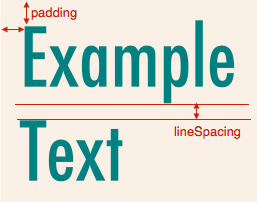
Example
text2png('Example\nText', {
  font: '80px Futura',
  color: 'teal',
  backgroundColor: 'linen',
  lineSpacing: 10,
  padding: 20
});
Enjoy!