typedoc-plugin-extras v3.1.0
typedoc-plugin-extras

This plugin only works for HTML documentation.
A TypeDoc plugin to add extras to the output documentation.
It allows you to:
- Set a custom favicon.
- Add the date/time of generation after "Generated using TypeDoc" in the footer. (cf. the example below)
- Set a custom top-most title name (without changing the package name, like
--namewould do).- For example, you could have
--customTitle "Go back" --titleLink <url-of-your-parent-documentation>
- For example, you could have
- And more... (cf. the list of arguments below)
No date/time will be added if --hideGenerator is set (because the footer wouldn't exist).
All extras are disabled by default: they are opt-in.
Feel free to ask for another extra or to make a PR 😉
Example
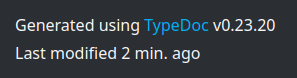
You also can view an example documentation using the plugin here:
https://drarig29.github.io/typedoc-plugin-extras/
Installation
npm install --save-dev typedoc-plugin-extrasUsage
$ npx typedoc --plugin typedoc-plugin-extras [args]Arguments
The following arguments can be used in addition to the default TypeDoc arguments.
--customTitleSpecify a custom title, for the top-most title only. Example:foo--customDescriptionSpecify a custom<meta name="description"property. Example:An example description--faviconSpecify the path or URL of the favicon file. Example:public/favicon.icoNote: If given a path, the favicon file is copied into the documentation's output directory (--out).--footerTypedocVersionAppends the TypeDoc version in the footer. Default:false--footerLastModifiedAppends a "Last Modified" text in the footer (e.g. "Last modified 6 min. ago"). Default:falseNote: If specified, the--footerDateand--footerTimeoptions are ignored.--footerDate(deprecated) Appends the date of generation in the footer (e.g. "Jul 29, 2022"). Default:falseNote: If combined with--footerTime, it will append "Jul 29, 2022, 3:44:42 PM GMT+2".--footerTime(deprecated) Appends the time of generation in the footer (e.g. "3:44:42 PM GMT+2"). Default:falseNote: If combined with--footerDate, it will append "Jul 29, 2022, 3:44:42 PM GMT+2".
Testing
To test this plugin, you can generate TypeDoc documentation for this plugin.
To do so, you'll first need to build it:
npm run buildThen, you can generate the documentation with the plugin (from source):
npm testLicense
2 years ago
3 years ago
3 years ago
3 years ago
4 years ago
4 years ago
4 years ago
4 years ago
4 years ago
4 years ago
5 years ago
5 years ago
5 years ago
5 years ago
5 years ago
6 years ago
6 years ago
6 years ago
6 years ago
6 years ago
6 years ago
6 years ago
6 years ago
6 years ago
6 years ago
6 years ago