umi-plugin-theme-switch v2.0.1
umi-plugin-theme-switch


基于css变量实现主题切换的umi插件
Umi plugin for theme switching based on css variables.
Install
# or yarn
$ npm install umi-plugin-theme-switch
Usage
Configure in .umirc.js,
export default {
  plugins: [
    ['umi-plugin-theme-switch', options],
  ],
}
Examples
Options
themes
Type: string | UmiPluginThemeItem
Required: true
主题列表,类型为string时表示主题列表目录,目录下的.json|.js都会被解析成主题配置
examle:
src/themes/dark.json
{
  "--bg-global": "#333",
  "--font-color": "#ddd"
}
.umirc.js
export default {
  plugins: [
    ['umi-plugin-theme-switch', {
      themes: 'src/themes'
    }],
  ],
}
也可以不用配置目录,example:
export default {
  plugins: [
    ['umi-plugin-theme-switch', {
      themes: [{
        name: 'light',
        variables: {
          '--bg-global': '#ddd'
          '--font-color': '#333'
        }
      }, {
        name: 'dark',
        variables: {
          '--bg-global': '#333'
          '--font-color': '#ddd'
        }
      }]
    }],
  ],
}
defaultTheme
Type: string
Default: 默认为上面themes数组的第一个主题
默认主题,不传的话默认为themes里第一项
scope
Type: string
Default: :root
主题作用域,建议使用:root或者body或者app的根节点例如#root,否则如果设置了remember或者autoDetectDarkMode,页面会在render之前设置主题,尚未渲染出的元素将不会生效
attribute
Type: string
Default: umi-theme
css变量的作用域是根据scope+属性选择器[umi-theme=theme]来确定的,如果想要自定义属性选择器的名字,可以更改此选项
remember
Type: boolean
Default: false
新打开页面时是否自动选用上次选择过的主题,每次切换时会写入 localStorage.setItem('umi_theme',theme)
autoDetectDarkMode
Default: null
自动检测浏览器的dark模式并设置主题
如果同时启用remember和autoDetectDarkMode,则只有首次打开页面时会自动检测
autoDetectDarkMode.enable
Type: boolean
启用自动检测浏览器的dark模式
autoDetectDarkMode.darkTheme
Type: string
Default: dark
浏览器dark模式对应的主题配置名称
Functions
import {getTheme, switchTheme} from 'umi-plugin-theme-switch';
getTheme(): string
获取当前的主题名
switchTheme(theme: string): void
切换主题
ENV
UMI_THEME_SCOPE : 主题作用域,为选择器字符串
UMI_THEME_ATTRIBUTE : 主题产生作用的属性,默认为 umi-theme
兼容性
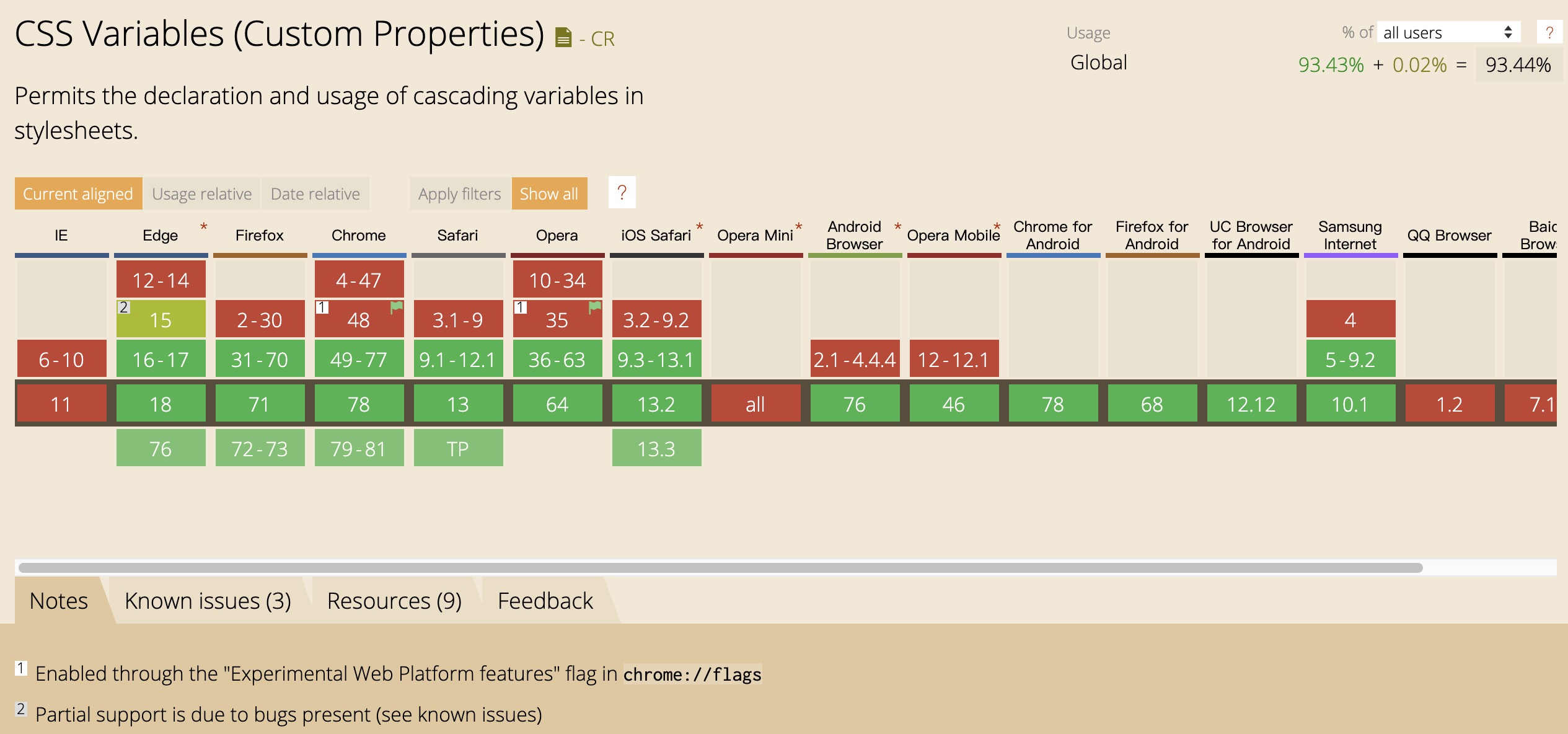
由于css变量不支持ie11,所以ie11可能需要一些解决方案 nuxodin/ie11CustomProperties
LICENSE
MIT