
useStorageBackedState 

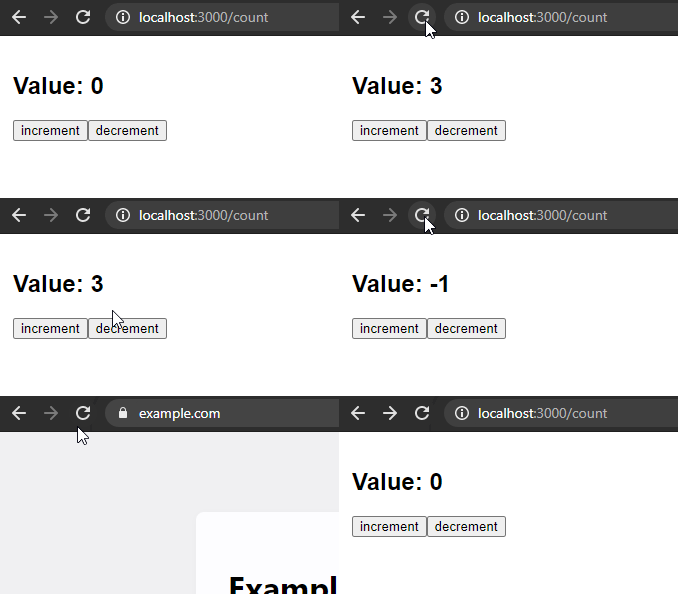
Custom React hook for state management like useState but persisted to localStorage. Check interactive demo.
Installation
npm install use-storage-backed-stateHow to use
import React from 'react'
import { useStorageBackedState } from 'use-storage-backed-state'

export const MyComponent = () => {
	const [count, setCount] = useStorageBackedState({
		key: 'count',
		defaultValue: 0,
	})

	return (
		<section>
			<h1>
				Value: <output>{count}</output>
			</h1>
			<button
				onClick={() => {
					setCount(count + 1)
				}}
			>
				increment
			</button>
			<button
				onClick={() => {
					setCount(count - 1)
				}}
			>
				decrement
			</button>
		</section>
	)
}
Notes
Stores data in
localStorage.Works with
sessionStoragetoo.useStorageBackedState({ // … storage: sessionStorage, })Realtime synchronization between multiple uses with the same
key. Even across tabs.You can opt out from storage and synchronization by passing
nulltostorageoption.const [count, setCount] = useStorageBackedState({ key: 'local-count', initialValue: 1, storage: null, })
Advanced Usage
Custom parser and serializer
By default, use-storage-backed-state uses JSON.stringify and JSON.parse to handle values. You can provide your own functions to handle custom data types, like Date objects.
const [date, setDate] = useStorageBackedState({
	key: 'my-date',
	defaultValue: new Date(),
	parse: (value) => new Date(value),
	stringify: (value) => value.toISOString(),
})
Usage outside of React component
You can also get, set, and remove values from outside of a React component.
import {
	getStorageBackedValue,
	setStorageBackedValue,
	removeStorageBackedValue,
} from 'use-storage-backed-state'

// Set a value
setStorageBackedValue({ key: 'my-key', value: 'my-value' })

// Get a value
const value = getStorageBackedValue({ key: 'my-key', defaultValue: 'default' })

// Remove a value
removeStorageBackedValue({ key: 'my-key' })
Subscribing to changes
You can subscribe to changes of a value. This is useful for integrating with other libraries like rxjs.
import { subscribeStorageBackedValue } from 'use-storage-backed-state'
import { Observable } from 'rxjs'

const myValue$ = new Observable((subscriber) => {
	const { unsubscribe } = subscribeStorageBackedValue({
		key: 'my-key',
		defaultValue: 'default',
		onChange: (value) => {
			subscriber.next(value)
		},
	})

	return unsubscribe
})

myValue$.subscribe((value) => {
	console.log('Value changed:', value)
})