vue-json-ui-editor v1.0.0






json-editor


Edit JSON in UI form with JSON Schema and Vue.js <json-editor> component.
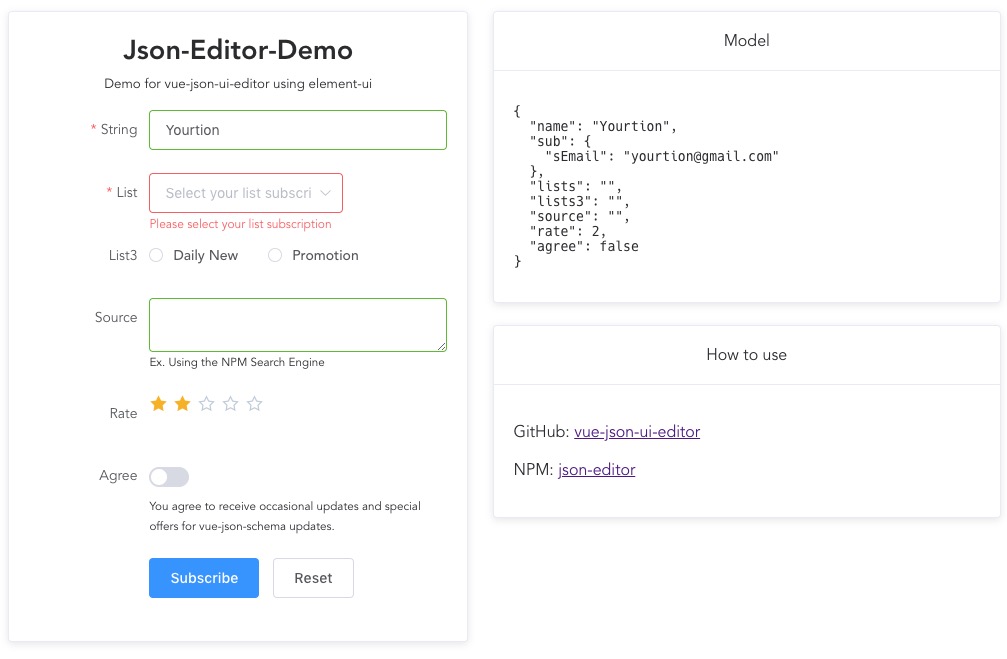
Install
npm install vue-json-ui-editor --saveUse
<template>
<json-editor ref="JsonEditor" :schema="schema" v-model="model">
    <button @click="submit">submit</button>
    <button @click="reset">Reset</button>
</json-editor>
</template>

<script>
const SCHEMA = {
  type: 'object',
  title: 'vue-json-editor demo',
  properties: {
    name: {
      type: 'string',
    },
    email: {
      type: 'string',
    },
  },
};
// import vue-json-ui-editor
import JsonEditor from '../../src/JsonEditor.vue';
export default {
  components: { JsonEditor },
  data: () => ({
    // init json schma file ( require('@/schema/newsletter') )
    schema: SCHEMA,
    // data
    model: {
      name: 'Yourtion',
    },
  }),

  methods: {
    submit(_e) {
      alert(JSON.stringify(this.model));
    },
    reset() {
      this.$refs.JsonEditor.reset();
    },
  },
};
</script>
More info on: Example-Subscription Schema: newsletter.json
props
schemaObject (required) The JSON Schema object. Use thev-ifdirective to load asynchronous schema.v-modelObject (optional)default: [object Object]Use this directive to create two-way data bindings with the component. It automatically picks the correct way to update the element based on the input type.auto-completeString (optional) This property indicates whether the value of the control can be automatically completed by the browser. Possible values are:offandon.no-validateBoolean (optional) This Boolean attribute indicates that the form is not to be validated when submitted.input-wrapping-classString (optional) Define the inputs wrapping class. Leaveundefinedto disable input wrapping.
data
defaultinitial value:[object Object]fieldsinitial value:[object Object]errorinitial value:nulldatainitial value:[object Object]
events
inputFired synchronously when the value of an element is changed.changeFired when a change to the element's value is committed by the user.invalidFired when a submittable element has been checked and doesn't satisfy its constraints. The validity of submittable elements is checked before submitting their owner form, or after thecheckValidity()of the element or its owner form is called.submitFired when a form is submitted
methods
input(name)Get a form input referenceform()Get the form referencecheckValidity()Checks whether the form has any constraints and whether it satisfies them. If the form fails its constraints, the browser fires a cancelableinvalidevent at the element, and then returns false.reset()Reset the value of all elements of the parent form.submit(event)Send the content of the form to the serversetErrorMessage(message)Set a message error.clearErrorMessage()clear the message error.