
Aviary - orchestrator for scheduling notifications
Aviary is a general-purposed notification orchestration library that uses a plugin architecture to allow for a modular approach to scheduling, retrieving and notifying of (personalized) content.
Documentation
Installation
Depending on the package manager you use:
bun add @aviaryjs/core
pnpm add @aviaryjs/core
then create custom plugins, or add one of the predefined plugins (see Plugins for more information)
Core concepts/plugin types:
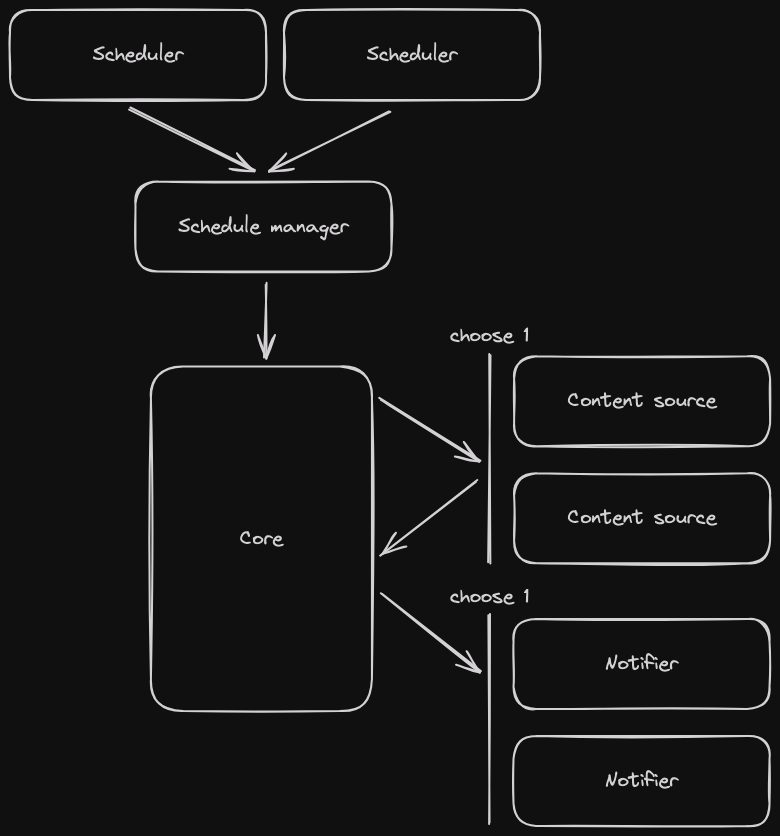
- Scheduler - Creates requests for scheduling, usually user(s) and a timestamp
- (Schedule/Schedule manager) - Processes the scheduling requests and triggers the rest of the pipeline (requesting content and sending the notification) on time
- Content Source - Retrieves content for notifications
- Notifier - Delivers the notifications to the intended recipient
Here is a basic showcase of how the library works:
const aviary = Aviary.builder()
  // Designate users which should get a notification
  .addScheduler({
    async *run() {
      yield { data: "user1", date: new Date("2024-08-24 07:00") }; // Once at a specific time
      while (true) {
        // Every minute at the current time
        yield { data: "user2", date: new Date() };
        sleep(60000);
      }
    },
  })
  .addContentSource({
    async getContent(data) {
      // Fetch (personalized) content for a specific data
      const response = await fetch(`https://content.example.com/data/${data}`);
      const data = await response.json();
      return data.content;
    },
  })
  .addNotifier({
    async notify(data, content) {
      // Notify the data
      await fetch("https://notification.example.com/send", {
        method: "POST",
        headers: { "Content-Type": "application/json" },
        body: JSON.stringify({ to: data, message: content }),
      });
    },
  })
  .build();

await aviary.run();
Though more realistically, you will be using existing or custom plugins:
Aviary.builder()
  .addScheduler(new CronScheduler("0 7 * * *")) // Every day at 7:00
  .addScheduler(new WebhookScheduler()) // Or on demand
  .addContentSource(new PersonalizedContentSource())
  .addNotifier(new EmailNotifier())
  .run();
Aviary has a default implementation of a schedule manager, which can be used when the shape of scheduling requests is { data: T, date: Date }.
Plugins
Aviary provides some plugins with the most used functionality or as a starting point/reference for creating custom plugins, located in packages/plugins.
Ready-to-use plugins:
periodic-scheduler- Uses a cron expression to periodically run a callback which returns scheduling requests
bun add @aviaryjs/plugin-periodic-scheduler
webhook-scheduler- Opens a webhook for scheduling notifications on demand
bun add @aviaryjs/plugin-webhook-scheduler
kafka-scheduler- Connects to and listens on a Kafka topic for scheduling requests
bun add @aviaryjs/plugin-kafka-scheduler
cron-scheduler- Schedules all specified users using a cron expression
bun add @aviaryjs/plugin-cron-scheduler
firebase-notifier- Sends notifications using Firebase Cloud Messaging
bun add @aviaryjs/plugin-firebase-notifier
- Example plugins: To illustrate/help with the process of creating own plugins, we provide several very simple example plugins:
vanilla-cron-scheduler: Showcase of how to handle scheduling using async generator functions in plain JSsimple-cron-scheduler: A more idiomatic version of thevanilla-cron-schedulerusing the utility classAsyncQueuefrom@aviaryjs/core, which greatly improves developer expericence when working with async generator functionssimple-content-source: A simple content source that returns a constant string for every userfetch-content-source: A content source that fetches data from an endpointfile-content-source: A content source that reads a file and then provides its content for every request
Examples
This monorepo includes examples integrations of Aviary:
packages/examples/channels-example: An example usage of multiple notifiers and channels (useswebhook-scheduler)packages/plugins/schedulers/kafka-scheduler/example: An example integration using thekafka-schedulerplugin (requiresbun run buildin the root before first run)
All examples can be run by installing dependencies bun install and executing bun start in the their respective directories.
Usage with Web Workers
Aviary can be run in a "web worker" mode, using Aviary.runWorkers. This has some limitations:
- Schedulers can only use APIs available in a worker context
- Data passed from schedulers will be copied using
structuredClone(), which postMessage uses for copying data from a worker to the main thread
Development
This library uses Bun for development.
To install dependencies:
bun installTo build:
bun run build