
brna
Agent-friendly snapshots and actions for React Native apps.
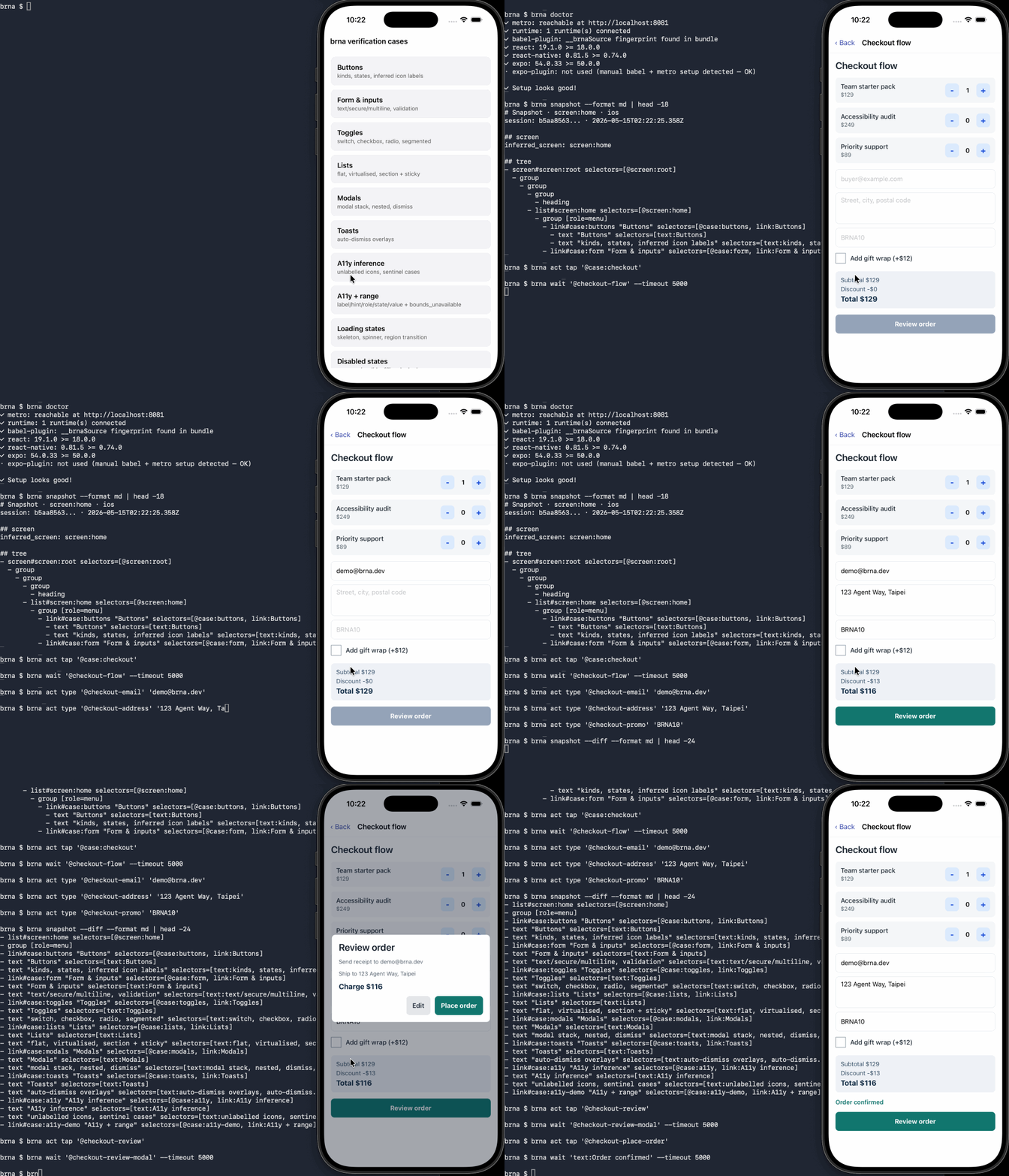
brna is an agent-time inspect/act primitive for development workflows. It
lets a coding agent read the current screen of a running React Native dev app
and drive it with stable selectors. It is not an end-to-end test runner
and is not a replacement for Maestro, Detox, or Appium — use those when you
need recorded test suites, native gesture coverage, or production app testing.
brna exposes a structured snapshot of the current UI and a small action API
for tapping, typing, scrolling, pressing keys, and checking what changed. Each
node carries a canonical selector and an ordered list of
suggested_selectors so an agent can copy a working selector directly out of
the snapshot.
It is built for Expo and React Native development sessions where you want an agent to understand the app screen like a developer would: labels, roles, inputs, disabled state, source metadata, and stable selectors.
What You Can Do
brna snapshot
brna act tap "#save"
brna act type "input:Email" "leo@example.com"
brna act scroll "#feed" --direction down --by 300
brna act swipe "#screen:root" --direction up --by 600
brna wait "text:Saved"
brna capture --to screen.png
brna logs --level warn
brna network --method POST
brna doctor
brna mcp
Use brna snapshot to read the screen. Use brna act ... to interact with the
screen. Use brna mcp when an agent client should access the same snapshot and
actions through the Model Context Protocol.
Quick Start In An Expo App
Install the CLI and runtime packages:
npm install --save-dev @brna/cli
npm install @brna/runtime @brna/metro-plugin @brna/babel-plugin
The CLI runs on Node.js 18 or newer.
For managed, EAS, and dev-client Expo apps — anything that runs expo start
without a local prebuild — wire Babel and Metro directly. This is the
recommended path:
// babel.config.js
module.exports = function (api) {
  api.cache(true);
  return {
    presets: ["babel-preset-expo"],
    plugins: ["@brna/babel-plugin"],
  };
};
// metro.config.js
const { getDefaultConfig } = require("expo/metro-config");
const { withBrna } = require("@brna/metro-plugin");
const config = getDefaultConfig(__dirname);
module.exports = withBrna(config);withBrna() preserves Expo and Metro resolver defaults. If an older custom
monorepo setup needs Metro symlink resolution explicitly enabled, set
config.resolver.unstable_enableSymlinks = true in your own Metro config before
calling withBrna(config).
If you use a static app.json prebuild workflow, you can additionally install
the config plugin and register it:
npm install --save-dev @brna/expo-plugin{
"expo": {
"plugins": ["@brna/expo-plugin"]
}
}The config plugin only applies during expo prebuild — use it on top of, or
instead of, direct wiring when you regenerate native projects. Direct wiring
above is the reliable path for expo start against an existing dev client.
Start Metro with a cleared cache after changing Babel or Metro config:
npx expo start --clearIn another terminal, check the setup:
npx brna doctorIf doctor reports missing setup, run:
npx brna doctor --fix--fix patches babel.config.js and metro.config.js directly for managed,
EAS, and dev-client Expo apps. For static prebuild app config it can also
register the @brna/expo-plugin.
Once the app is running in a simulator, emulator, or device, capture a snapshot:
npx brna snapshotThe default Metro URL is http://localhost:8081. If your app uses another
port, pass a full URL or the bare port:
npx brna snapshot --metro 19000CLI Guide
snapshot
Capture the current UI from a connected runtime.
brna snapshot
brna snap --format json
brna snapshot --format yaml
brna snapshot --diff
brna snapshot --diff --target "#submit"
brna snapshot --device ios-sim
Useful options:
--format json|md|yamlselects the output format.--diffcompares against the rolling session baseline.--target <selector>focuses diff output to one selector's region.--metro <url-or-port>points at a non-default Metro server.--device <id>targets one connected runtime when several are available.--timeout <ms>changes the request timeout.
verify
Compare a freshly captured live snapshot against a saved golden.
brna snapshot > snapshot.md
brna verify snapshot.md
brna snapshot --format json > snapshot.json
brna verify snapshot.json
If you invoke brna through an npm script and redirect snapshot output to a golden file, run npm in silent mode so its script banner does not contaminate the snapshot:
npm --silent run brna -- snapshot --format md > snapshot.mdMarkdown goldens compare the markdown projection and ignore volatile session
header metadata. JSON goldens compare the validated snapshot structure and
ignore volatile capture metadata (captured_at, session_id, snapshot_id).
Use --active-layer with markdown goldens to compare only the current modal,
sheet, popover, toast, or overlay projection.
act
Resolve a selector against a fresh snapshot and dispatch one action.
brna act tap "#save"
brna act click "button:Submit"
brna act type "input:Email" "leo@example.com"
brna act scroll "#feed" --direction down --by 300
brna act swipe "#screen:root" --direction up --by 600
brna act long-press "#menu" --duration 750
brna act key tab
Selectors can target explicit ids such as #save or semantic matches such as
button:Submit and input:Email. Prefer explicit testID values for workflows
that need to be stable over time. Quote semantic labels when the label itself
looks like selector syntax, for example button:"Save in #toolbar".
When a selector matches one interactive node and only container wrappers, act
auto-selects the interactive target and prints a note. If several real targets
match, the error lists indexed candidates; re-run with --at <index> to pick one.
brna act tap "#check" --at 0wait
Poll snapshots until a selector appears or disappears.
brna wait "text:Saved"
brna wait "text:Loading" --gone --timeout 5000
brna wait "button:Continue" --interval 250
Use wait when the app needs time to settle after navigation, async work, or
animations. --gone waits for a selector to stop matching. --timeout controls
the total wait time, and --interval controls the polling cadence.
capture
Write a PNG screenshot of the connected runtime device, optionally annotated with brna snapshot bounds and selector labels.
brna capture --to screen.png
brna capture --overlay --to overlay.png
brna capture --native-platform android --native-device emulator-5554
brna capture --native-platform ios --native-device booted
Useful options:
--to <path>writes the PNG to a specific file. Without it, brna writes a session-scopedcapture-<timestamp>.pngand prints the path on stdout.--overlayfetches a fresh snapshot and annotates the PNG with each node's bounds and a short selector label. Logical bounds are converted to pixels usingmeta.device.viewport.scale. Nodes without bounds are skipped.--device <id>selects a connected brna runtime; the CLI usesnative_device_idfrom the device record when available.--native-device <id>is the authoritative target — anadbserial on Android or a simulator UDID (orbooted) on iOS. Use this when several emulators or simulators are running.--native-platform android|iosforces the platform when no runtime is connected (useful for purely host-side captures).
Platform support:
- Android emulator and device via
adb exec-out screencap -p. Requires the Android Platform Toolsadbbinary on PATH. - iOS Simulator via
xcrun simctl io <device> screenshot. Requires the Xcode Command Line Tools. - Physical iOS device capture is not supported in the first version.
Overlay limitations:
- Labels render in a 5x7 bitmap font (ASCII only); long selectors are truncated with an ellipsis.
- Captures and overlays may catch slightly different UI states because the screenshot and snapshot run sequentially.
devices
List runtimes connected through the Metro bridge.
brna devices
brna devices --json
doctor
Check Metro reachability, runtime connection, Babel instrumentation, and project configuration.
brna doctor
brna doctor --fix
--fix can register the Expo plugin or patch direct Babel and Metro config
files after confirmation.
logs and network
Read recent runtime console output and network activity captured by the brna runtime in development. Both commands are development-only and redacted by default — they are never wired into production bundles.
brna logs
brna logs --level warn
brna logs --since 5000 --json
brna network
brna network --method POST
brna network --status 4xx --json
Useful options:
--since <ms-or-timestamp>returns records after a duration or absolute millisecond timestamp.--level debug|log|info|warn|errorfilters logs to that severity and above.--method <verb>filters network records by HTTP method.--status <code-or-range>filters network records by status code, numeric range, or class shortcut such as4xx.--limit <n>returns only the most recent matching records.
The runtime keeps a small bounded ring buffer of recent console.* calls,
captured runtime errors, and fetch / XMLHttpRequest activity. Records leave
the runtime only after redaction:
Authorization,Cookie,Set-Cookie, and similar sensitive headers are always replaced with<redacted>.- URL query parameters whose names look like tokens, secrets, or API keys are
replaced with
<redacted>. - JSON body fields whose names look like tokens, passwords, secrets, or session
ids are replaced with
<redacted>. - Custom
redactrules frombrna.config.tsapply to log messages, network URLs, headers, and bodies. - Bodies are captured as bounded text previews; binary and streamed payloads (FormData, Blob, ArrayBuffer) are not captured.
--since accepts either a duration in milliseconds (--since 5000 returns the
last 5 seconds) or an absolute millisecond timestamp.
mcp
Start the brna MCP server on stdio.
brna mcp
brna mcp --device ios-sim
The MCP server exposes the current snapshot and action tools so agent clients can inspect and interact with the running app through one protocol.
Manual Expo Setup
Manual setup is the recommended path for managed, EAS, and dev-client Expo
apps that run expo start without a local prebuild. Add the Babel plugin:
module.exports = function (api) {
  api.cache(true);
  return {
    presets: ["babel-preset-expo"],
    plugins: ["@brna/babel-plugin"],
  };
};
Wrap the Metro config:
const { getDefaultConfig } = require("expo/metro-config");
const { withBrna } = require("@brna/metro-plugin");

const config = getDefaultConfig(__dirname);

module.exports = withBrna(config);
withBrna() does not force Metro symlink resolver overrides. If an older custom
monorepo setup needs that behavior, set
config.resolver.unstable_enableSymlinks = true yourself before wrapping the
config.
The Babel plugin injects @brna/runtime/auto into development entry files. The
runtime connects back to Metro only in development builds.
Local Monorepo Development
This repository is a Bun workspace:
packages/schema        Shared snapshot and action types
packages/core          Snapshot serialisation, selector parsing, and diffs
packages/runtime       In-app snapshot capture and action dispatch
packages/babel-plugin  Runtime injection and JSX annotations
packages/metro-plugin  Metro middleware and Expo integration helpers
packages/expo-plugin   Expo config plugin for brna setup
packages/cli           The brna CLI
packages/mcp           MCP server shim for agent clients
packages/docs          Public documentation site
Install dependencies and run the core checks:
bun install
bun run typecheck
bun test
Run the CLI from the workspace:
bun run packages/cli/src/cli.ts snapshot
bun run packages/cli/src/cli.ts doctor
Other useful maintainer commands:
bun run build:schema
bun --filter '@brna/docs' extract:cli
bun --filter '@brna/docs' dev
bun run e2e:expo-sample
Compatibility
brna doctor checks the supported minimums:
- React
18.0.0or newer - React Native
0.74.0or newer - Expo
50.0.0or newer for Expo projects
Name
brna stands for Bring React Native Agent-friendly.