
@camille-hdl/fat-marker
What it is
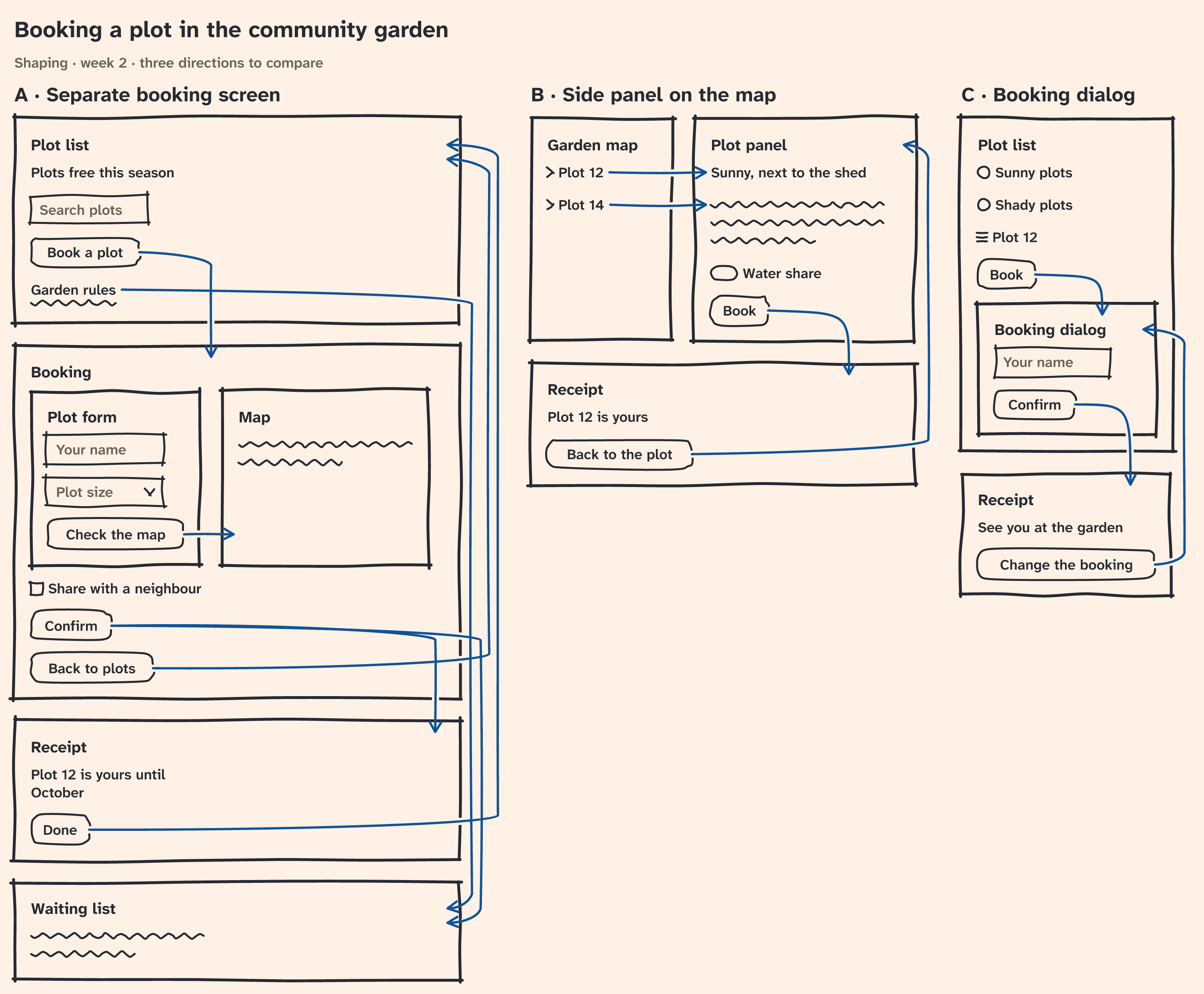
Draws a fat marker sketch of UI directions, as in Shape Up, chapter 4, from JSON to SVG or PNG.
Quick start
Save this as sketch.json:
{
  "title": "Plot booking",
  "variants": [
    {
      "variant": "A · Separate screen",
      "contains": [
        {
          "place": "Plot list",
          "contains": [
            { "affordance": "Plots free this season", "read": true },
            { "affordance": "Book a plot", "to": "Booking" }
          ]
        },
        {
          "place": "Booking",
          "contains": [{ "affordance": "Your name", "mark": "field" }]
        }
      ]
    }
  ]
}
Render it with:
npx @camille-hdl/fat-marker sketch.json -o sketch.pngData format
A sketch has optional title and subtitle, and at least one variants entry. Variants are drawn left to right under
their names.
| Element | JSON | Holds |
|---|---|---|
| sketch | { "title"?, "subtitle"?, "variants": [...] } |
variants, at least one |
| variant | { "variant": "A · Name", "contains": [...] } |
places and rows |
| place | { "place": "Name", "contains"?: [...] } |
places, affordances and rows; omit contains for an empty place |
| affordance | { "affordance": "Text", "to"?: …, "mark"?: … } |
— |
| copy | { "affordance": "Text", "read": true } |
— |
| scribble | { "affordance": "Text", "read": true, "scribble": 3 } |
— |
| row | { "row": [...] } |
places, affordances and rows |
An affordance is always inside a place, even within a row. Lists are never empty. Any other key is an error, and every error names its field:
fat-marker: sketch.json: variants[0].contains[0]: an affordance must be inside a placeA place is a named screen, panel, dialog or menu. Place names must be unique within a variant. Keep names short:
arrows refer to places by name in to.
An affordance is something to act on, drawn as a button by default. to names one or more destination places and draws
arrows to them. Targets must be in the same variant, and cannot be the place holding the affordance or one of its
parents. An affordance with read: true is copy: it is drawn as bare text, and cannot have to or mark. Add
scribble: n to copy to draw n wavy lines instead of its text; n is from 1 to 20.
The optional mark says what kind of control the affordance is:
| Mark | Drawn as |
|---|---|
field |
A text field |
select |
A field with a chevron |
checkbox |
A checkbox |
radio |
A radio button |
toggle |
A toggle |
link |
An underlined link |
chevron |
A chevron before the label |
handle |
Three grip strokes |
A row puts its contents side by side. Places and rows can nest at most 20 levels deep. Other contents stack in data
order. The renderer chooses all positions; the JSON has no coordinates. No date is added automatically. Errors identify
the field that needs attention.
CLI
The command reads a JSON file, or stdin when the input is - or omitted. It writes SVG to stdout by default. Use -o
to write a file; its .svg or .png extension selects the format. --format selects it explicitly. PNG output to a
terminal is refused. Input files, stdin and theme files are limited to 1 MiB. Exit code 0 means success, 1 means invalid
JSON, data or theme, an input over 1 MiB, or a PNG that cannot be drawn; 2 means a usage or file access error.
Once the image is written, the command reports on stderr each arrow that runs through a place's name or an
affordance's label or scribble, as checkSketch finds them (see API), one line each. Warnings do not change the exit
code:
fat-marker: warning: sketch.json: variants[0].contains[0].contains[0].row[0].to: arrow "Go → Far" crosses the label "Label"The field is the arrow's to. To clear it, set the target place beside the affordance's place in a row, put the
affordance last in its row, or move the place or affordance it crosses, then render again.
npx @camille-hdl/fat-marker sketch.json > sketch.svg
npx @camille-hdl/fat-marker sketch.json -o sketch.png
npx @camille-hdl/fat-marker sketch.json --format png > sketch.png
npx @camille-hdl/fat-marker sketch.json -o sketch.png --theme theme.json
cat sketch.json | npx @camille-hdl/fat-marker -o sketch.svg
Run npx @camille-hdl/fat-marker --help for the complete format guide and example.
Installed in a project (npm install @camille-hdl/fat-marker), run it as npx fat-marker or from npm scripts.
Theme
A theme is a flat JSON object. Set only the keys to change; unspecified keys keep their defaults. Colors are #rgb or
#rrggbb, except background may be "transparent", which draws no background and no arrow halos. The default theme
is available as @camille-hdl/fat-marker/default-theme.json.
Start with a partial theme such as:
{ "background": "transparent", "accent": "#990f3d", "seed": 7 }Installed in a project, copy the full default theme into the current project to edit it:
cp node_modules/@camille-hdl/fat-marker/default-theme.json theme.json| Key | Default | Meaning and bounds |
|---|---|---|
background |
#fff1e5 |
Background color or transparent |
ink |
#262a33 |
Main strokes and text |
muted |
#6b6259 |
The subtitle, and the text inside a field or select |
accent |
#0f5499 |
Arrows |
fontSize |
18 |
Text size, from 6 to 96 |
seed |
1 |
Wobble seed, an integer from 0 to 4,294,967,295 |
The image fits its contents, so there is no width setting. Change seed to choose a different hand-drawn look.
API
Install the package in a project with npm install @camille-hdl/fat-marker:
import { writeFile } from "node:fs/promises";
import {
  checkSketch,
  FatMarkerError,
  renderPng,
  renderSvg,
} from "@camille-hdl/fat-marker";

const sketch = {
  title: "Plot booking",
  variants: [{
    variant: "A · Separate screen",
    contains: [{ place: "Plot list", contains: [{ affordance: "Book", to: "Booking" }] }, { place: "Booking" }],
  }],
};

const svg = renderSvg(sketch); // string
const png = await renderPng(sketch, { seed: 7 }); // Promise<Uint8Array>
await writeFile("sketch.svg", svg);
await writeFile("sketch.png", png);

for (const { field, message } of checkSketch(sketch)) console.warn(`${field}: ${message}`);

try {
  renderSvg({ variants: [] });
} catch (error) {
  if (!(error instanceof FatMarkerError)) throw error;
  console.error(error.field); // variants
}
renderSvg(sketch, theme?) returns a string; renderPng(sketch, theme?), a Promise<Uint8Array>. theme is a partial
theme, as in the Theme section. The package is ESM only.
The three functions validate data and themes and throw FatMarkerError on invalid input; its field gives the field path.
renderSvg is synchronous and linear in the number of elements, so a very large sketch blocks the event loop.
renderPng is asynchronous: a usual sketch takes about 120–150 ms, and a sketch at the size limit can take up to 7.4 s.
The API reads no files and has no input size limit; set a limit before parsing untrusted input. The package exports the
Sketch, Variant, Place, Affordance, Row, Theme and Warning types.
checkSketch(sketch, theme?) returns a Warning[]: one { field, message } for each text an arrow runs through, a
place's name or an affordance's label or scribble, other than the arrow's own affordance's. An arrow gets three warnings
at most, for the first texts along its path: enough to move it or what it crosses. It lays the sketch out as renderSvg
does, draws nothing, and throws the same FatMarkerError on invalid input. It is synchronous, and takes about half a
second at the CLI's 1 MiB limit. An arrow may cross frames and outlines, which its halo keeps legible; those are not
reported. For the sketch where Go sits in a row beside Label, and its target Far is further down:
checkSketch(sketch);
// [{ field: "variants[0].contains[0].contains[0].row[0].to",
//    message: 'arrow "Go → Far" crosses the label "Label"' }]
Determinism
The same sketch and theme produce the same image, byte for byte. An element keeps its strokes when other elements or variants are added, removed or reordered, and when another variant changes. When that element's box changes size, its strokes use the same random draws on the new geometry: it looks alike, but is not identical.
Fonts and PNG limits
PNG uses only the embedded Atkinson Hyperlegible Next font, so its output
does not depend on installed system fonts. It covers Latin, including extended Latin. Greek, Cyrillic, CJK, emoji and
symbols such as ☐, ✓, ▾ and → are not covered: use the corresponding mark, write the idea as a word, or render SVG.
Scribble text is not drawn and is not checked for font coverage. A PNG wider or taller than 16,384 px fails with field
(root). SVG uses the fonts available in the viewer.
Editing
Keep the JSON next to the image; it is the editable source for the sketch. The package does not export Excalidraw files.
Requirements
- Node ≥ 22.14 to use the package.
- Node ≥ 22.18 to develop it; tests run the TypeScript sources directly.
Development
npm install
npm test               # run tests on the TypeScript sources
npm run test:update    # rewrite SVG snapshots; review them as images
npm run check          # format, lint and type-check
npm run build-font     # regenerate the embedded font; needs network access and HarfBuzz
After changing rendering, redraw the README image from the sample fixture:
node src/bin.ts test/fixtures/sample.json -o docs/fat-marker.pngReleasing
npm version minor      # or patch, or major
git push --follow-tags
Pushing a version tag runs three jobs: build checks the tag, runs checks and tests, packs the tarball and tries it;
publish uses npm trusted publishing to publish that tarball with provenance; github-release creates the GitHub release.
The first npm publish is manual.
License
The code is under 0BSD. The embedded font, Atkinson Hyperlegible Next, is under OFL-1.1.