@detachhead/ts-helpers v11.2.0-1059c400260abfe58b651a0922ebcb50c5cb3812
ts-helpers
various typescript helper functions and utility types

features
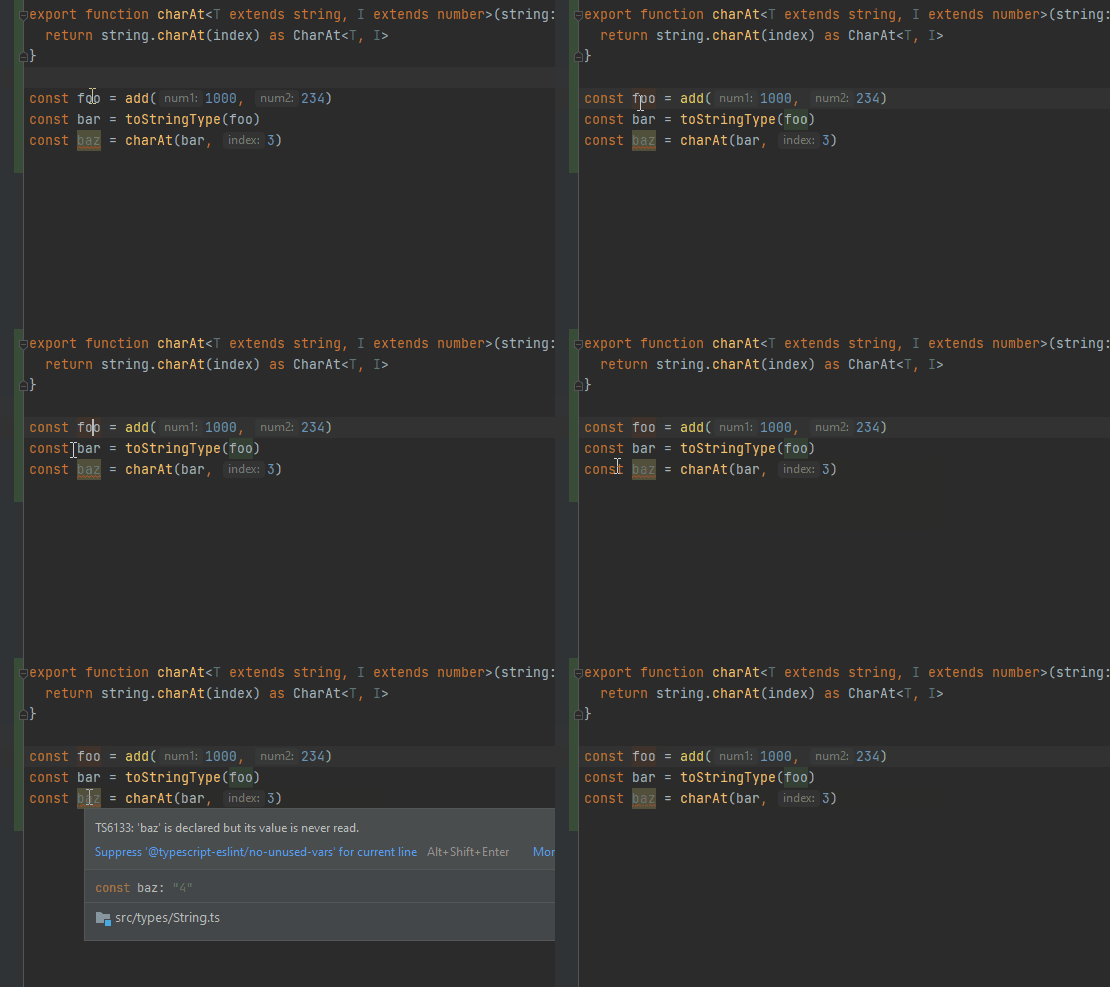
value tracking
this library includes many helper types and functions such as add, subtract, and substring which allow the values
to be known at compile time
noUncheckedIndexedAccess support
the noUncheckedIndexedAccess compiler flag is epic, but there's room for improvement. for example, the following
issue:
if (foo.length > 2) {
    const bar: string = foo[1] //error: string | undefined not assignable to string
}
can be solved with lengthGreaterThan
import { lengthGreaterThan } from '@detachhead/ts-helpers'

if (lengthGreaterThan(foo, 2)) {
    const bar: string = foo[1] //no error, foo is casted to [string, string]
}
there's also lengthLessThan, lengthGreaterOrEqual, etc.
most of the array functions in this library keep track of the length, mostly thanks
to this TupleOf utility type
date formatter type
this library contains a helper type and function for formatting dates using
the date-fns format.
const date = formatDate(new Date(), 'dd-MM-yyyy')

assert(date === '01/01/2021') //compile error, wrong date format
you can use any date format that date-fns accepts, and the FormatDate utility type will generate a template literal
type to match your desired date format.
Type Testing
With the exactly function you can test if types or values are an exact match to a type
const a: 1 | 2 = 1
//values (also does a runtime assertion on the values)
exactly(1 as number, a) // error as `1 | 2` is not an exact match of `number`
exactly(1 as number, a as number) // no error
exactly(1 as 1 | 2, a) // no error

// mixed
exactly<number>()(a) // error as `1 | 2` is not an exact match of `number`
exactly<number>()(a as number) // no error
exactly<1 | 2>()(a) // no error

// types
type Foo = 1 | 2
exactly<1, Foo>() // error as `1 | 2` is not an exact match of `1`
exactly<1 | 2, Foo>() // no error
The Equals type allows you to check if two types are equal at the type level
Equals<number, 1 | 2> // false
Equals<any, 10> // false
Equals<unknown, never> // false
variance modifier types
when using the old method syntax, typescript does not check the variance on assignment:
declare class A<T> {
    set(value: T): void
    get(): T
}

const a = new A<number>()

const b: A<unknown> = a

b.set('')
a.get() // typescript thinks this is a number but it's actually a string
for more information about how variance works, see this PR. the TL;DR is basically that arrow functions are checked more strictly than the old method syntax (for backwards compatibility reasons). this means you should be using arrow functions where possible.
declare class A<T> {
    set: (value: T) => void
    get: () => T
}

const a = new A<number>()

const b: A<unknown> = a // error: Type 'A<number>' is not assignable to type 'A<unknown>'
unfortunately however, arrow functions can't always be used. sometimes you need to use methods instead if, for example, you need to access super from a subclass:
class B extends A<number> {
    get = () => super.get() // runtime error, arrow functions can't access super
}
this is where variance modifiers come in
SafeVariance / ToArrowFunction
you can use SafeVariance<A> to enable strict variance checking on a class that has methods in it. or if for whatever reason you need to convert an individual function type to an arrow function type, you can use ToArrowFunction<A['get']>
class B<T> extends A<T> {
    override get() {
        return super.get()
    }
}

const a = new B<number>()

const b: SafeVariance<A<unknown>> = a // error
UnsafeVariance / ToNonArrowFunction
variance is only an issue when you're dealing with classes that have mutable state. if your type is immutable, you may want to disable variance checking without having to convert your shiny new arrow functions into cringe old methods.
to do this, simply use UnsafeVariance<A> on your class, or ToNonArrowFunction<A['set']> to convert a function type:
declare class A<T> {
    doSomethingElseThatTotallyDoesntChangeTheValue: (value: T) => void
    get: () => T
}

const a = new A<number>()

const b: UnsafeVariance<A<unknown>> = a // no error
drawbacks
- these modifier types can currently only be used at the use site, meaning you have to remember to use them on all usages of your types. see these issues:
- probably doesn't work properly with more complicated types. if you encounter anything like that, raise an issue
- private methods don't work properly with
UnsafeVariance
it goes without saying that these modifiers do not change the runtime behavior of a function. an arrow function is still an arrow function regardless of whether you use the ToNonArrowFunction type on it.
requirements
typescript
this package is designed for typescript >=4.8. you will probably have issues trying to use it with older versions, tho it will probably still work if you set skipLibCheck to true in your tsconfig.json (which isn't recommended)
runtime
as long as it supports es2021 you should be good. tested on:
- nodejs >=15
- browsers (chrome >=85)
- deno (using esm.sh - eg.
import { exactly } from 'http://esm.sh/@detachhead/ts-helpers/dist/utilityFunctions/misc')
2 years ago
3 years ago
3 years ago
3 years ago
3 years ago
3 years ago
3 years ago
3 years ago
3 years ago
3 years ago
3 years ago
4 years ago
4 years ago
4 years ago
4 years ago
4 years ago
4 years ago
4 years ago
4 years ago
4 years ago
4 years ago
4 years ago
4 years ago
5 years ago
5 years ago
5 years ago
5 years ago
5 years ago
5 years ago
5 years ago
5 years ago
5 years ago
5 years ago
5 years ago
5 years ago
5 years ago
5 years ago
5 years ago
5 years ago
5 years ago
5 years ago
5 years ago
5 years ago
5 years ago
5 years ago
5 years ago
5 years ago
5 years ago
5 years ago
5 years ago