
@eeacms/volto-controlpanel

Volto add-on that enhance Version Overview information in Control Panel:
- Frontend Version
- When it was updated and from which version
- Link to Frontend changelog
- Volto version and the list of all installed Volto add-ons
- Backend Version
- When it was updated and from which version
- Link to Backend changelog
- List of all Python eggs installed on Backend
Requirements
This addon requires a server-side package to be installed.
Features
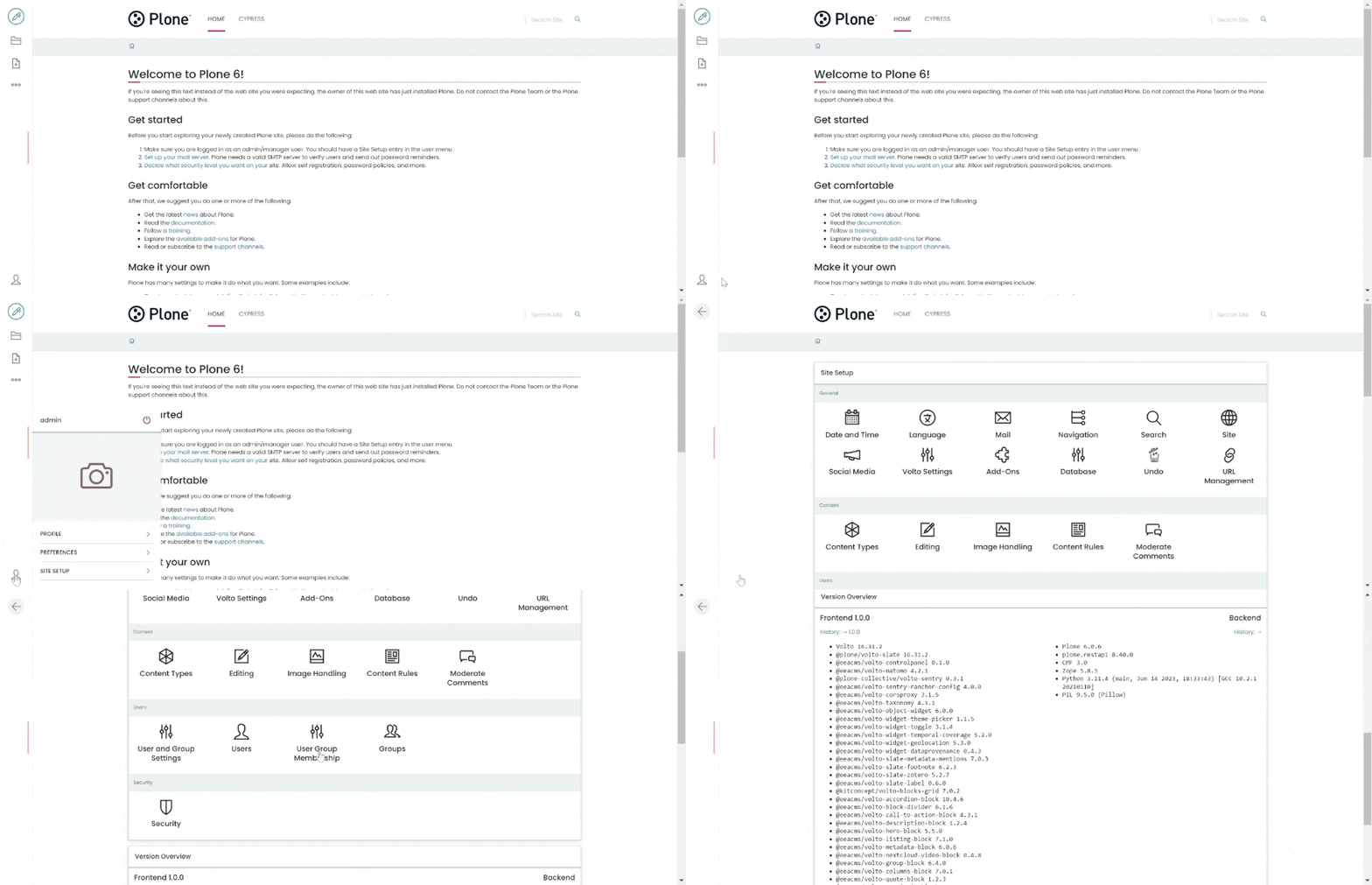
Environment Variables
You can control the information displayed in Volto Control Panel via the following environment variables:
RAZZLE_CHANGELOG_PREFIX- Default:https://github.com/eea- Used to compose the links to CHANGELOGRAZZLE_CHANGELOG_SUFFIX- Default:releases- Used to compose the links to CHANGELOGRAZZLE_FRONTEND_VERSION- Default:''- Frontend versionRAZZLE_FRONTEND_NAME- Default:''- Used to compose the links to CHANGELOGRAZZLE_BACKEND_VERSION- Default:''- Backend versionRAZZLE_BACKEND_NAME- Default:plone-backend- Used to compose the backend link to CHANGELOG
Upgrade Guide
Upgrading to 3.x
This version requires
Volto 18orVolto 19and Node.js 22.
The add-on keeps the same API and the same settings keys, so upgrading from 2.x on Volto 18 needs no code changes. The release adds Volto 19 support and moves the repository to the Volto 19 layout, where the published package lives in packages/volto-controlpanel.
Breaking changes
- Node.js 22 or newer is required (
engines.node >= 22), 2.x declared no engine. - React 18 is required. The package declares
reactandreact-domas^18.2.0peers, 2.x declared no peers. - The package no longer ships the Jest setup.
jest-addon.config.jsandjest.setup.jswere removed in favour of Vitest, so a Volto 18 project that still runs the Jest harness has to keep its own copy.
Upgrading to 2.x
This version requires
Volto >= 17and adds full support forVolto 18+(Cookieplone). It removes the hard-coded dependency on the project's rootpackage.jsonand drops thenode-fetchserver-side dependency in favor of Node's built-infetch.
Breaking changes
- Removed the project
package.jsonimport. Previous versions used a relative import (../../../../package.json) to read the project'snameandversionas fallback values forfrontendVersionandfrontendName. This path only worked when the addon was installed undersrc/addons/(Volto 17 layout) and crashed at build time in Cookieplone'spackages/layout. The import has been removed —RAZZLE_FRONTEND_VERSIONandRAZZLE_FRONTEND_NAMEenvironment variables (orconfig.settings.frontendVersion/config.settings.frontendName) are now the only way to set these values. If neither is provided, they default to empty strings. - Removed
node-fetchdependency. The server-sideupdateSystemInfocall now uses Node's nativefetch(available in Node 18+). Iffetchis not available, the call is silently skipped.
Migration
- Ensure
RAZZLE_FRONTEND_VERSIONandRAZZLE_FRONTEND_NAMEenvironment variables are set in your deployment (Docker, Rancher, etc.). These were already the recommended way to configure these values — this change only removes the automatic fallback frompackage.json. - No code changes are required in your project if you were already setting these environment variables.
Installation
Make sure you have a Plone backend up-and-running at http://localhost:8080/Plone
docker compose up backendStart Volto frontend
If you already have a volto project, just update
package.json:"dependencies": { "@eeacms/volto-controlpanel": "*" }and
volto.config.js:const addons = ['@eeacms/volto-controlpanel'];If not, create one with Cookieplone, as recommended by the official Plone documentation for Volto 18+:
uvx cookieplone project
cd project-title
Install or update dependencies, then start the project:
make installFor a Cookieplone project, start the backend and frontend in separate terminals:
make backend-start
make frontend-start
Go to http://localhost:3000
Happy editing!
License
See LICENSE.md for details.