
Populace
A simulated population that uses your app through its real API — so you can test what needs more than one person.
npm install -g @gigzen/populace
populace demo
Site: https://shakhtar-sankur.github.io/populace/ · Test report: the full engineering record · A Gigzen product
Some bugs only exist when two people are using your app at the same time. Presence, live sync, read receipts, notification fan-out, "does deleting this remove it for everyone", and every permission rule you wrote — none of them can be tested by one developer with one account, however carefully they tap through every screen.
Populace gives you a few dozen believable people who sign up, move around a real city, post, like, comment, message each other and join groups — as real authenticated users, through your own API, with your own permission rules applying. Then it hands you a report on what broke.
It has done this to a real, finished app
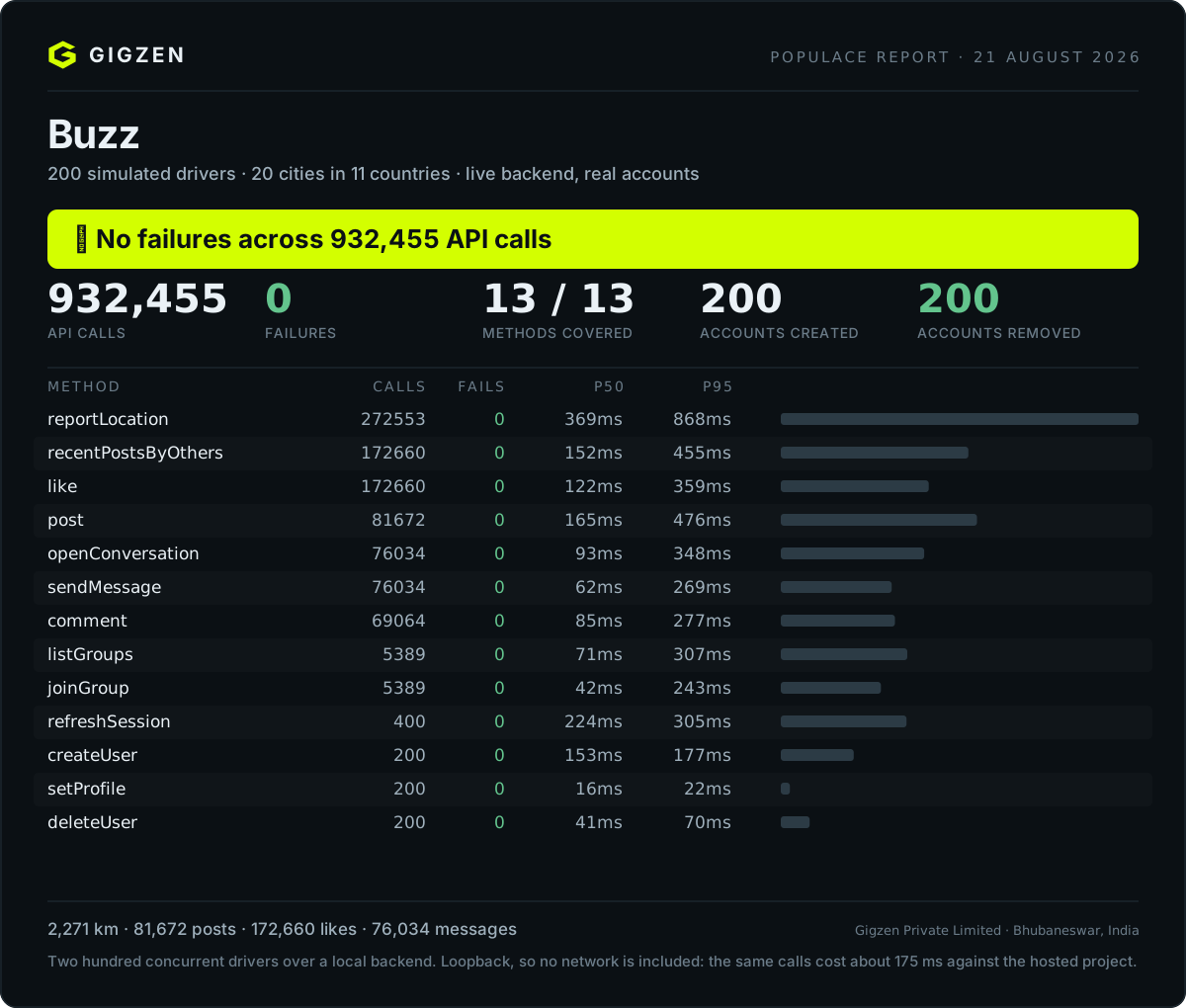
That is the second run. The first one is the interesting one.
What happened, in plain English
On 9 August 2026 we pointed Populace at Buzz — a gig-worker platform on Android with a live Postgres backend, 17 tables and 48 row-level-security policies. It was finished. It was signed. It had been through a full manual test of every screen by the person who wrote it, and it had passed.
We started six simulated drivers: three in Manila, three in Mumbai. Each one signed up for a real account, set a profile, started driving a plausible route through real streets, and behaved like a person — posting about traffic, reading the feed, liking and commenting on what other drivers posted, opening conversations, sending messages, joining a group. Nobody told Populace where the bugs were. Nobody told it what to look for. It just used the app.
Three and a half minutes later it had found five bugs. The app that had passed a full manual test could not create a working account.
The five, one at a time
1. Signing up created no profile — every new user was broken.
A privacy fix earlier that day had restricted write access on the profiles
table to a named list of columns, so that phone numbers could never be read by
other users. The signup code used an upsert. In Postgres, INSERT … ON CONFLICT DO UPDATE needs SELECT permission on every column it touches — and one of
those columns was, deliberately, unreadable. So the write was refused. Silently.
Every account created after that point existed in the auth system with no profile row behind it. Then every post, every comment and every group join died on a foreign key pointing back at the row that was never written.
Why one person never sees this: their own account already exists. You only hit it on a fresh signup, and you only notice the damage when that new user tries to do something. Populace creates six brand-new accounts every run, which is why it hit the bug in the first fifteen seconds.
2. Likes bounced back, at random.
The post_likes table has an insert policy and a delete policy, and no UPDATE
policy — by design. The app used an upsert here too, so the second time anyone
liked a post, it became ON CONFLICT DO UPDATE and row-level security refused
it. The feed refreshes every 2.5 seconds, so a slightly stale "already liked"
state was completely ordinary, and one tap in four failed.
Why one person never sees this: with one account and one slow thumb, you rarely double-like anything. Six people liking each other's posts on a 2.5-second poll do it constantly.
3. Editing your profile failed the same way. Same upsert, same unreadable column, same silent refusal.
4 and 5. Two faults in Populace's own reference adapter. One passed an RPC argument under the wrong name. The other is the one worth dwelling on: it ignored the error returned by a write. Because that failure was swallowed at signup, the report blamed a later method for it — so the run said "post failed 14 times" when the truth was "the profile row was never created."
An unchecked error is the precise fault this tool exists to catch, and it was sitting in our own code. Making that one line throw changed the report from three confusing symptoms into one sentence naming the real cause: profile row not created: permission denied for table profiles.
The rule worth taking away
You cannot upsert a column you cannot select.
Three of the five bugs were the same mistake wearing different clothes. It is invisible in code review, invisible in a single-user walkthrough, and obvious within seconds to six users signing up at once.
After the fixes
All five were fixed, and the runs since have grown by three orders of magnitude. The report at the top of this page is the largest that was clean end to end: no failures across 932,455 API calls, 200 concurrent drivers over 20 cities in 11 countries, 200 accounts created and 200 removed.
A later run put 300 drivers through 1,401,435 calls with zero API failures — but one call never reached the server, a socket exhausted on the test machine, so Populace marked it inconclusive rather than clean. That distinction is the point: a verdict that is never withheld is worth nothing when it is given.
What this does not claim. These runs are against a local backend over loopback, so no network is in the latencies — the same calls cost about 175 ms against a hosted project. Three hundred drivers is where throughput stops scaling, not where the app breaks; that is still unfound.
Try it in ten seconds
No backend, no signup, nothing of yours touched — the demo adapter fakes a small app in memory.
populace demoThe demo app has a real bug in it: a row-level-security policy that rejects likes. Watch the report find it, name the policy, and exit non-zero. That exit code is the whole point — the run fails your build rather than telling you it went fine.
Two files land in whatever directory you ran it from: populace-report.json for
CI, and populace-report.html, which is one self-contained page you can email
to someone who was not watching your terminal.
Point it at your own app
populace init      # scaffolds populace.config.mjs + adapters/my-app.mjs
populace doctor    # checks config, reachability and coverage WITHOUT running
populace run
populace clean     # removes every account a run created
You write one adapter — thirteen small methods, each answering "how does
this happen in my app?". Two are required (createUser, deleteUser);
everything else is optional and anything you skip is reported as untested rather
than quietly passing. Full spec in adapters/contract.md,
and adapters/buzzbuzz.mjs is a complete real-world
example in ~150 lines.
populace doctor on a fresh scaffold says 2/13 and refuses to run — a method
that exists but does nothing is not coverage.
Check the adapter before you run
doctor tells you which methods exist. smoke tells you whether they work:
populace smokeIt creates one user, calls every method you implemented once, checks what came back against what the contract promises, and deletes the user again. Seconds, not minutes — and it reports on your adapter, not your app, which is the question you actually have while writing one.
A full run against a subtly wrong adapter spends five minutes producing a report about nothing. This is the step that stops that.
If your API uses expiring tokens, implement refreshSession. Without it,
any run longer than your token lifetime collapses at once and the report blames
your API for what were really expired tokens — and the run cannot even delete
its own accounts, stranding simulated users in your environment. See it happen:
node examples/token-expiry/expiry-demo.mjs
And to an app we did not write
Pointed at a local Gitea instance — a git forge, not a social app, and nobody here has touched its source:
POPULACE REPORT — Gitea
✔ No failures across 1106 API calls.

  recentPostsByOthers   382   0   364ms   879ms
  like                  382   0   186ms   520ms
  post                  173   0   575ms    1.2s
  comment               139   0   405ms   771ms
  createUser             10   0   116ms   183ms
  setProfile             10   0    59ms    77ms
  deleteUser             10   0   336ms   410ms

  NOT TESTED — adapter implements 8/13
✔ Cleanup complete — 10 accounts removed.
Gitea has no location tracking, no direct messages and no group joins, so five methods have no equivalent. They are absent from the adapter rather than stubbed, and the report says which and what each would have covered — because a stub returning a fake success turns "we did not test this" into "this works". Posting is opening an issue; the feed is listing other people's; liking is a reaction.
Ten accounts created through Gitea's own signup, driven under Gitea's own permissions with per-user tokens, and ten removed — checked inside Gitea afterwards, not taken from this tool's own report.
It found five defects on the way in, all of them in Populace. Gitea's OpenAPI
description has 482 operations against the 18 in the fixture the adapter
generator was built on, and at that scale it mismatched four methods whose
correct endpoint was right there in the spec: it summed path-word hits instead of
taking the best, penalised path depth too weakly, matched "registration" inside
a CI-runner token endpoint, and — the good one — matched "dm" inside
"admin". All fixed; the confidence markers are what stopped the wrong guesses
from looking finished.
It tells you what to do about it
A report that says duplicate key value violates unique constraint has told you
what happened and nothing about what to do. Every run now ends with the part
that matters:
  WHAT TO DO
    12 failures in the application.

    [YOUR APP]  like × 12
      The database refused the write on permissions, not on data.
      A row-level-security policy rejected this call for the signed-in role.
      The request was well formed; the policy did not allow it. This is
      invisible to whoever wrote the policy, because their own account
      usually satisfies it.
      Fix:
        Check the policy for this table against the role the app
        authenticates as, and confirm there is a policy for this specific
        command — a table with only a SELECT policy refuses every INSERT.
The first judgement is the one that matters: was this your application at all? A socket that never opened and a 500 look equally red in a terminal and mean completely different things. Every failure is attributed to your app, the platform, or the test client, and the summary line says so before any detail:
No application failures — 21 never reached the server.A failure Populace cannot recognise is reported as unrecognised. It is never counted as "not your app", because that would turn we could not tell into an all-clear.
When no rule fits
Rules cover the shapes a simulated population usually provokes. For anything
else, populace explain can ask a model:
export ANTHROPIC_API_KEY=sk-ant-...
populace explain
Rules run first and the model only ever sees what they could not name — so most runs never call it at all, and the ones that do send a handful of short strings. Explanations that came from the model are labelled as such.
What is sent, exactly: the method name, the error text, how many times it
happened, and that method's p50/p95. Nothing else — no target URL, no keys, no
tokens, no request bodies, no simulated users' content. Run with --verbose to
print it before it leaves.
  Sending to the model — this is everything, nothing else leaves this machine:
    [ { "method": "post", "error": "quorum lost on shard 3 …",
        "occurrences": 9, "p50ms": 40, "p95ms": 120 } ]
The model layer can never break a run. No key, a rejected key, a rate limit, a
refusal, a malformed reply — each prints one line and falls back to the rule
output. populace explain is a separate command for the same reason: a run
should not wait on somebody else's network, and a report is complete without it.
Start from your API description
Writing the adapter is the slow part: thirteen methods against your endpoints. If your API has an OpenAPI description, Populace can fill most of it in:
populace init --from-openapi openapi.jsonIt reads every operation, matches them against the thirteen contract methods by path, verb and description, and writes the adapter with each confidence marked:
  Read 18 operations from openapi.json and matched 13 of 13.

    ✔ createUser            POST /auth/signup
    ✔ like                  POST /posts/{postId}/likes
    ? joinGroup             POST /groups/{id}/members
        low confidence — check this one
    ✖ reportLocation        left as the template default
Path parameters become real template literals — `/posts/${postId}/likes`,
not the literal string — so the adapter runs rather than requesting a URL with
braces in it.
This is a guess and the generated file says so. Request bodies, field names
and response shapes are still the template's defaults. It removes the half hour
of looking endpoints up; it does not finish the job. Run populace smoke next —
it calls every method once and names the first one that is wrong.
A verb match alone is never enough to claim a method: a spec containing only
/health matches nothing, rather than guessing that a lone GET is your feed.
JSON only. A YAML parser would be Populace's first runtime dependency, and
npx js-yaml openapi.yaml > openapi.json covers it.
Run it in CI
Populace is a GitHub Action, so a population can run against your staging environment on every pull request:
- uses: Shakhtar-Sankur/populace@v1
  with:
    agents: 30
    minutes: 10
  env:
    MY_API_URL: ${{ secrets.STAGING_URL }}
    MY_API_KEY: ${{ secrets.STAGING_KEY }}
Your credentials stay in your repository's secrets and are read by your own adapter. Populace never sees them and nothing is sent anywhere — the run happens on your runner, against your server.
The job fails when the run is not clean, and the per-method table is written to the job summary, so the result is visible in the pull request without downloading an artifact.
| input | default | |
|---|---|---|
config |
populace.config.mjs |
path to your config |
agents minutes tick engagement cities |
from the config | overrides |
report |
populace-report.json |
the HTML lands beside it |
working-directory |
. |
|
fail-on-problems |
true |
set false to record without breaking the build |
Outputs verdict, calls, api-failures, transport-failures,
report-json and report-html for later steps:
- uses: actions/upload-artifact@v4
  if: always()
  with:
    name: populace-report
    path: ${{ steps.populace.outputs.report-html }}
api-failures is the number about your app. transport-failures counts
calls that never reached your API at all — a flaky runner, not your code — and
Populace reports a run with any of those as inconclusive rather than clean,
because it cannot vouch for a call it could not make.
Staying current
populace updateChecks the npm registry and tells you if there is a newer release. A run mentions it at most once a day, after the report rather than before it, and says nothing at all if the registry cannot be reached — a version check is never worth an error message at the end of a good run.
It is a plain anonymous GET to the public registry: no identifiers, no telemetry,
nothing about your app or your runs. Off entirely with POPULACE_NO_UPDATE_CHECK=1,
and off by default under CI, because a build server should not make an outbound
call nobody asked for.
The safety guard
Populace creates real accounts and writes real rows. Pointed at production it would put invented people in front of paying customers. So it refuses to start in three independent ways:
environmentmust declare a non-production value. Opt in, never assumed.neverRunAgainstis checked against every string in your target — however deeply nested. One match and the run is refused; no flag overrides it.- An empty denylist warns loudly, because "I forgot to fill that in" is the likeliest version of this mistake.
Refusals exit non-zero, so CI catches them too.
The same principle runs through the contract: go through the front door. Use the API your app actually uses — not admin keys, not service-role credentials, not direct database writes. A simulation that bypasses your permission rules proves nothing about whether they work, and permission bugs are exactly what a multi-user simulation is best at finding.
What you get
- A populated app instead of an empty one — the cold-start problem, solved for demos and for judging your own UX
- Multi-user paths exercised without recruiting humans: presence, receipts, realtime fan-out, membership counts
- Permission rules tested by users who genuinely have different identities
- Latency per endpoint (p50/p95/p99/max) under N concurrent users
- Failures grouped by shape, not exact text, so one bug is one line rather than fifty
- Account deletion actually tested — the path almost nobody exercises and the one regulators ask about
populace-report.jsonfor CI; the run exits non-zero when problems are foundpopulace-report.htmlbeside it — one self-contained file, no scripts and nothing fetched from the network, for the people who were not watching the terminal
A run always finishes
Every call into your adapter has a deadline (timeoutMs, 20s by default). Past
it, Populace stops waiting, records a timeout against that endpoint, and the
other agents carry on.
This matters more than it sounds. We found it the hard way: a real run against a flaky link froze two minutes in and sat there silently until something outside killed it nine minutes later. No report, no error — just a progress line that stopped moving. The API under test was fine; one dead socket had taken the whole run with it.
A hang is the worst outcome a testing tool can produce, because it does not look
like a failure. It looks like nothing, and the natural conclusion is that the
tool is broken. So now a slow or unresponsive endpoint becomes a line in the
report, which is a finding you can act on — and the run still ends with a
verdict. Set timeoutMs: 0 if your adapter does long work on purpose.
What it will not tell you
Whether people want your product. These people are generated from patterns. They will never surprise you the way a real customer does, they cannot tell you your onboarding is confusing or your pricing is wrong, and they are least accurate for exactly the users least represented online.
Use Populace to prove your app works. Use real people to decide what to build. A report full of green ticks means your API held up — not that anyone wants what you made.
Design notes
- The engine never learns your app.
src/engine/knows how to be a person; everything app-specific lives in an adapter. If app logic ever leaks into the engine, Populace has collapsed back into a test script. - Zero runtime dependencies. Adapters bring their own.
- Deterministic identities. Agent n always gets the same phone number, so
re-runs reuse accounts instead of piling up new ones — and
populace cleancan find them after a run that crashed halfway. - Cheap by default. Scripted agents cost nothing, so hundreds can run at once. If you later want genuinely emergent conversation, put an LLM behind a tier — a handful of expensive agents among many cheap ones, the way games vary NPC detail.
- Concurrent, not sequential. Everyone acts at once, because sequential agents never surface a race condition.
npm test # runs the whole product against an in-memory app — no backend needed