
Multi-Range Liveness Component
Overview
Innovatrics Multi-Range Liveness Component is a web component that renders the video stream from an available phone or web camera to automatically capture multiple images of a user’s face in random distances with the required quality. The component lays the foundation for an active liveness capture capability.
The component output is multiple face images in the JPEG format and/or a proprietary file format for safe transfer to Digital Identity Service on server for further processing.
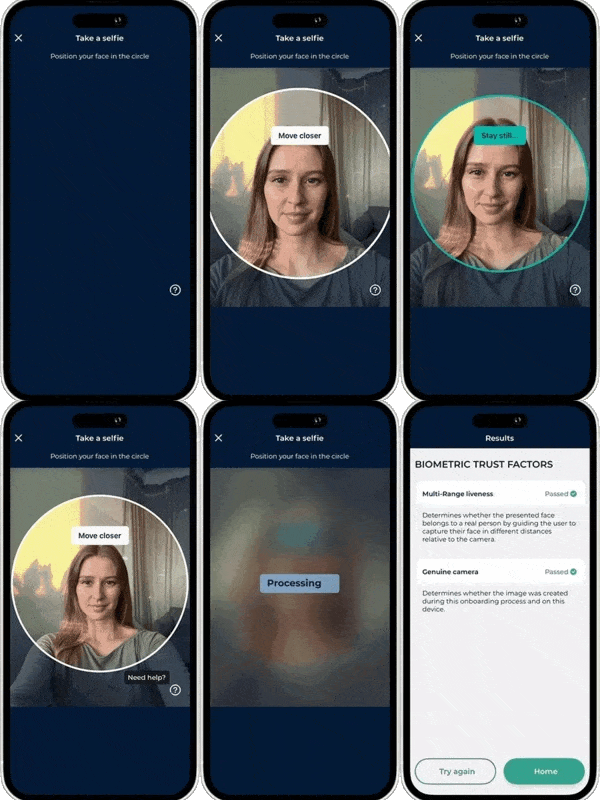
The Multi-Range Liveness Component can be used in combination with other components to develop remote identity verification or digital onboarding solutions, as demonstrated in this demo application.
You can also check out the integration samples in various technologies (React, Vue, Angular, jQuery).
Pre-requisites
UI Component
IMPORTANT: For this component to work as intended, we highly recommend you also have the Auto Capture UI Component installed in your project. You can learn more about why this is important on our developers portal.
Camera requirements
To get appropriate results using this component, the camera resolution on your device needs to be at least 720x720 pixels.
Supported browsers
The Multi-Range Liveness Component was tested with Chrome, Firefox, Edge, Safari, SafariVC, WebView and WKWebView. More information can be found here.
Installation
Installation of the package is available via NPM, PNPM or Yarn:
Using NPM:
$ npm install @innovatrics/dot-multi-range-livenessUsing PNPM:
$ pnpm add @innovatrics/dot-multi-range-livenessUsing Yarn:
$ yarn add @innovatrics/dot-multi-range-livenessUsage
The Multi-Range Liveness Component is a web component which uses custom HTML tag. Properties need to be passed into the component after the tag was rendered.
Head to our developers portal to learn more about:
- Initial setup
- Usage with TypeScript
- Hosting SAM wasm
- Troubleshooting
- Properties
- Callback parameters
- Multi capture capabilities
- Error handling
- Custom events - communication between the Multi-Range Liveness Component and the Auto Capture UI Component
- Examples of using the Multi-Range Liveness Component and the Auto Capture UI Component together
Changelog
See changelog here.
License
The Multi-Range Liveness Component is available under Innovatrics proprietary license.
The component can be used in a freemium mode without a license agreement. However, please note that the free version includes a watermark overlay in the component.
To obtain a license agreement and use the component without the overlay, please contact us at support@innovatrics.com.