



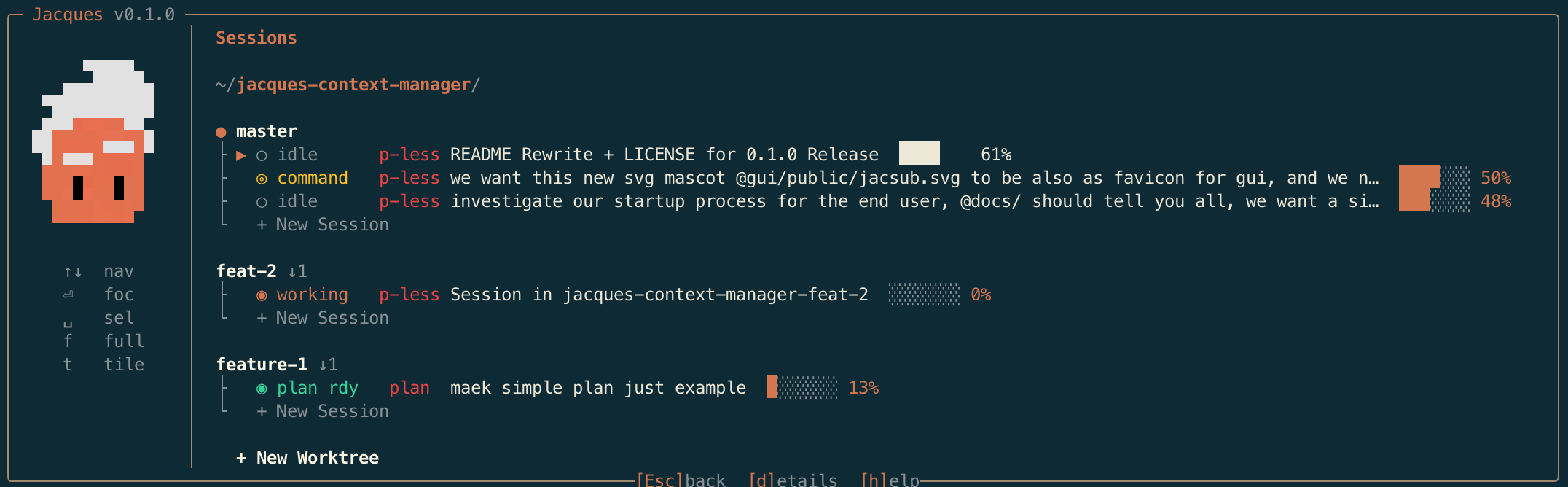
Navigate through many AI coding sessions and local worktrees.
Monitor Claude Code, Gemini CLI, Codex, and OpenCode — all from one tool.
Manage multiple sessions and repos.
Install it with a single command:
npx jacquesNo global install needed. First run auto-detects missing setup and walks you through it.
Available for macOS, Windows, and Linux.
Features • Who Is This For • Commands • Architecture • Roadmap • Development
Installation
npx jacquesThat's it. First run detects missing setup and launches the interactive wizard automatically. After setup, you go straight to the dashboard.
Need to reconfigure later? Run npx jacques setup anytime.
Other ways to install
# Global install (faster startup after first run)
npm install -g @jacques-ai/cli
jacques

# pnpm
pnpm add -g @jacques-ai/cli
jacques

# bun
bunx jacques
bun add -g @jacques-ai/cli
jacques
npx vs global install: npx runs directly without installing — great for trying it out. A global install (npm i -g) means jacques is always available and starts faster since it skips the download step.
Requirements: Node 20+, Python 3.8+, and at least one supported AI coding tool (Claude Code, Gemini CLI, Codex, or OpenCode).
Documentation map: docs/README.md
Windows notes
Windows 10/11 is fully supported. Python must be available as python (not python3). PowerShell 5.1+ is required (pre-installed on Windows 10+).
Known limitations on Windows:
- No terminal persistence — managed terminals are lost on server restart (no tmux)
- No terminal focus detection — all sessions appear equally active
- Direct PTY backend only — tmux backend is unavailable
See docs/PLATFORM-SUPPORT.md for full cross-platform details.
Problems That Jacques Solves
No more running blind between multiple opened terminals, tabs, worktrees and projects.
Everything available from inside a single app — monitor, focus, tile.
One-click to spawn new Claude Code instances and create new worktrees per task.
Never lose track of uncommitted changes on the 107th worktree you've created.
Who Is This For
Just starting with vibe coding — feeling overwhelmed with multiple terminal instances, having a hard time keeping good practices with your workflow. Jacques gives you one place to see everything.
Pre-AI era coders who fully embrace the shift — but feel the headache with these new dynamic, multi-context workflows and gitflows you have to apply now. Jacques keeps it organized.
Multiple screens, dozens of agents — working on different things across different repos. Jacques helps you keep track of all of it.
13-inch MacBook, single screen — a single CLI window will help you get the most out of limited space.
What You Get
Jacques stays simple but powerful. Inside there are a few modules and some additional resources. During the setup process you decide what to install.
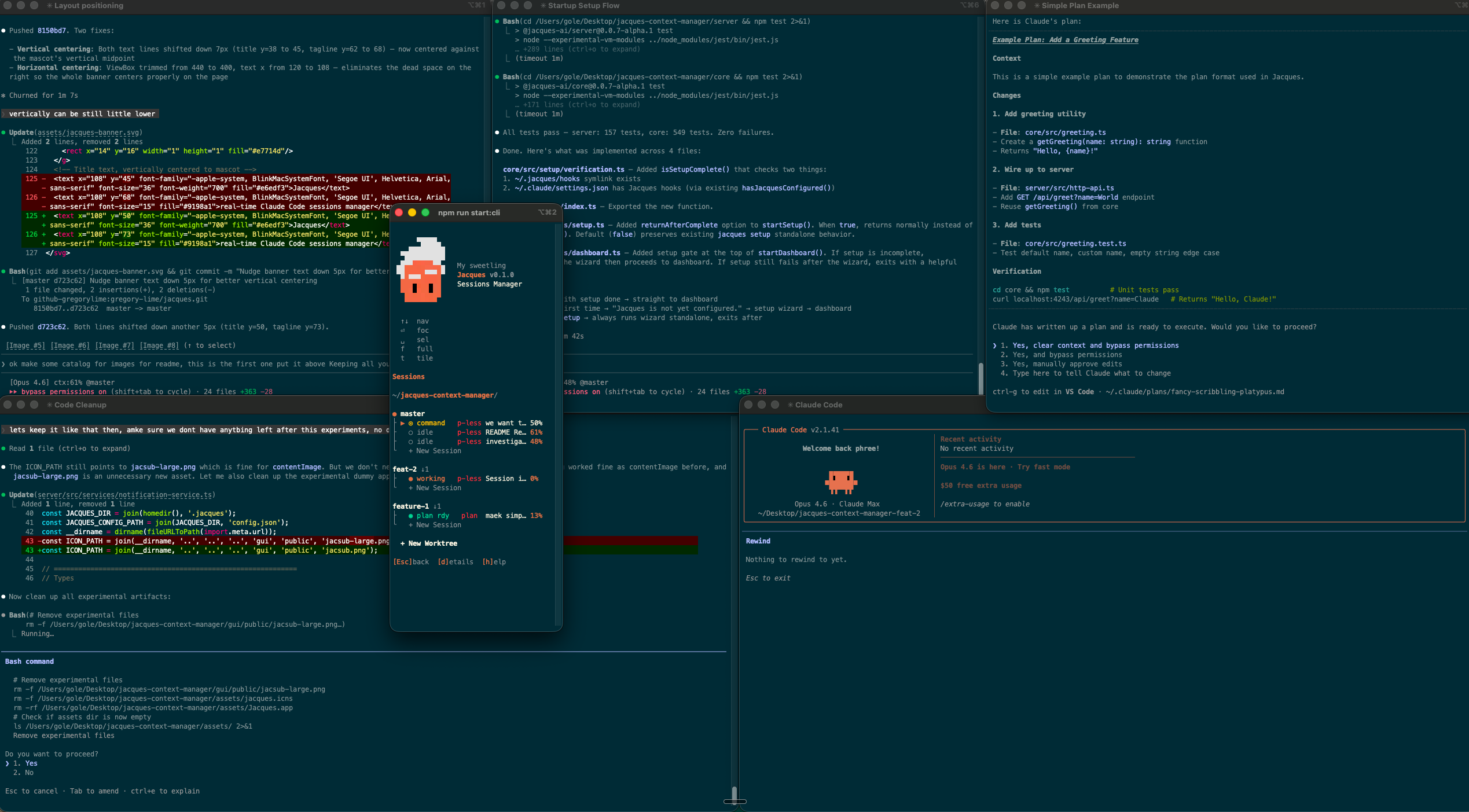
CLI Dashboard
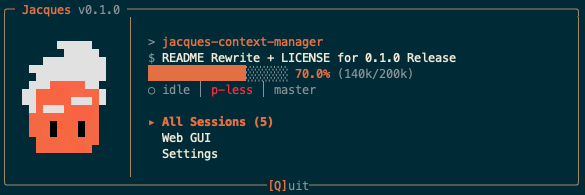
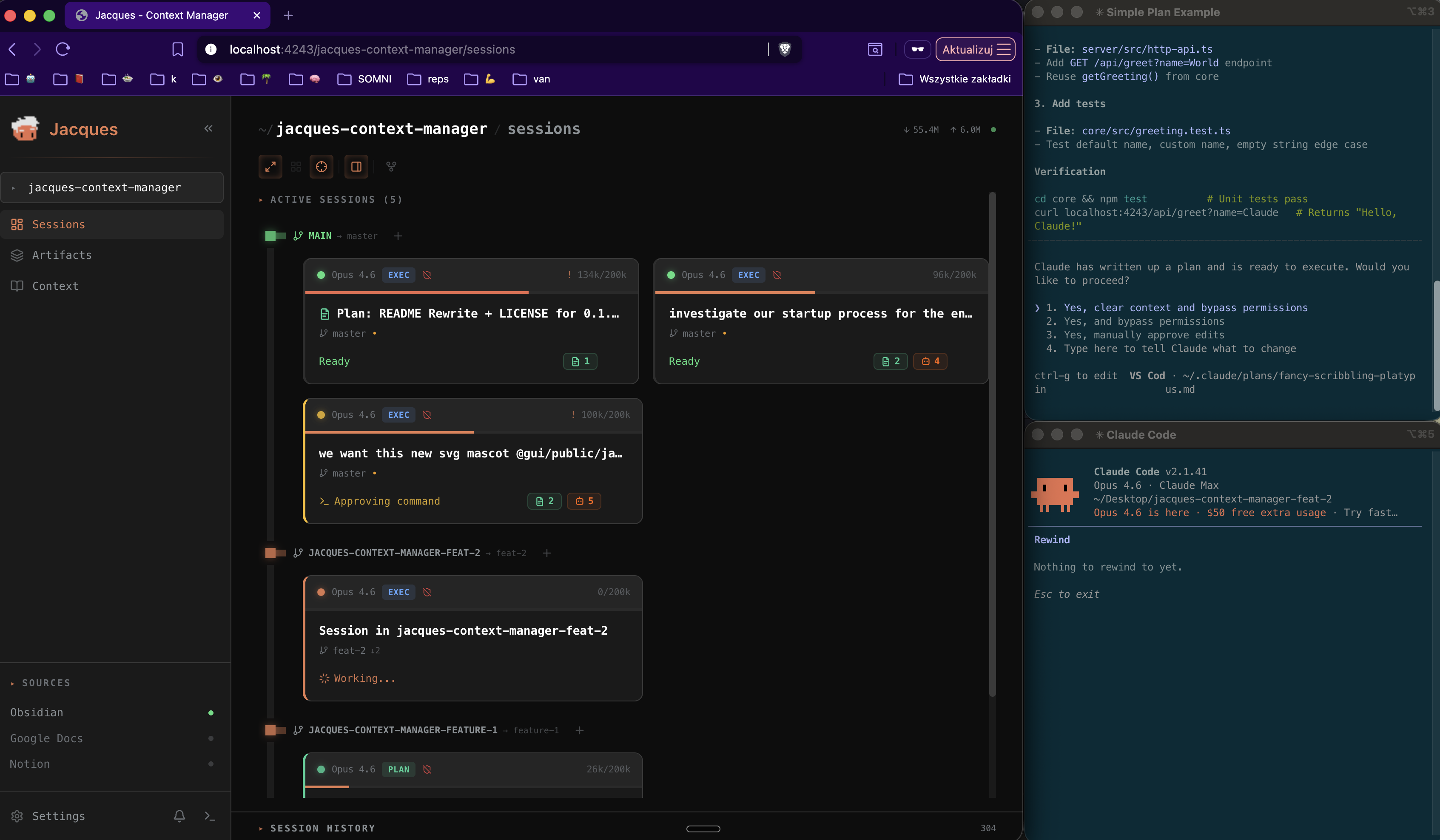
A terminal TUI that shows real-time context usage %, session status, and plan progress for every active AI coding session across Claude Code, Gemini CLI, Codex, and OpenCode. Keyboard-driven — focus sessions, tile terminal windows into a grid, spawn new sessions, and manage git worktrees without ever leaving the dashboard.
Web GUI
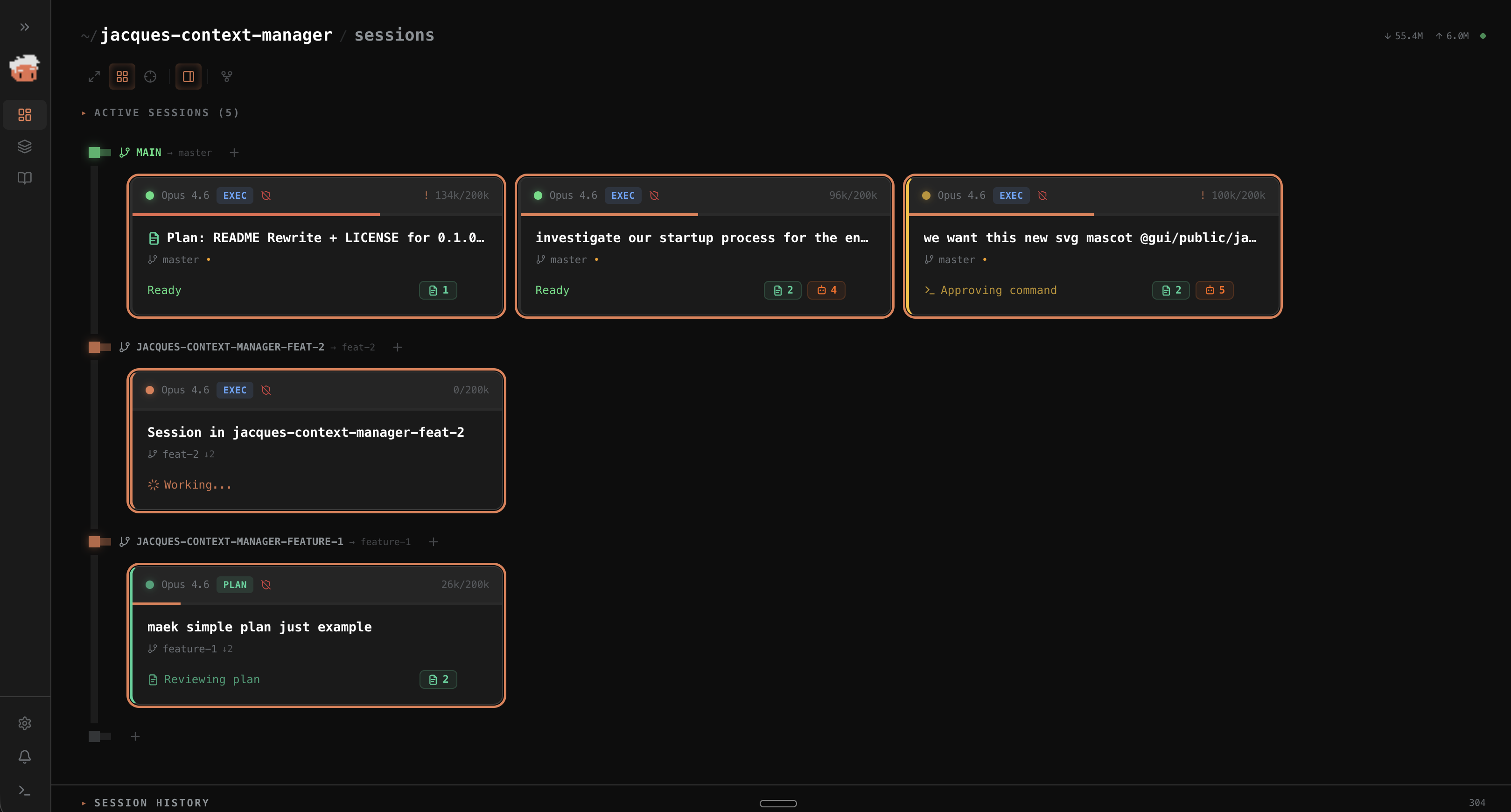
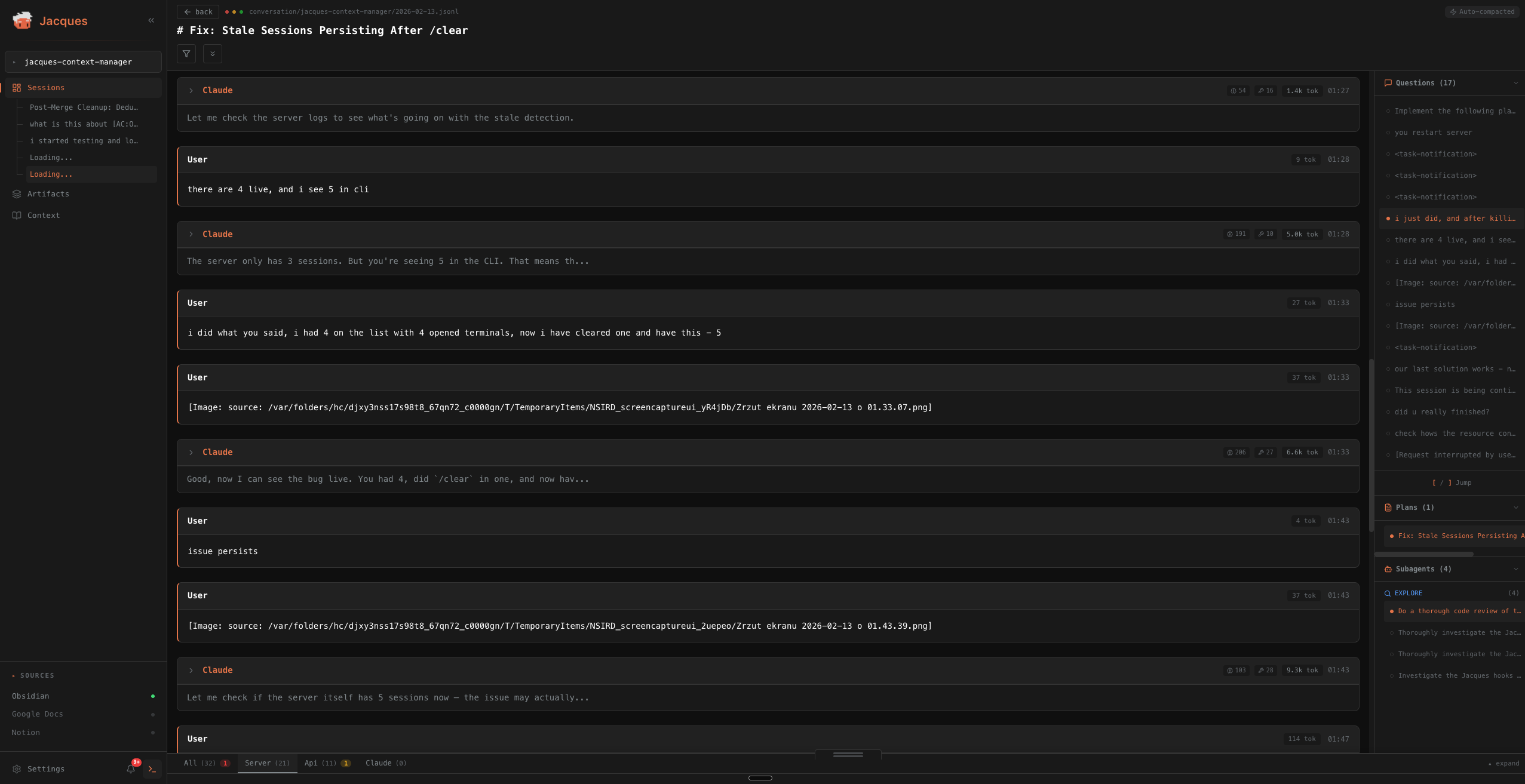
Full browser dashboard at localhost:4243. Browse session history, view extracted plans and subagent results, manage worktrees, launch sessions. Your entire Claude Code conversation archive — searchable.
StatusLine
[Opus] ctx:42% displayed right inside Claude Code. No window switching needed — context usage is always visible.
Archive & Search
Every session is auto-cataloged on exit — even if you Ctrl+C. Plans, subagent results, and session manifests are extracted and saved. Full-text search across all past conversations, filterable by project, date range, and technology.
Notifications
Native OS notifications for events that matter — context thresholds (50%, 70%), plan creation, and auto-compact. Works across macOS (with click-to-focus), Linux, and Windows. The web GUI adds in-app toasts and a notification center with read/unread tracking. Opt-in via Settings with per-category toggles.
The setup wizard lets you choose what to enable. Install just the lightweight CLI or add the web GUI for history browsing.
Roadmap
The first release was built for a vibeathon organized by BridgeMind.
It's early, and it needs improvements. This is a preview of what Jacques will eventually become — your next coding assistant.
More features on the way.
Commands
CLI
| Command | Description |
|---|---|
jacques |
Start dashboard + embedded server |
jacques setup |
Interactive setup wizard (re-run anytime to reconfigure) |
jacques status |
Show current session status |
jacques list |
List active sessions as JSON |
jacques search <query> |
Search archived conversations |
jacques archive-stats |
Show archive statistics |
jacques update |
Check for and install the latest version |
jacques --version |
Show version |
jacques --help |
Show all commands |
Search options: -p/--project, --from/--to, -t/--tech, -l/--limit, --json
npm scripts
| Script | Description |
|---|---|
npm run start:server |
Server + web GUI only |
npm run dev:gui |
GUI dev server (hot reload) |
npm run build:all |
Rebuild all packages |
npm run start:remote |
Server + GUI with Tailscale remote access |
npm run stop:server |
Stop running server |
Architecture
AI Coding Tools
  Claude Code · Gemini CLI · Codex · OpenCode
    │  IPC Socket (/tmp/jacques.sock)
    ▼
┌─────────────────────────────────┐
│  Jacques Server (Node.js/TS)    │
│  HTTP + WebSocket :4243         │
└─────────────────────────────────┘
    │              │
    ▼              ▼
 CLI TUI      Web GUI
(terminal)  (localhost:4243)
AI coding tools (Claude Code, Gemini CLI, Codex, OpenCode) report lifecycle events (start, tool use, idle, context updates) over an IPC socket via per-tool event adapters. The server aggregates state and broadcasts to connected clients. Running jacques starts the server, CLI, and web GUI in a single process.
Terminal I/O
Jacques spawns and manages terminal sessions through node-pty (prebuilt binaries for macOS, Linux, Windows — arm64 + x64). Two backends handle the actual I/O, selected automatically at startup:
                        ┌─────────────────────────────┐
                        │       Web GUI / CLI          │
                        │      (xterm.js viewer)       │
                        └──────────┬──────────────────┘
                                   │ binary WebSocket
                        ┌──────────▼──────────────────┐
                        │     PtyBridge (base class)   │
                        │  scrollback · batching · seq │
                        └──────┬───────────┬──────────┘
                               │           │
                ┌──────────────▼──┐  ┌─────▼───────────────┐
                │  TmuxPtyBridge  │  │   DirectPtyBridge    │
                │  pty.spawn(     │  │   pty.spawn(shell)   │
                │   tmux attach)  │  │                      │
                └────────┬────────┘  └──────────┬──────────┘
                         │                      │
                    tmux session            shell process
                   (survives restarts)     (dies with server)
tmux backend (macOS, Linux — when tmux is installed):
- Terminal sessions persist across server restarts and crashes
- Runner scripts keep running even if you restart Jacques
- "Open in Terminal" attaches to the live tmux session
- Server recovery re-discovers and re-bridges surviving sessions on startup
Direct PTY backend (Windows always, macOS/Linux without tmux):
- Terminal sessions are tied to the server process — stopping the server kills all terminals
- Runner scripts are lost on server restart
- "Open in Terminal" opens a new shell in the same directory (not the same session)
- No recovery — everything starts fresh
Platform Support
| macOS | Linux | Windows | |
|---|---|---|---|
| Terminal backend | tmux (persistent) | tmux (persistent) | Direct PTY (non-persistent) |
| Fallback | Direct PTY if no tmux | Direct PTY if no tmux | N/A (always direct) |
| IPC transport | Unix socket | Unix socket | Named pipe (\\.\pipe\jacques) |
| Window tiling | AppleScript | wmctrl (X11 only) | PowerShell + Win32 |
| Focus detection | iTerm2, Terminal.app | Not supported | Not supported |
| Wayland | N/A | No tiling support | N/A |
tmux is recommended on macOS and Linux (brew install tmux / sudo apt install tmux). Set JACQUES_FORCE_DIRECT_PTY=1 to use the direct backend even when tmux is available.
See docs/PLATFORM-SUPPORT.md for full cross-platform details.
Configuration
| Item | Location |
|---|---|
| Jacques config | ~/.jacques/config.json |
| Jacques secrets | ~/.jacques/secrets.json |
| Tool adapter config | ~/.claude/settings.json |
| Per-project catalog | {project}/.jacques/ |
config.json stores preferences, UI settings, and source integration metadata (non-sensitive fields). secrets.json stores Jacques' own OAuth tokens and API keys (GitHub, Google Docs, Notion) with restrictive file permissions (0600 on Unix). Both files are managed by ConfigManager — see docs/STATE.md for details.
Environment variables (all optional):
| Variable | Default | Purpose |
|---|---|---|
JACQUES_HTTP_PORT |
4243 |
HTTP + WebSocket port |
JACQUES_TAILSCALE_AUTH |
false |
Enable Tailscale remote access auth |
JACQUES_FORCE_DIRECT_PTY |
unset | Force direct PTY backend (skip tmux) |
See docs/PLATFORM-SUPPORT.md for Windows paths and cross-platform details.
Troubleshooting
Sessions not appearing
Restart Claude Code so adapter events reconnect to Jacques. If sessions still do not appear, verify the server is listening on /tmp/jacques.sock and check the Jacques server logs for event-handler errors.
Server won't start
A zombie process may be holding the port:
npm run stop:server              # Kill zombie process
rm /tmp/jacques.sock             # Remove stale socket (macOS/Linux)
lsof -i :4243                    # Check port conflicts
StatusLine not showing
Check that Claude Code settings include the Jacques StatusLine command, then restart Claude Code.
CLI shows "Disconnected"
The server isn't running. Start it with jacques or npm run start:server.
For other issues, open a GitHub issue.
FAQ
Does Jacques slow down Claude Code?
No. The hooks are lightweight Python scripts that send a single message over a Unix socket. Overhead is negligible.
Do I need to keep the CLI open?
No. The StatusLine integration works independently — context % shows inside Claude Code without any external window. The CLI and web GUI are optional views.
Does it work with multiple projects?
Yes. Jacques discovers all your Claude Code projects automatically and groups sessions by git repo. Switch between projects in the CLI or web GUI.
What happens when a session is killed with Ctrl+C?
Jacques detects the dead process within 30 seconds and extracts the session's plans, subagent results, and manifest to your project's .jacques/ directory. Nothing is lost.
Can I use this with Cursor?
Partial support. Jacques can monitor Cursor sessions but hook integration is still experimental.
Remote Access
Monitor your sessions from your phone or tablet using Tailscale:
npm run start:remoteOne command starts the server with Tailscale Serve proxying HTTPS traffic from your Tailnet. Approve your device with a 6-digit PIN shown on the server terminal. No ports are exposed to the internet — all traffic stays within your private Tailnet.
See docs/REMOTE.md for setup details, architecture, and troubleshooting.
Development
git clone https://github.com/gregory-lime/jacques.git
cd jacques
npm run setup
Build order: core → server → cli → gui (each depends on the previous).
npm run dev:server      # Server with tsc --watch
npm run dev:gui         # GUI with Vite hot reload
npm run build:all       # Full rebuild
Tests
cd server && npm test       # Server tests
cd core && npm test         # Core tests
cd cli && npm test          # CLI tests
Agent repo guides:
- AGENTS.md for shared repository rules
- CLAUDE.md for the detailed development guide
- GEMINI.md for Gemini CLI entry instructions
Star History
License
Built for developers who run AI coding tools at scale.