@kwooshung/cvlar v1.3.8
@kwooshung/cvlar












Why Develop It?
Before Cvlar, for an open-source project, I had to use the following packages to achieve git commit standardization, version management, and automatic changelog generation. Additionally, I utilized my own project standard-version-helper for interactive console-based version upgrades.
Naturally, there was no feature for automatic version publishing in Github Actions.
With Cvlar, you only need to optionally retain commitlint to access all previously mentioned functionalities and more.
commitizen- commitlint
commitlint-config-czcommitlint-config-git-commit-emojiconventional-changelogconventional-changelog-clicz-conventional-changelogcz-customizablestandard-version@kwooshung/standard-version-helper
Why Name It Cvlar?
- C:
commit - V:
version - L:
changelog - A:
auto - R:
release
Although named Cvlar, its features are not limited to these.
Features at a Glance
- Easy to Remember: Simply use the
cvlarcommand, orcvlar -h/helpfor help; - Effortless Script Selection and Execution: from
package.json'sscripts; - Package Management:
- Easily choose between
npm,yarn,pnpm, or other package managers for automatic installation; - Configurable sources without affecting existing settings;
- Easily choose between
- Git Commit:
- Smooth selection of 'commit types' and 'commit scopes';
- Input for 'short descriptions', 'long descriptions', 'closing issues', custom 'fields', 'commit message' validation, and auto 'push to repository';
- Support for auto-translating
commit messagesinto specified languages via Google Translate, especially useful for non-English speakers;
- Version Management:
- Easily 'upgrade version numbers', choose 'major', 'minor', 'patch', or 'preview versions', with 'preview versions' automatically iterating, e.g.,
v1.0.0-preview.1,v1.0.0-preview.2; - Specify 'version upgrades' or 'downgrades';
- Auto-generate 'changelogs' and 'push to repository';
- Easily 'upgrade version numbers', choose 'major', 'minor', 'patch', or 'preview versions', with 'preview versions' automatically iterating, e.g.,
- Log Management: Easy 'template' setup, auto-generate
changelogsfromgit messages, with Google Translate support for multiple languages, and auto 'push to repository'; - Automatic Publishing:
- In
Github Actions, usingcvlar -rwill analyze thelogfile and automatically publish it to the repository's release page. - See: This repository's releases page;
- In
- Simple Configuration:
- Initiate with
cvlar -i/initfor interactive configuration file creation; - Multilingual interactive menu during initialization; subsequent use supports any language, configurable in
cvlar's file; - Config file supports
js,cjs, andmjs;- To configure
commit typesandcommit scopesonce; - Discovered that
commitlintdoes not recognizemjs, hence onlycjsandjsconfiguration formats are currently supported.
- To configure
- See:
- Initiate with
- Customizable menu languages through configuration
- Boosts work efficiency
- User-friendly for beginners
Installation
npm
npm install @kwooshung/cvlar -Dyarn
yarn add @kwooshung/cvlar -Dpnpm
pnpm add @kwooshung/cvlar -DYou may choose to install this package either as a development dependency in your project or globally.
Development Dependency
If you use commitlint, it's recommended to install it within the project. You might need to do the following in .commitlintrc.cjs:
const types = require('./scripts/ks-cvlar.types.cjs');
const scopes = require('./scripts/ks-cvlar.scopes.cjs');
const { ConvertToLintTypes, ConvertToLintScopes } = require('@kwooshung/cvlar'); // Import is necessary
Advantages
Convenient for importing @kwooshung/cvlar.
Disadvantages
You need to configure the cvlar command in package.json under scripts as follows:
{
  "scripts": {
    "cvlar": "cvlar"
  }
}
Then execute with npm cvlar [-xxx]
Global
If you don't use commitlint, it is advisable to install globally.
Advantages
Execute directly with cvlar [-xxx].
Disadvantages
If you need to use commitlint later, you will have to install it again in the project.
Global + Development Dependency Installation (Recommended)
Advantages
- Easy to import
@kwooshung/cvlar. - Execute directly with
cvlar [-xxx].
Disadvantages
- The first time, you need to install it twice, once
globallyand once as adevelopment dependency. Subsequently, you only need to selectively install in the project as needed.
How to Use
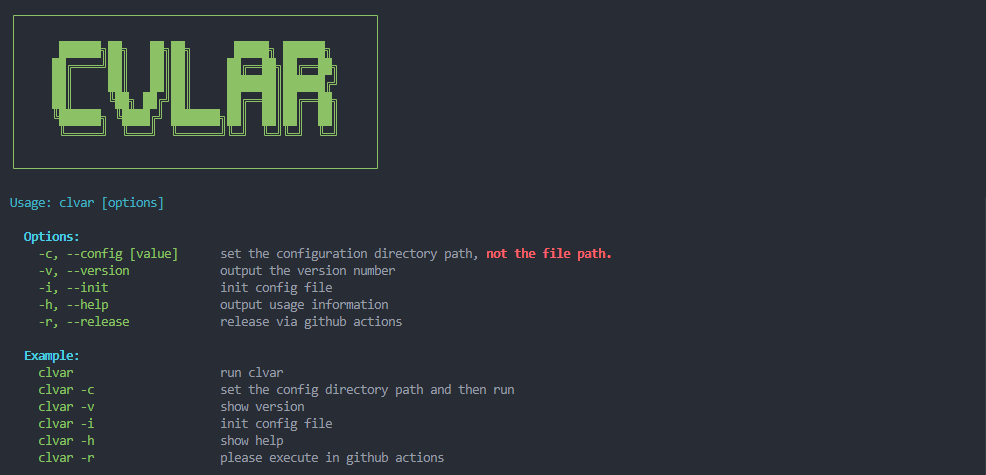
View Help with cvlar -[h, help]
Initialize with cvlar -[i, init]
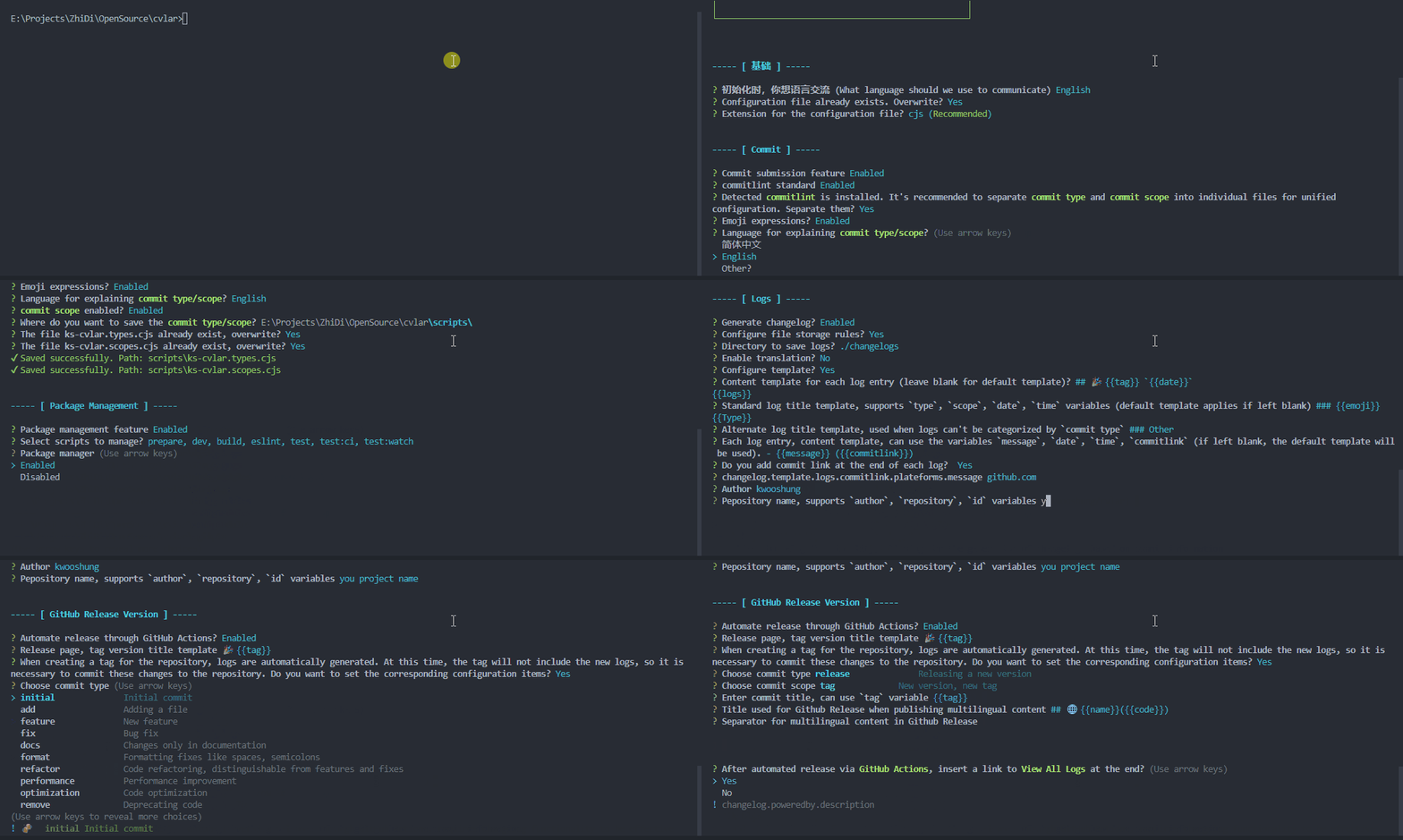
After initialization, the .ks-cvlarrc.cjs configuration file can be placed anywhere. The screenshot above doesn't show the option to specify a save path because it detected an existing configuration file.
- This repository's commit types configuration
- This repository's commit scopes configuration
- This repository's cvlar config;
Main Menu cvlar
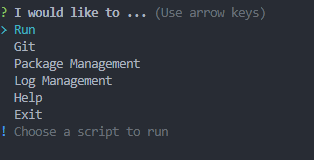
Important Notice
The following images demonstrate the interface using Chinese GIFs for illustration. However, in practice, this menu can be in any language, customizable through the
cvlarconfiguration file. Due to the complexities of recording, English version demonstrations are currently unavailable but will be supplemented when possible. Additionally, English static image screenshots are provided below the titles for reference, if necessary.
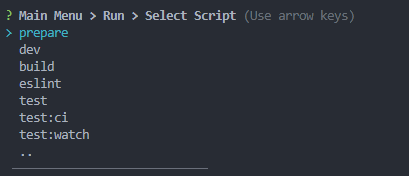
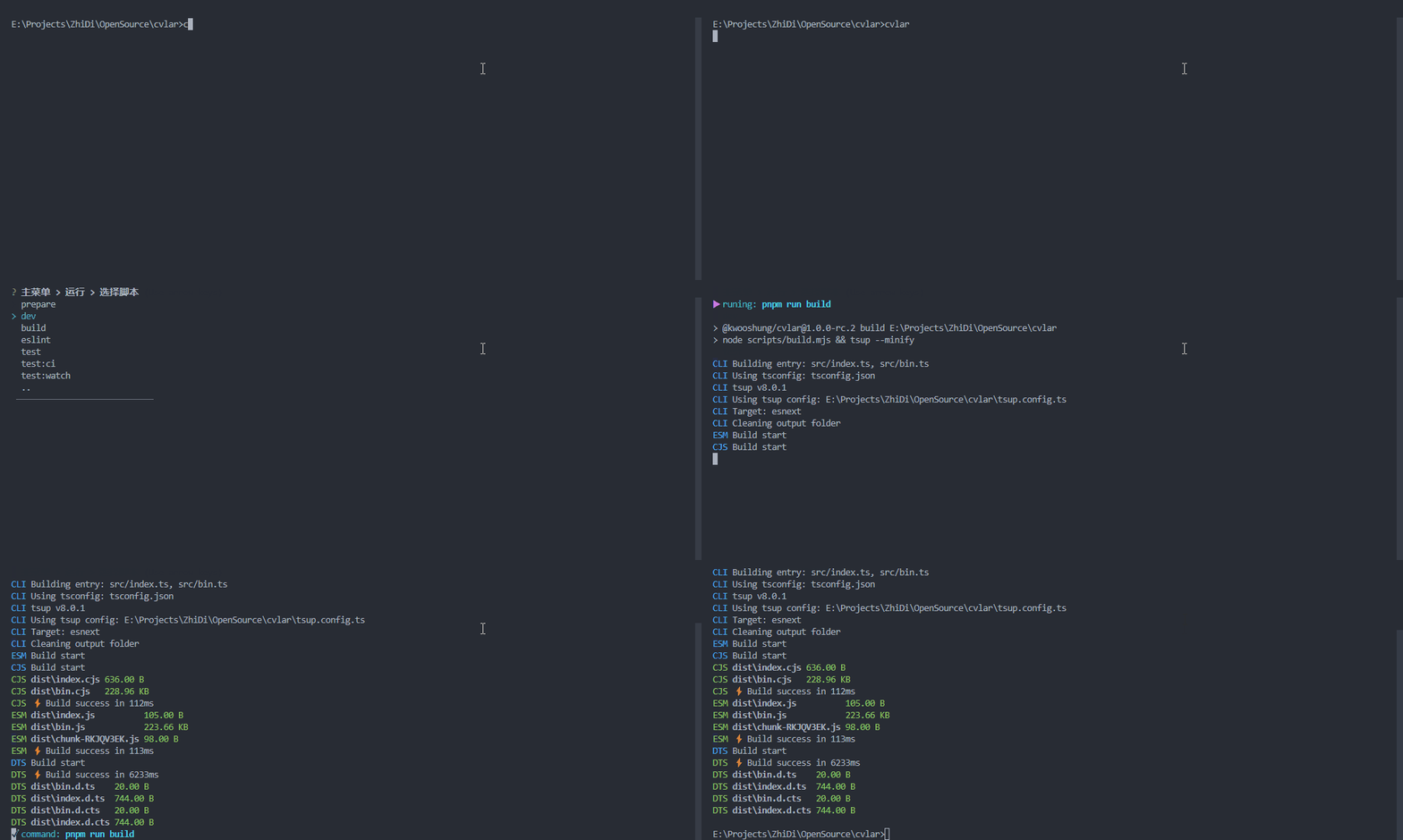
Run package.json script
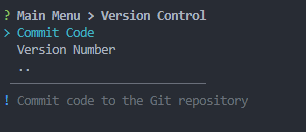
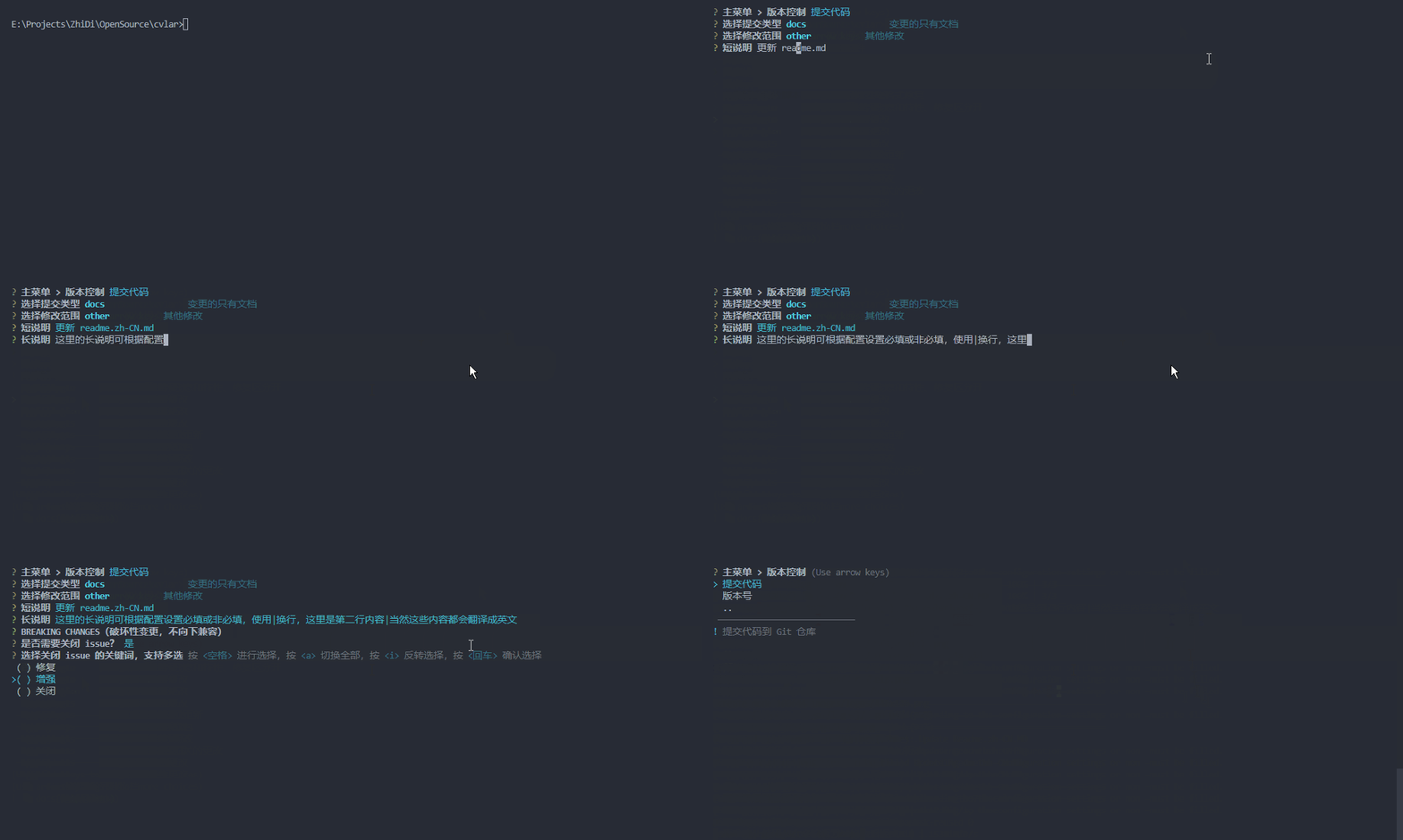
Git Commit
Run Commit Files
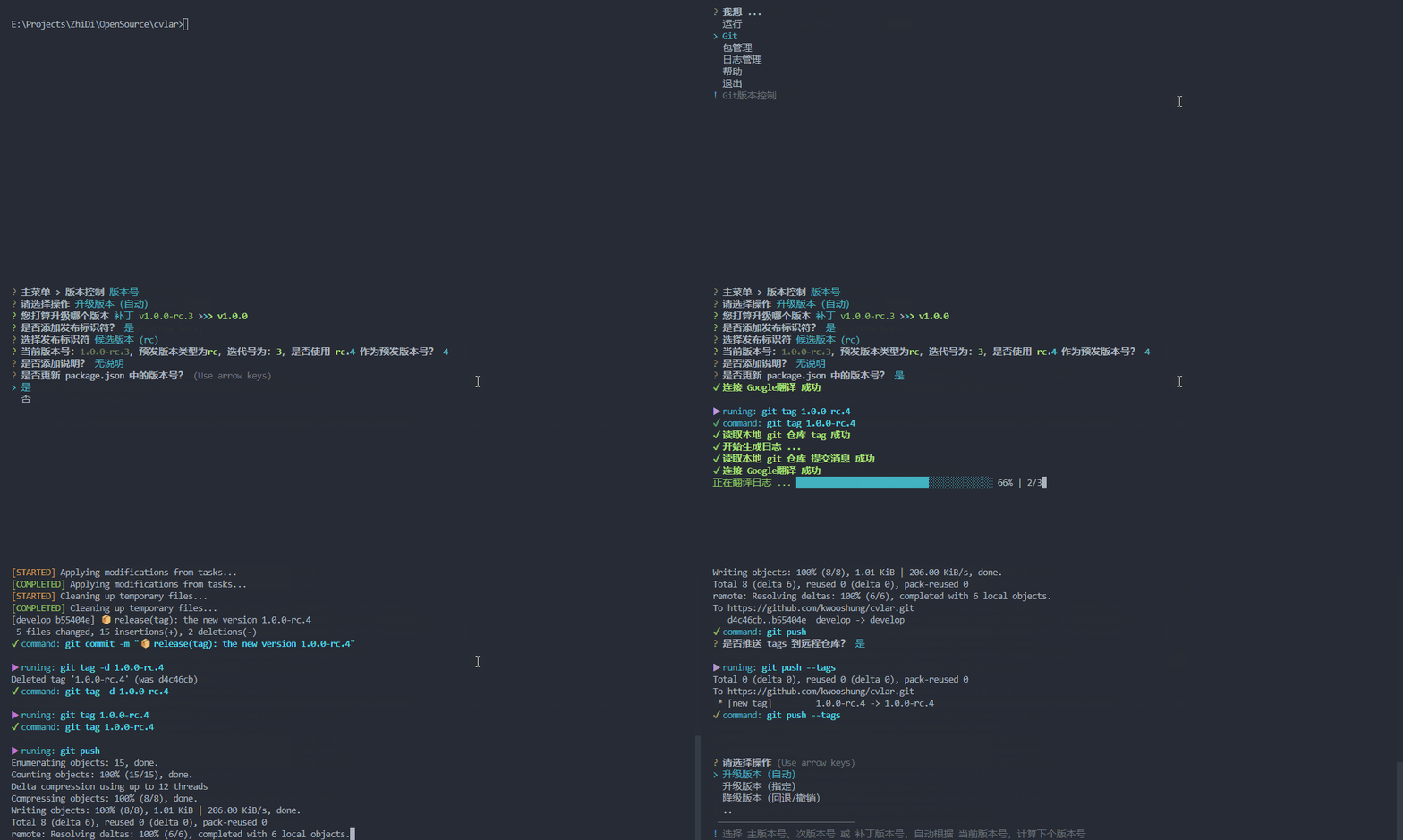
Run Upgrade Version

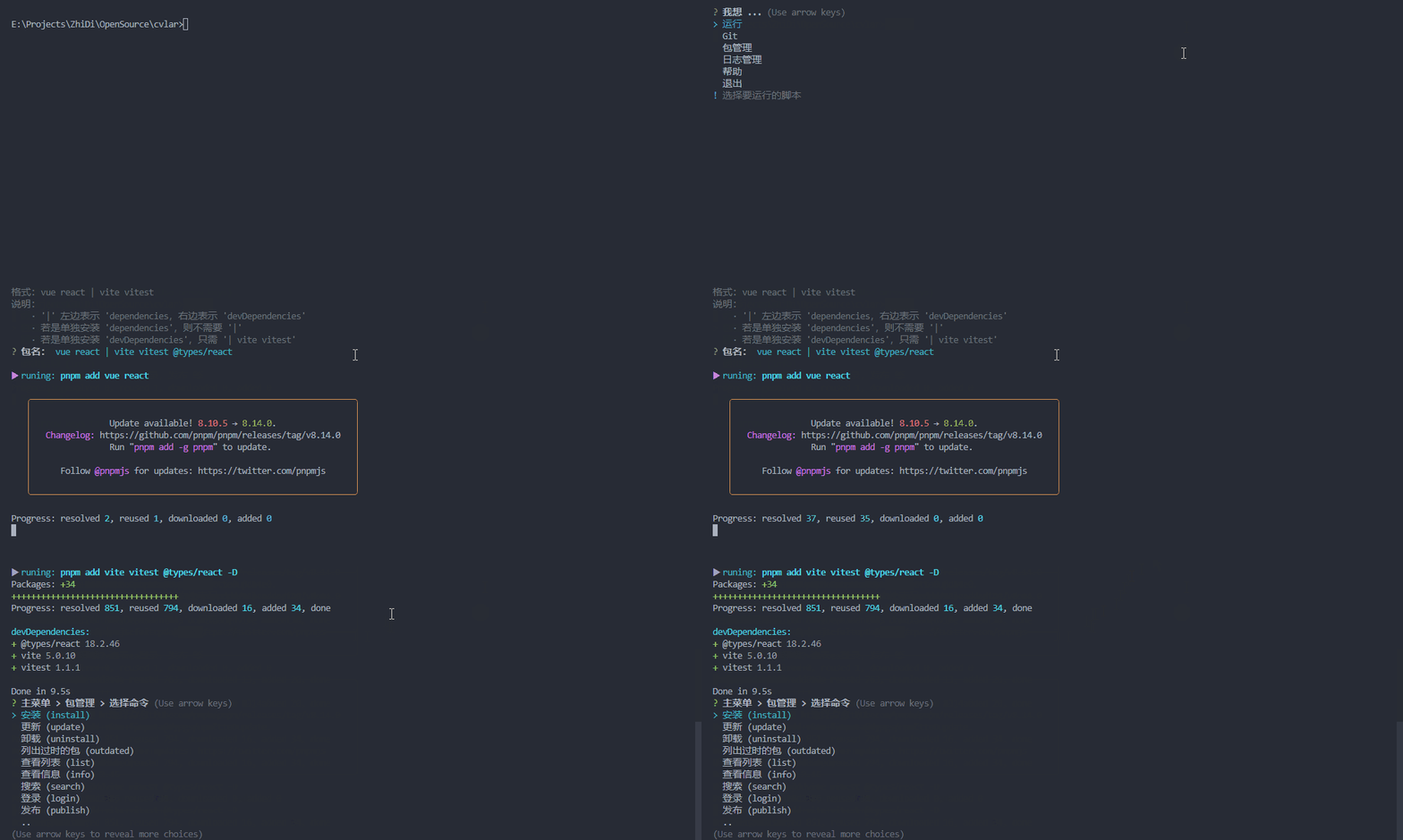
Package Management
Install Dependencies
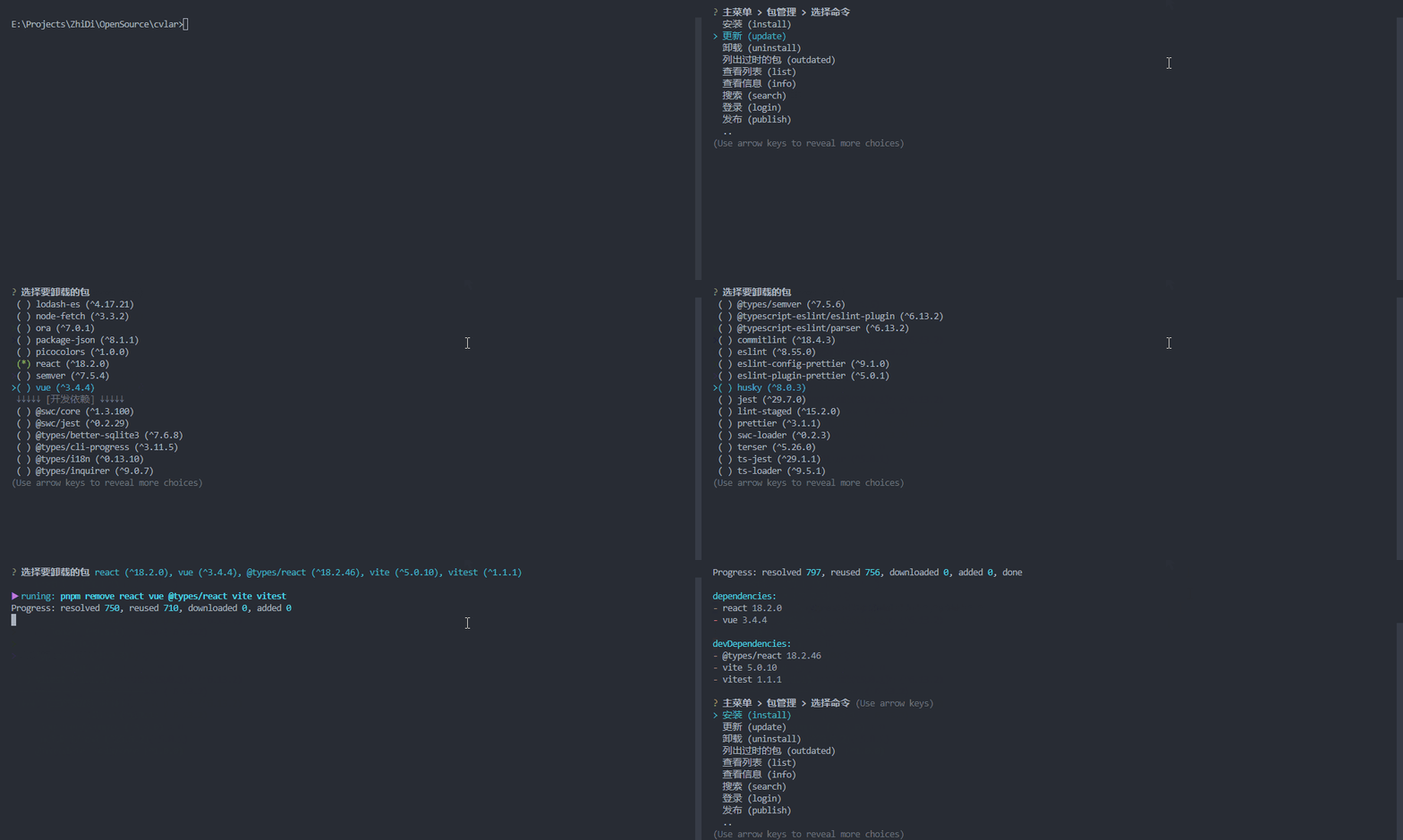
Uninstall Dependencies
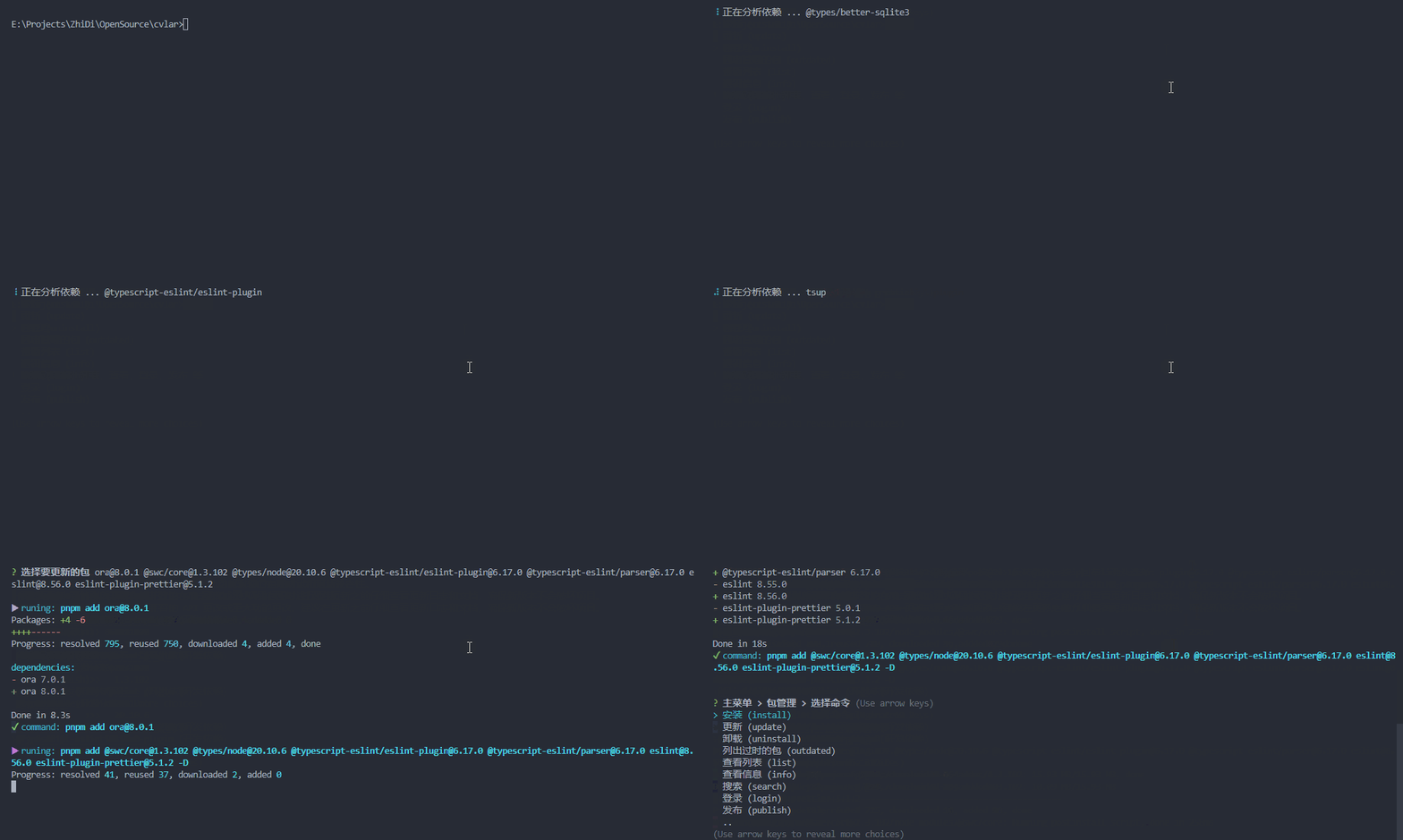
Update Dependencies
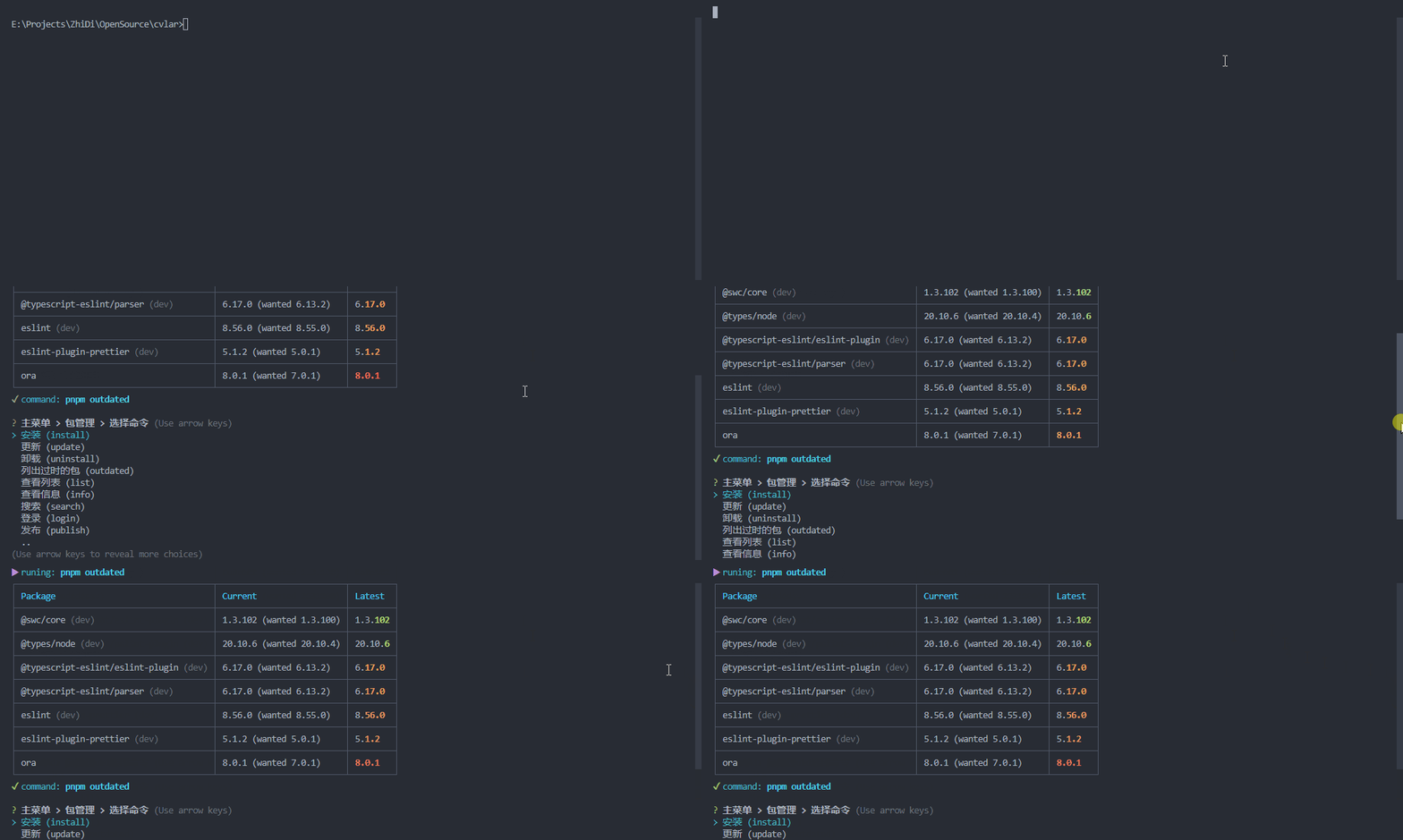
List Outdated Packages
View Dependency List
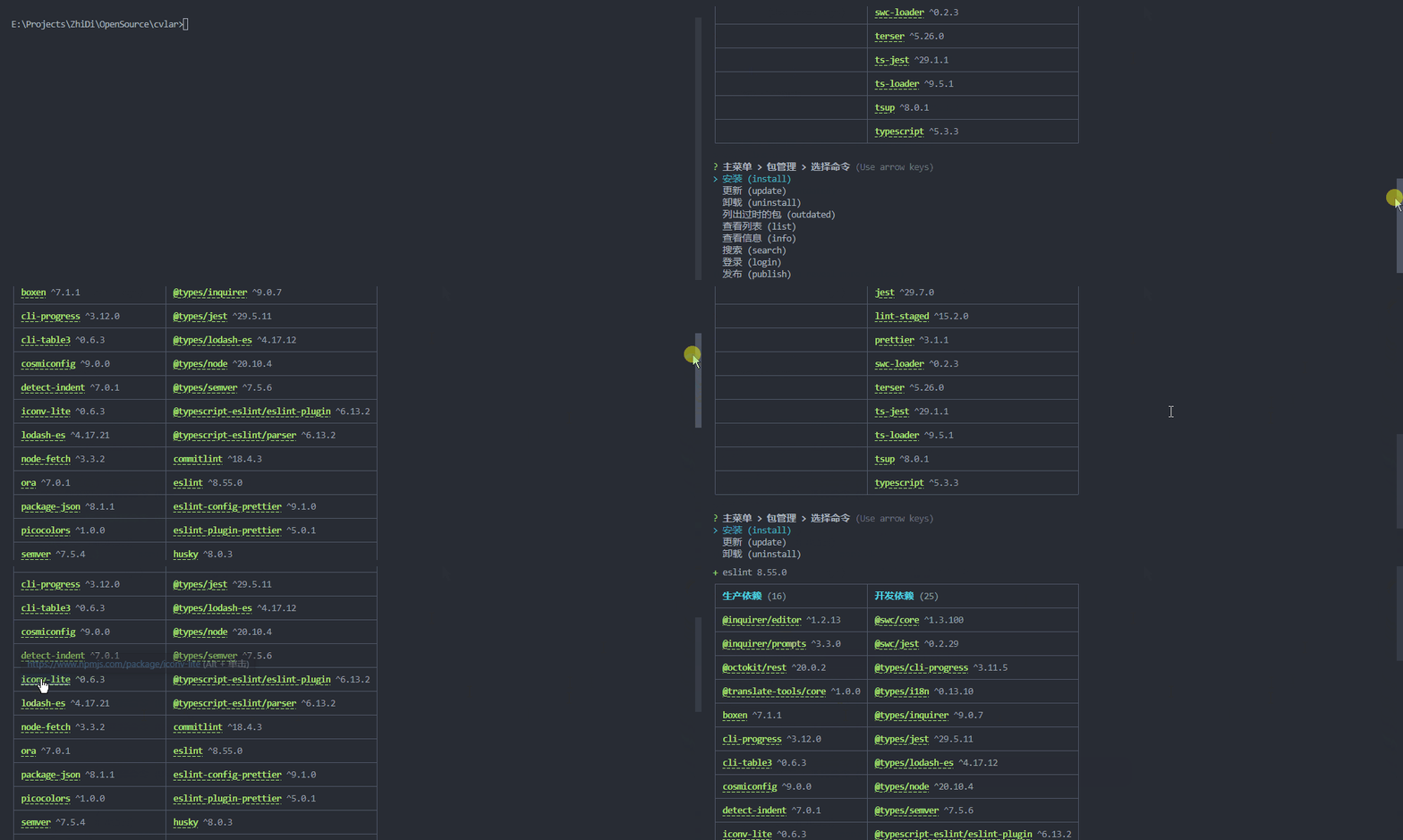
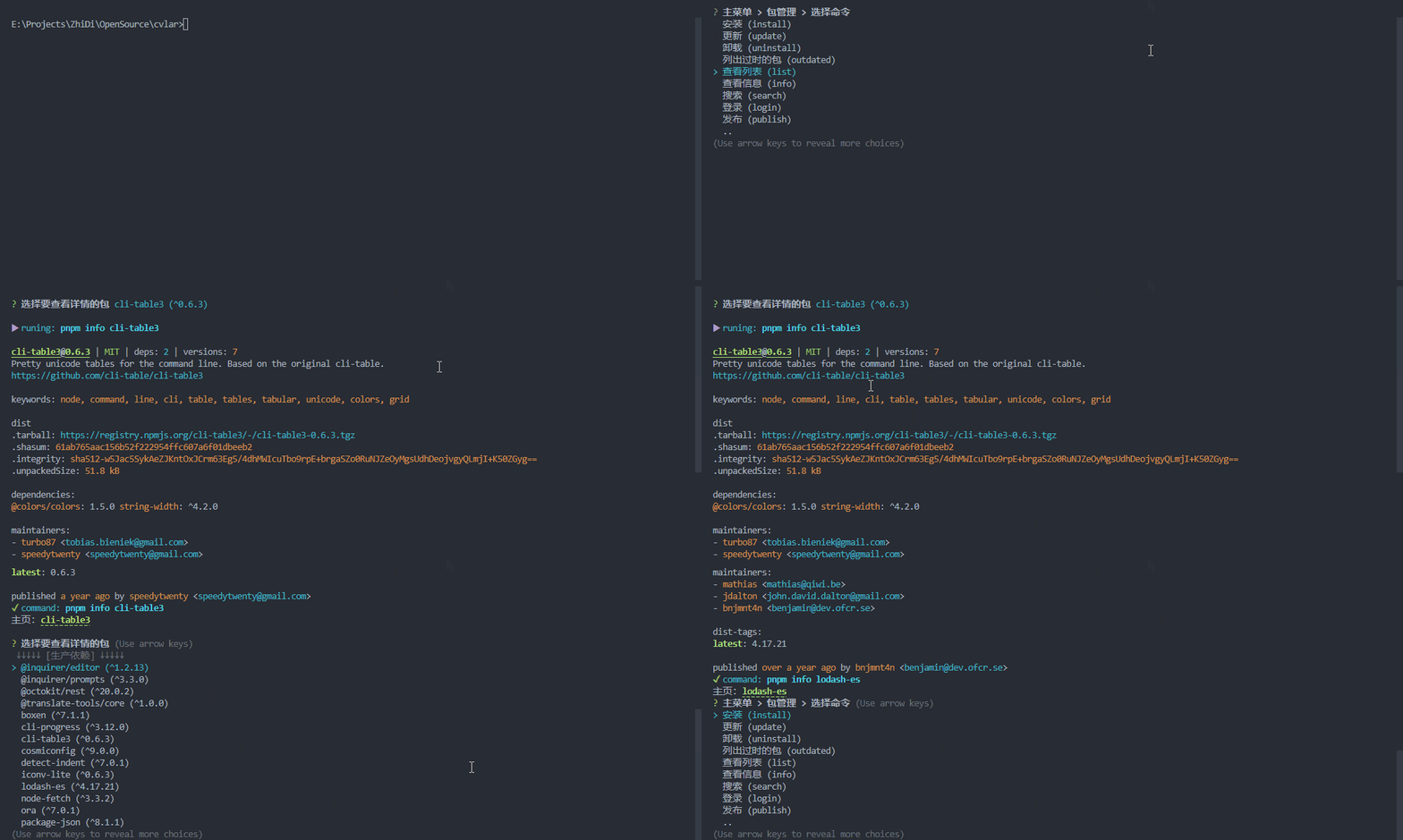
View Package Details
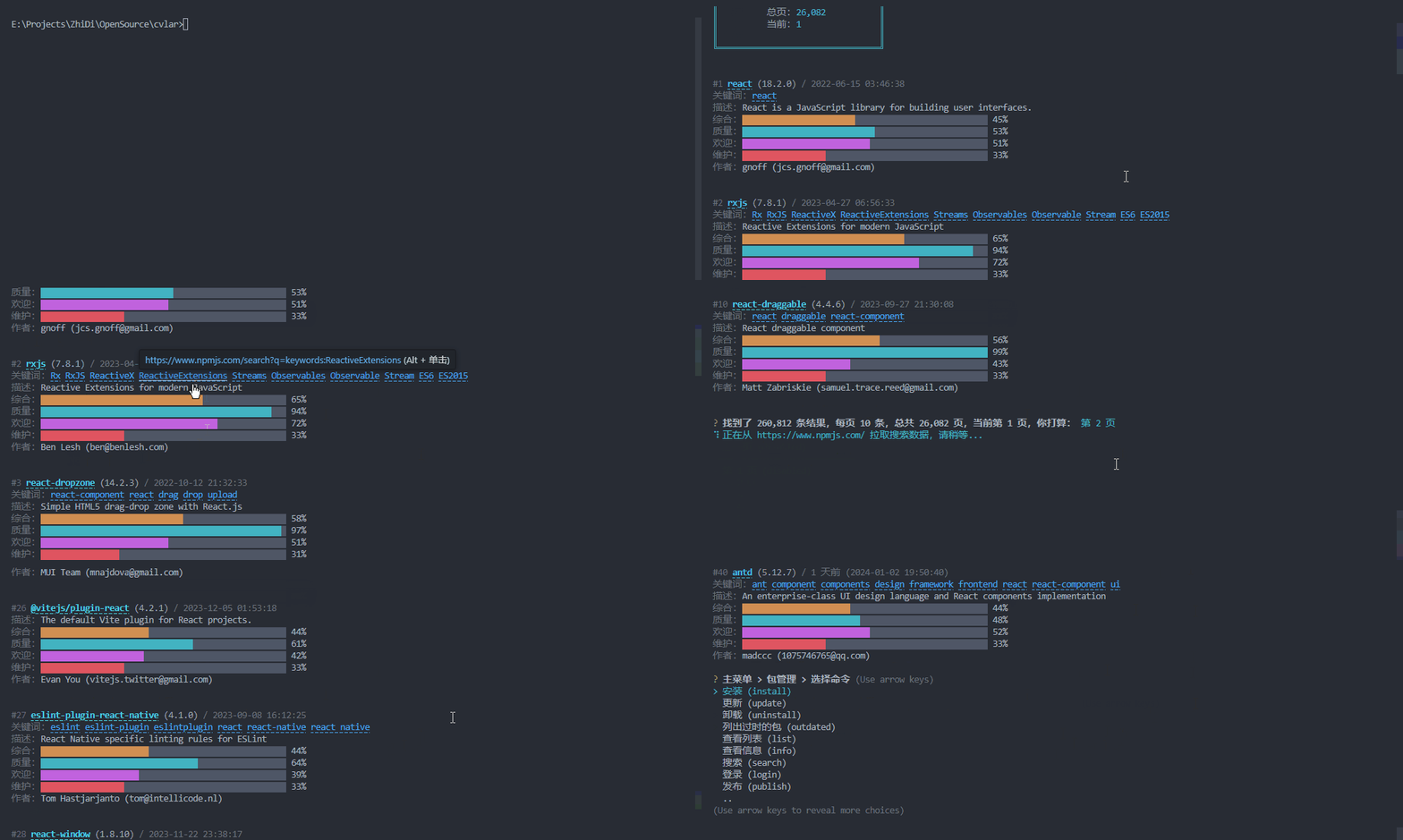
Search for Packages
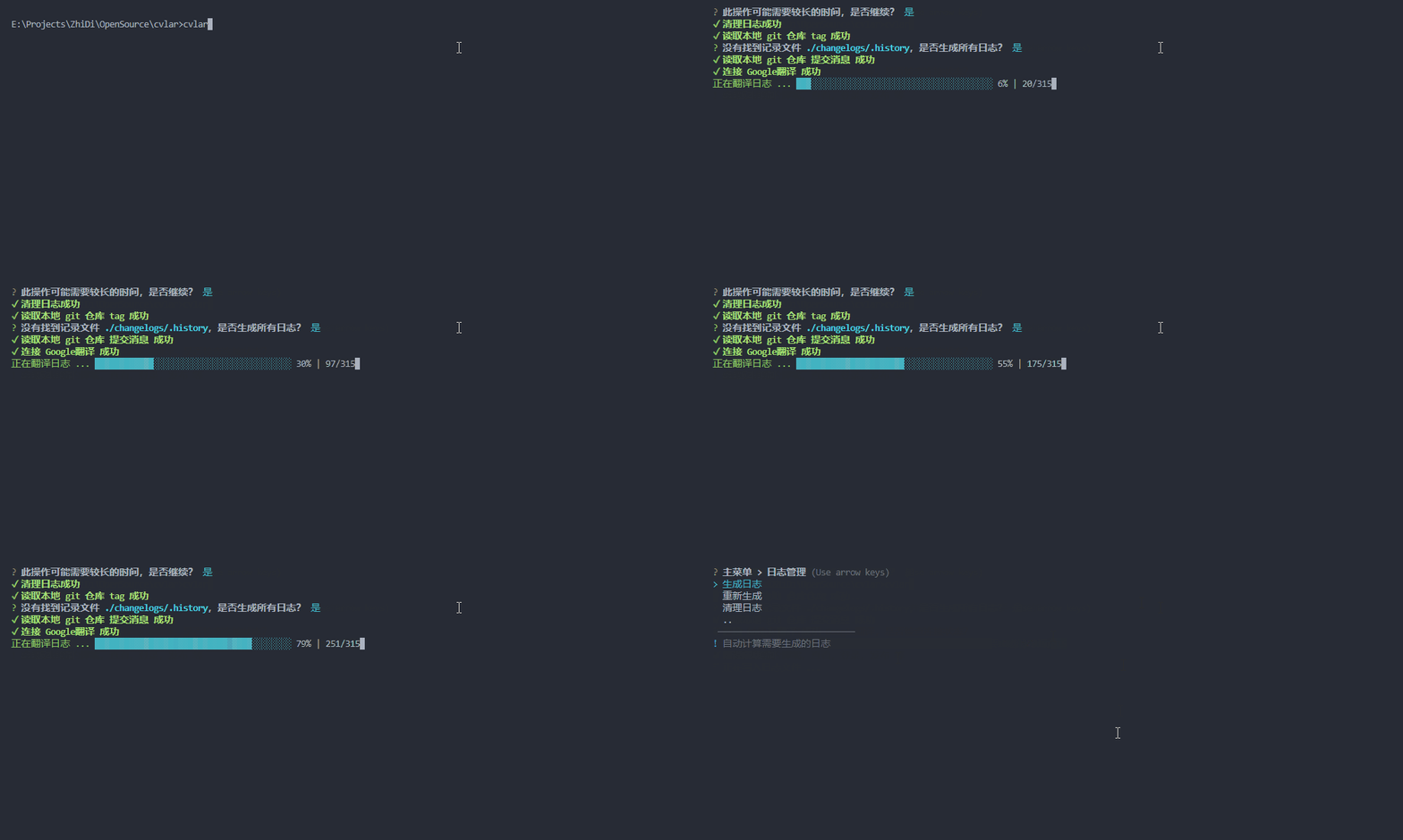
Log Management
Here, Regenerate Logs is used as a demonstration, as it consists of two steps: Clear Logs and Generate Logs.
Automatic Publishing
References
Script Reference
- name: Auto Release
  run: npx cvlar -r
  env:
    GITHUB_TOKEN: ${{ secrets.GITHUB_TOKEN }}
Configuration
Default Search Paths and Files
The commented .mjs files, as previously mentioned, are not recognized by commitlint. Therefore, only cjs and js format configurations are currently supported.
[
  '/ks-cvlar.js',
  '/ks-cvlar.conf.js',
  '/ks-cvlar.config.js',
  //'/ks-cvlar.mjs',
  //'/ks-cvlar.conf.mjs',
  //'/ks-cvlar.config.mjs',
  '/ks-cvlar.cjs',
  '/ks-cvlar.conf.cjs',
  '/ks-cvlar.config.cjs',
  '/ks-cvlarrc.js',
  '/ks-cvlarrc.conf.js',
  '/ks-cvlarrc.config.js',
  //'/ks-cvlarrc.mjs',
  //'/ks-cvlarrc.conf.mjs',
  //'/ks-cvlarrc.config.mjs',
  '/ks-cvlarrc.cjs',
  '/ks-cvlarrc.conf.cjs',
  '/ks-cvlarrc.config.cjs',
  'ks-cvlar.js',
  'ks-cvlar.conf.js',
  'ks-cvlar.config.js',
  //'ks-cvlar.mjs',
  //'ks-cvlar.conf.mjs',
  //'ks-cvlar.config.mjs',
  'ks-cvlar.cjs',
  'ks-cvlar.conf.cjs',
  'ks-cvlar.config.cjs',
  'ks-cvlarrc.js',
  'ks-cvlarrc.conf.js',
  'ks-cvlarrc.config.js',
  //'ks-cvlarrc.mjs',
  //'ks-cvlarrc.conf.mjs',
  //'ks-cvlarrc.config.mjs',
  'ks-cvlarrc.cjs',
  'ks-cvlarrc.conf.cjs',
  'ks-cvlarrc.config.cjs',
  '.ks-cvlar.js',
  '.ks-cvlar.conf.js',
  '.ks-cvlar.config.js',
  //'.ks-cvlar.mjs',
  //'.ks-cvlar.conf.mjs',
  //'.ks-cvlar.config.mjs',
  '.ks-cvlar.cjs',
  '.ks-cvlar.conf.cjs',
  '.ks-cvlar.config.cjs',
  '.ks-cvlarrc.js',
  '.ks-cvlarrc.conf.js',
  '.ks-cvlarrc.config.js',
  //'.ks-cvlarrc.mjs',
  //'.ks-cvlarrc.conf.mjs',
  //'.ks-cvlarrc.config.mjs',
  '.ks-cvlarrc.cjs',
  '.ks-cvlarrc.conf.cjs',
  '.ks-cvlarrc.config.cjs',
  'config/ks-cvlar.js',
  'config/ks-cvlar.conf.js',
  'config/ks-cvlar.config.js',
  //'config/ks-cvlar.mjs',
  //'config/ks-cvlar.conf.mjs',
  //'config/ks-cvlar.config.mjs',
  'config/ks-cvlar.cjs',
  'config/ks-cvlar.conf.cjs',
  'config/ks-cvlar.config.cjs',
  'config/ks-cvlarrc.js',
  'config/ks-cvlarrc.conf.js',
  'config/ks-cvlarrc.config.js',
  //'config/ks-cvlarrc.mjs',
  //'config/ks-cvlarrc.conf.mjs',
  //'config/ks-cvlarrc.config.mjs',
  'config/ks-cvlarrc.cjs',
  'config/ks-cvlarrc.conf.cjs',
  'config/ks-cvlarrc.config.cjs',
  '.config/ks-cvlar.js',
  '.config/ks-cvlar.conf.js',
  '.config/ks-cvlar.config.js',
  //'.config/ks-cvlar.mjs',
  //'.config/ks-cvlar.conf.mjs',
  //'.config/ks-cvlar.config.mjs',
  '.config/ks-cvlar.cjs',
  '.config/ks-cvlar.conf.cjs',
  '.config/ks-cvlar.config.cjs',
  '.config/ks-cvlarrc.js',
  '.config/ks-cvlarrc.conf.js',
  '.config/ks-cvlarrc.config.js',
  //'.config/ks-cvlarrc.mjs',
  //'.config/ks-cvlarrc.conf.mjs',
  //'.config/ks-cvlarrc.config.mjs',
  '.config/ks-cvlarrc.cjs',
  '.config/ks-cvlarrc.conf.cjs',
  '.config/ks-cvlarrc.config.cjs'
];
Specifying the Configuration File
If you wish to store the configuration file in a different location, use the following command to specify the directory. This makes cvlar prioritize the directory specified by -[cd/config-dir].
Note: Specify the folder path, not the file path!
cvlar -[cd/config-dir] xxx/xx/xIt's recommended to set this in the scripts section of package.json:
{
  "scripts": {
    "cvlar": "cvlar -cd xxx/xx/x"
  }
}
Configuration File Description and Reference
Generate the corresponding configuration file using cvlar -i/init, as described in the Initialization section above;
The following two files are configuration files generated by this command, representing configurations in Chinese and English respectively;
Other
Commitlint Configuration
The file .commitlintrc.cjs is a configuration file for commitlint. It is designed for setting up commitlint. To simplify unified management, two separate files, ks-cvlar.types.cjs and ks-cvlar.scopes.cjs, are created. They are used for configuring the types and scopes in commitlint and also for configuring the commit menu in cvlar.
In .commitlintrc.cjs, you can import the ks-cvlar.types.cjs and ks-cvlar.scopes.cjs files. However, since the commit configuration in cvlar differs from that in commitlint, you need to import two functions like this:
const { ConvertToLintTypes, ConvertToLintScopes } = require('@kwooshung/cvlar');This facilitates conversion to commitlint configuration. For detailed usage, please refer to .commitlintrc.cjs.
When Translating Commit Messages with Commitlint Enabled
If the translation feature for commit message is enabled and the standard short description length is 72 characters, it's not advisable to set commitlint's header-max-length rule to 72 characters as well. Translated commit messages may exceed 72 characters, causing commitlint errors. There are three recommended settings for commitlint's header-max-length rule:
Option 1 (Recommended): Set commitlint's header-max-length to double or more of the normal character limit, such as 200
module.exports = {
  extends: ['@commitlint/config-conventional'],
  rules: {
    'header-max-length': [2, 'always', 200]
  }
};
Option 2: Disable commitlint's header-max-length rule, but future implications are uncertain
module.exports = {
  extends: ['@commitlint/config-conventional'],
  rules: {
    // 'header-max-length': [0, 'always', 72]
  }
};
Option 3: Set commitlint's header-max-length as follows
module.exports = {
  extends: ['@commitlint/config-conventional'],
  rules: {
    'header-max-length': [0, 'always']
  }
};
.gitignore: Ignoring Temporary Files in Git Commit
It's recommended to add the following line to your .gitignore file to prevent the accidental inclusion of cvlar temporary files in your repository.
This helps avoid the unintended submission of temporary files under certain edge cases, preventing unnecessary files in your repository.
Such files are automatically deleted when appropriate, so there's no need to worry. This practice serves as a double safeguard!
.cvlar-commit-message-*.tmpDevelopment & Maintenance
- This project was primarily developed to accelerate development processes. Given the limited daily development time and tight schedules, some unforeseen
issuesmay arise. Your valuable opinions and suggestions are most welcome. Please submit them in a friendly and kind manner! - Recently, due to a hectic work schedule, responses to
issuesandpull requests (pr)might be slower than usual. Your understanding is greatly appreciated. However, I still encourage everyone to actively submitissuesandpr. As time permits, they will be addressed collectively! - Given my time constraints, I highly recommend submitting
pull requests (pr)as it facilitates faster resolution ofissues!
2 years ago
2 years ago
2 years ago
2 years ago
2 years ago
2 years ago
2 years ago
2 years ago
2 years ago
2 years ago
2 years ago
2 years ago
2 years ago
2 years ago
2 years ago
2 years ago
2 years ago
2 years ago
2 years ago
2 years ago
2 years ago
2 years ago
2 years ago