
Baron
One pane of glass from backlog to deploy — for AI coding agents. Drive issues, branches, PRs, CI, deployments, and notifications across any stack through a single normalized contract, instead of hardwiring one vendor's API into your prompts.
The problem
AI coding agents bake one vendor's API and one team's process into prompts. The moment your issues live in Azure DevOps but your code is on GitHub, or your board columns aren't literally "To Do / Done", or you switch trackers next quarter — the prompts break, and the agent falls back to raw, vendor-specific tools. You've hardcoded vendor lock-in into the way you work.
What Baron does
Baron puts a normalized contract between the agent and your providers. The agent speaks one
abstract vocabulary — work items, branches, PRs, CI runs, deployments, notifications, in terms of
roles (backlog → ready → in_progress → in_review → done, plus blocked) — and Baron translates
to each provider's real API, states, and quirks. Mix providers freely (Linear issues + GitHub PRs +
Slack notifications). Same prompt, any stack.
What it looks like
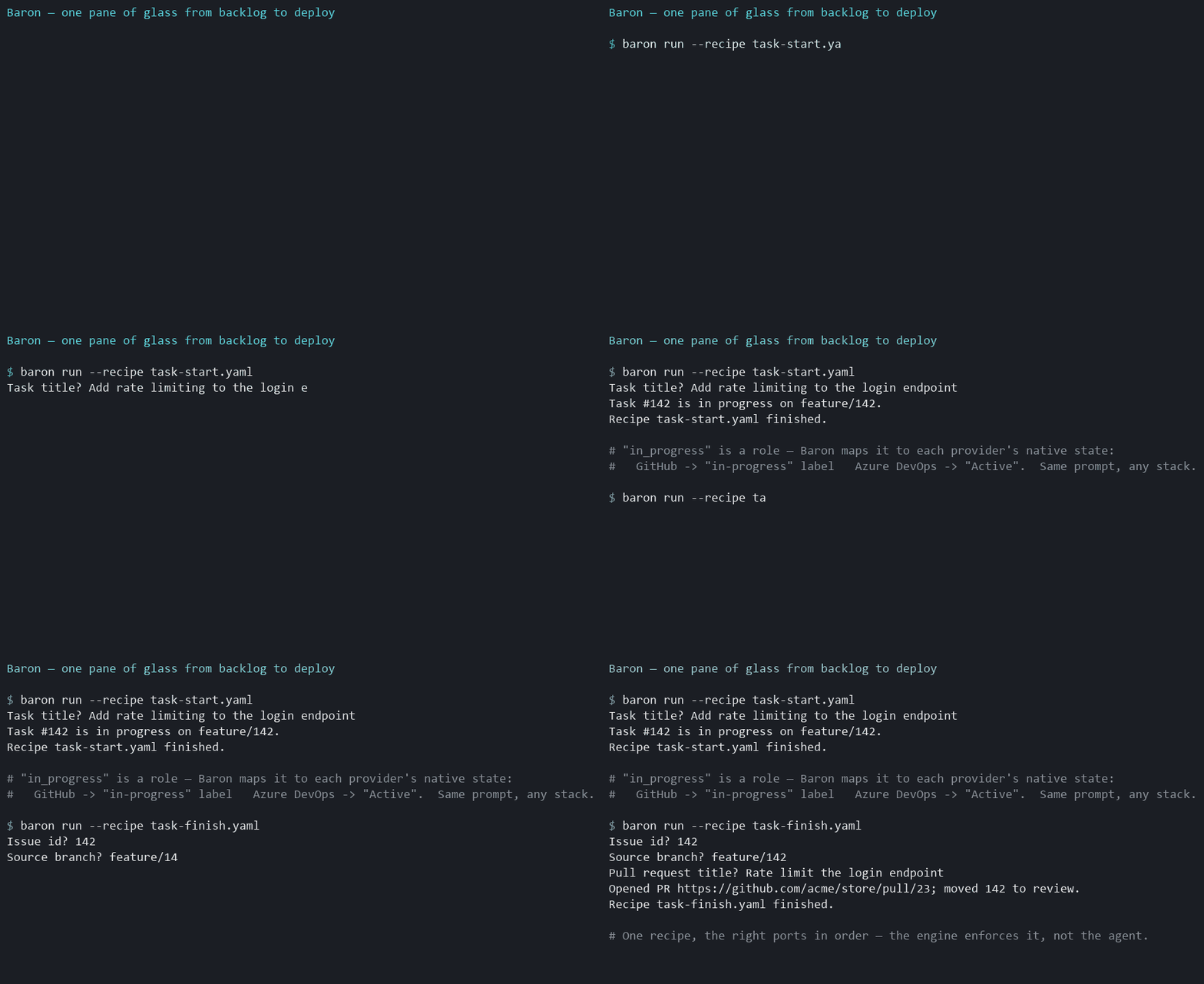
You:  Start a task: add rate limiting to the login endpoint.

Baron  ▸ runs the task-start recipe as ONE deterministic call:
  ✓ Created STORE-142 "Add rate limiting to the login endpoint"  (type role: task)
  ✓ Branched feature/STORE-142 from the repo's default branch
  ✓ Moved STORE-142 → in_progress
  ✓ Commented: "Started on branch feature/STORE-142."
That same prompt on Azure DevOps sets the work item state to Active; on GitHub it applies an
in-progress label — because in_progress is a role, not a vendor state. You confirmed that mapping
once, at baron init. The agent never learns a vendor's column names, and the workflow's order is
enforced by Baron's engine, not by the model improvising.
Why it's different
- Capability ports, not "a tracker."
issues/scm/ci/deploy/notify, each bound to a provider independently — so a consumer mixes providers rather than betting on one vendor spanning everything. - Normalize, don't raw-proxy. New capabilities become first-class normalized ports; a clearly labeled provider-native escape hatch is the explicit last resort, never the default path.
- Capability gaps are never silent. When a provider lacks something (say, native issue hierarchy), Baron either emulates it (e.g. labels), degrades with a warning, or errors loudly — decided by policy, never swallowed.
- Workflows are deterministic recipes. Multi-step flows (
task-start,task-finish,ship) are declarative YAML run as one rule-enforced call — the engine enforces step order, the agent doesn't.
Quick start
Baron runs from source today (no build step needed — workspace packages resolve to TypeScript source):
pnpm install

# 1. Configure: introspect a provider and write .baron/policy.json (you confirm the role mapping)
pnpm baron init --provider azure-devops      # or: --provider github

# 2. Add credentials (env or .baron/credentials — never committed). For Azure DevOps:
#    AZURE_DEVOPS_ORG, AZURE_DEVOPS_PROJECT, AZURE_DEVOPS_REPO, AZURE_DEVOPS_TOKEN

# 3. Check the policy against the live provider
pnpm baron doctor

# 4. Run a workflow recipe
pnpm baron run --recipe packages/recipes/recipes/task-start.yaml
Or wire the MCP server into your agent and call the tools directly across every port —
baron_issue_create, baron_scm_pr_create, baron_ci_runs, baron_deploy_deployments,
baron_notify_send, plus baron_recipe_run for whole workflows. In Claude Code, the plugin also
ships per-recipe skills (/baron:task-start, /baron:ship). See docs/mcp.md.
New to it? The Azure DevOps setup walkthrough is copy-paste from
scratch (PAT scopes, init → doctor → MCP, troubleshooting).
Providers
| Provider | Ports |
|---|---|
| Azure DevOps | issues · scm · ci · deploy |
| GitHub | issues · scm · ci · deploy |
| Slack | notify |
More adapters (Jira, Linear, GitLab, Notion) are on the roadmap — the whole point is that adding one never changes how the agent talks to Baron.
Documentation
| Guide | What it covers |
|---|---|
| Getting started | Install, prerequisites, first init → doctor → run. |
| Setup walkthrough — Azure DevOps | From-scratch, copy-paste setup on Azure DevOps + Claude Code. |
| Concepts | Ports, roles, capability gaps, the knowledge loop — the mental model. |
| Configuration | .baron/policy.json, role/type/gap maps, credentials. |
| CLI | baron init / doctor / run reference. |
| Recipes | Writing YAML recipes: ask / do / message, interpolation, the op table. |
| MCP server & plugin | The MCP tools and the Claude Code plugin. |
| Trying it with Claude Code | Hands-on: wire the MCP server to a real project + a verification checklist. |
| Providers | Which provider supports which port and capability. |
| Demo script | Ready-to-record 60-second "single pane" demo (Claude Code or CLI). |
The full design decision record is in ARCHITECTURE.md; the contributor working contract is CLAUDE.md, contribution terms are in CONTRIBUTING.md, and the publish playbook is RELEASING.md.
Status
v1 is built end-to-end: the issues, scm, ci, and deploy ports across Azure DevOps and
GitHub plus notify via Slack, the config engine (baron init / doctor), a multi-port MCP
server, the YAML recipe engine + baron run, the knowledge loop, and a Claude Code plugin. Every
adapter passes a network-free conformance suite; the Azure DevOps ports are additionally
live-validated against a real project. GitHub/Slack live validation is next.
License
Open-core. The core, the P0 adapters (Azure DevOps, GitHub, Slack), the recipes, and the CLI/MCP server are licensed under Apache-2.0. Future commercial-tier features (SSO, secret-manager integrations, multi-team governance, audit) will ship under a separate commercial license — see ARCHITECTURE.md decision #20.