
ProofHound
The self-hosted platform that makes prompt engineering far easier
Across the full lifecycle, with automatic, data-driven optimization built in.
Version, regression-test, experiment, optimize, release, and roll back — on data and models you own.
proofhound.org · Reserve a ProofHound Cloud seat
Quick start · How it works · Discord









ProofHound turns prompt engineering into a data-driven, traceable workflow. Instead of stitching together scripts, ad-hoc experiments, spreadsheets, and hand-rolled release logic, you run the whole loop — dataset regression, experiments, automatic optimization, canary and production releases, immutable run results, and rollback — in one place, self-hosted on infrastructure you control.
It is built for developers first: clone, pnpm dev, connect a model, and start experimenting in minutes. And because the tuning loop is productized around datasets, metrics, and prompt versions, non-engineering teammates can define goals, launch optimizations, and ship releases too. The open-source edition runs as a single-workspace local admin console and keeps a project_id data boundary, so it can later connect to an external control plane without changing core resource semantics.
What you get
ProofHound runs one lifecycle, and every stage writes to the same fact tables — so a model invocation stays traceable from a dataset sample all the way to production and back:
- Prompt versions — every edit creates an immutable version with its variables, output fields, and judgment rules; once an experiment, optimization, or release references it, the version is frozen, so every result maps back to the exact prompt used.
- Dataset regression — run a version against a dataset of expected outputs (CSV / TSV / JSONL / JSON / ZIP) and get accuracy, precision, recall, F1, per-class metrics, failed samples, and full invocation details — not an aggregate score that hides minority-class behavior.
- Experiments — batch prompt version × dataset × model, then stop, resume, compare across runs, and export; every run is reproducible because the version it used is frozen.
- Automatic optimization — analyze failed samples, generate new candidate versions, and re-run regression round by round, targeting class-level goals (e.g. lift recall on a high-risk class) and falling back to the best version when a round regresses.
- Canary & production releases — promote a proven version through queue-connector canaries with traffic split and dual-run, then 100% promotion, config updates, rollback, and forced stop; webhook ingress can go straight to production.
- Run results — every stage writes one immutable record per call: input variables, rendered prompt, raw output, structured output, judgment, latency, tokens, and cost.
- Human annotations — written to a separate table, never mutating the original run results.
- Connectors — wire prompts to queue connectors and webhook ingress for online traffic.
- MCP channel — built in, so agents can manage prompt versions, start experiments / optimizations, and query results.
- Bring your own models — OpenAI, Azure OpenAI, Anthropic, DeepSeek, and more, with your own keys and pricing.
Get started
You need:
- Node.js 24
- pnpm
- Docker and Docker Compose
PostgreSQL, Redis, and the other local dependency services are started for you by Docker Compose — you do not need to install them manually.
git clone https://github.com/proofhound/proofhound.git
cd proofhound
pnpm install
cp .env.example .env
pnpm dev
pnpm dev starts the local dependency services, runs database migrations, and launches server, webhook, worker, and web together.
cp .env.example .env ships working local defaults, but replace the model API key encryption secret before any non-local run — see Configuration.
Default local services:
| Service | Address |
|---|---|
| Web UI | localhost:3000 |
| Server API | localhost:4000 |
| PostgreSQL | localhost:5432 |
| Redis | localhost:6379 |
| Kafka | localhost:9092 |
| Redpanda Console | localhost:8088 |
| RedisInsight | localhost:5540 |
Testing
pnpm test
pnpm test:e2e
pnpm test runs the unit test suite. pnpm test:e2e runs the Playwright functional suite through an
isolated local stack: it creates/resets proofhound_e2e, uses Redis DB 1, starts API, webhook,
worker, web, and the fake LLM server, then stops the app processes after Playwright exits. The suite
prefers API http://localhost:4200, webhook http://localhost:4201, web http://localhost:3200,
and fake LLM port 5599, but automatically selects nearby free ports when those defaults are
occupied.
To run a single e2e spec:
pnpm test:e2e e2e/experiment.spec.ts --reporter=lineConfiguration
ProofHound reads the repo-root .env (used by server, webhook, worker, and the DB scripts; apps/web reads NEXT_PUBLIC_* from apps/web/.env.local). cp .env.example .env gives working local defaults — the common variables you may want to set:
| Variable | What it's for | Default |
|---|---|---|
MODEL_API_KEY_ENCRYPTION_KEY |
Required — encrypts stored model API keys at rest. Generate a real one with openssl rand -base64 32. |
dev placeholder |
DATABASE_URL |
PostgreSQL connection string. | Docker Compose Postgres |
REDIS_URL |
Redis connection (rate limits + queues). | Docker Compose Redis |
SERVER_PORT |
Server API port. | 4000 |
WEB_PUBLIC_URL |
Web origin allowed for CORS. | http://localhost:3000 |
NEXT_PUBLIC_SERVER_URL |
Server URL the web app calls. | http://localhost:4000 |
WORKER_CONCURRENCY |
Per-process llm queue concurrency. |
64 |
LOG_LEVEL |
Pino log level. | debug |
More advanced / optional variables (deploy metadata, DB reset & seeding, tests, the pnpm probe:model script, connector demos) are documented inline in .env.example.
Walkthrough
Once ProofHound is running, the manual end-to-end flow from a fresh dataset to a production release is:
- Add a model — register a provider/model with your endpoint, API key, pricing, and RPM / TPM / concurrency limits (start from a quick preset).
- Upload a dataset — a CSV / TSV / JSONL / JSON / ZIP file, and map the field roles (input text/image, the expected output, metadata).
- Write a prompt — create a prompt and its first version: the template, variables, output fields, and judgment rules.
- Run an experiment — pick a prompt version × dataset × model and run the batch regression; read accuracy / precision / recall / F1, per-class metrics, failed samples, and the full run results.
- Inspect and iterate — review the failed samples, edit the prompt into a new version, and re-run the experiment; repeat until the metrics hit your goal. (Each referenced version is frozen, so every comparison maps back to exact prompt content.)
- Release — bind the winning version to an upstream connector and ship it: a queue connector goes through a canary (traffic split + dual-run) → 100% → production, with rollback and forced stop available; a webhook's first release goes straight to production.
Run results are written for every call along the way, and you can layer human annotations on top without mutating them.
Skip the manual loop with optimization
Instead of doing step 5 by hand — reading failures, editing the prompt, and re-running round after round — create an optimization task: set a goal (e.g. a target accuracy, or recall on a specific class) and a round budget, and it automatically analyzes failed samples, generates new candidate versions, re-runs the regression each round, and keeps the best version.
So with optimization you can skip step 5 (it automates the loop), and via Quick start even step 3 — the analysis model generates the first prompt version for you. You still do steps 1–2 (a model and a dataset; optimization also uses an analysis model) and step 6 (the release stays your call).
How it works
ProofHound is a TypeScript monolith split by module boundaries, with a Node.js worker for LLM calls. Three surfaces drive it — the Web UI, an HTTP API + MCP channel for agents and automation, and per-connector webhook ingress for online traffic — and they all share the same orchestration and storage.
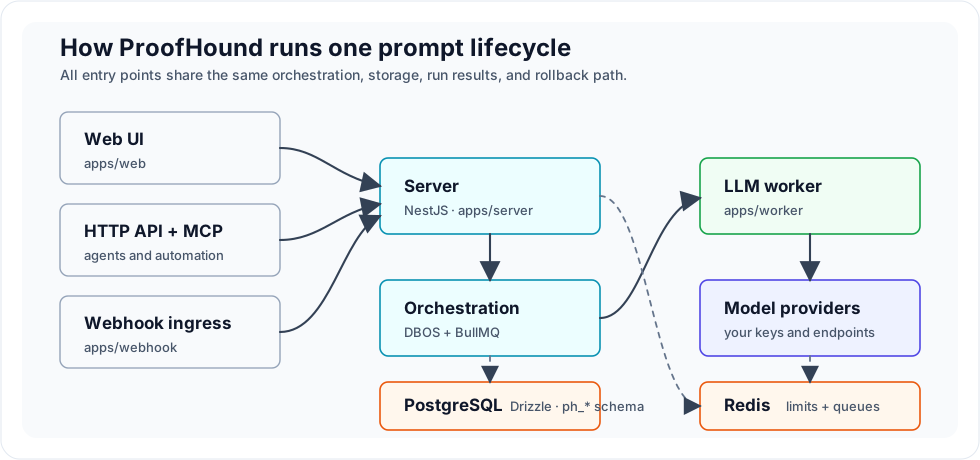
| Layer | Choice |
|---|---|
| Frontend | Next.js + TypeScript + Refine + shadcn/ui + Tailwind |
| Backend | NestJS monolith, split by module boundaries |
| Database | PostgreSQL + Drizzle ORM (ph_* schema), no proprietary SQL extensions |
| Orchestration | DBOS + BullMQ + Node.js LLM worker |
| Rate limiting | Centralized in Redis (RPM / TPM / concurrency) |
| Logging | Pino, stdout JSON; every LLM call is logged with full input and response before run results are written |
Models and providers
ProofHound does not resell model calls or add a markup on usage — you bring your own providers, and spend stays between you and your provider.
- Quick presets — start from a preset for a mainstream provider, then just fill in your credentials, quotas, unit prices, and capability declarations instead of wiring everything by hand.
- Fully configurable — per model you set the endpoint, API key, unit prices (for cost tracking), context window, image capability, and RPM / TPM / concurrency limits; limits are enforced centrally in Redis and counted per model.
- Auto concurrency, on by default — instead of hand-computing how much concurrency saturates your RPM / TPM, ProofHound tunes the effective in-flight concurrency in real time (Little's Law over observed latency and token usage) and backs off automatically on provider 429s (AIMD), always staying within your configured limit as a safety cap.
Built-in provider types: OpenAI · Azure OpenAI · Anthropic · DeepSeek · Kimi · MiniMax · Qwen · ERNIE — plus any OpenAI-compatible endpoint via an open provider string.
How ProofHound is different
Data facts, not intuition. ProofHound connects samples, judgments, metrics, failure patterns, and version evolution into one loop. Teams spend less time writing scripts, defining ad-hoc structures, and comparing results by hand — and prompt tuning is no longer controlled only by a small group of engineers.
Built for classification and imbalanced data. The open-source edition prioritizes classification tasks, especially scenarios with obvious class imbalance such as risk control, finance, moderation, and support-intent detection. Per-class metrics are kept everywhere, so aggregate accuracy never hides minority-class behavior.
A complete path from experiment to production. ProofHound is not only a prompt registry, and not only an evaluation tool. Datasets, experiments, optimizations, releases, and run results live in one lifecycle, so you can trace why a version went online, what ran before it, how it behaved in canary and production, and why it was later rolled back.
Self-hosted, low lock-in. PostgreSQL for storage, Redis for centralized rate limits, stdout JSON for logs — and your own models, credentials, providers, and usage costs.
In development
- Generative-task optimization — evaluation, comparison, and optimization strategies beyond the current classification-first workflow.
- ProofHound Cloud — a hosted edition to cut deployment and operations work. Visit proofhound.org to reserve an early-access seat.
Project structure
proofhound/
├── apps/
│   ├── server     # NestJS API, MCP channel, SSE
│   ├── webhook    # connector webhook ingress
│   ├── worker     # BullMQ LLM worker
│   └── web        # Next.js admin console
├── packages/      # shared, db, crypto, providers, llm-client, judgment,
│                  # optimization-strategy, limiter, metrics, logger,
│                  # orchestration-shared, connector-client, api-client, ui
├── dev/           # docker-compose for local dependency services
├── docs/specs/    # business specs — the source of truth
└── datasets/      # example and local datasets
Contributing
ProofHound is still early, and community contributions are very welcome. You can help by:
- Opening issues for bugs, installation problems, model-integration problems, or real workflow feedback.
- Opening pull requests for documentation, fixes, tests, or interaction improvements.
- Extending capabilities with new model providers, connectors, dataset parsers, experiment metrics, or optimization strategies.
- Sharing use cases, especially classification, imbalanced datasets, risk control, finance, moderation, and support-intent detection.
If you are unsure whether an idea fits the project, please open an issue first to discuss the context and expected behavior.
Community and support
- Website — product overview, docs entry, and Cloud early-access form: https://proofhound.org
- Discord — best for questions, setup help, and chatting with other users: https://discord.gg/DGC6AzWrnt
- QQ group — 318412485.
- GitHub Issues — best for bugs, installation problems, model-integration problems, and feature requests.
- Email — best for private or sensitive topics: z@proofhound.org
License
ProofHound is licensed under the Apache License 2.0.